Changelog: Amazon Bestseller API Endpoint Added
Real-time Amazon bestseller data via REST or GraphQL — ranks, ASINs, prices, ratings, pagination and global domain support with API key auth.

Amazon bestsellers API
Category ranks, the bestSellersRank field, and how slugs differ from search browse nodes are documented on the Amazon bestsellers API page. A single product’s title and price still come from the Amazon product API.
The Amazon Bestseller API endpoint offers a real-time solution for tracking top-selling products across Amazon categories. Designed for both REST and GraphQL, it simplifies data retrieval, providing structured JSON responses with up to 22 product-specific data points like rankings, prices, ratings, and Prime eligibility. This tool eliminates the need for manual scraping, handles IP blocks, and supports multiple Amazon domains globally.
Key Features:
- Comprehensive Data: Access Best Sellers Rank (BSR) (which can be used to estimate monthly sales), ASIN, pricing, reviews, and category hierarchies.
- Global Support: Works across Amazon domains like
.com,.co.uk,.de,.jp, and.in. - Flexible Integration: Use REST for full data sets or GraphQL for targeted queries.
- Pagination: Efficiently manage large datasets with built-in pagination.
- Secure Access: API key authentication with HTTPS encryption.
Benefits:
- Monitor competitor sales and market trends in real time.
- Automate inventory management, pricing, and demand forecasting.
- Save time and resources by avoiding scraping vs API costs.
Response Example:
A typical response includes product rank, title, ASIN, price, ratings, and pagination details, ensuring accurate and timely data for e-commerce operations.
This API is a practical tool for businesses looking to streamline operations and improve decision-making with real-time Amazon marketplace insights.
Endpoint Specifications and Parameters
REST and GraphQL Endpoints
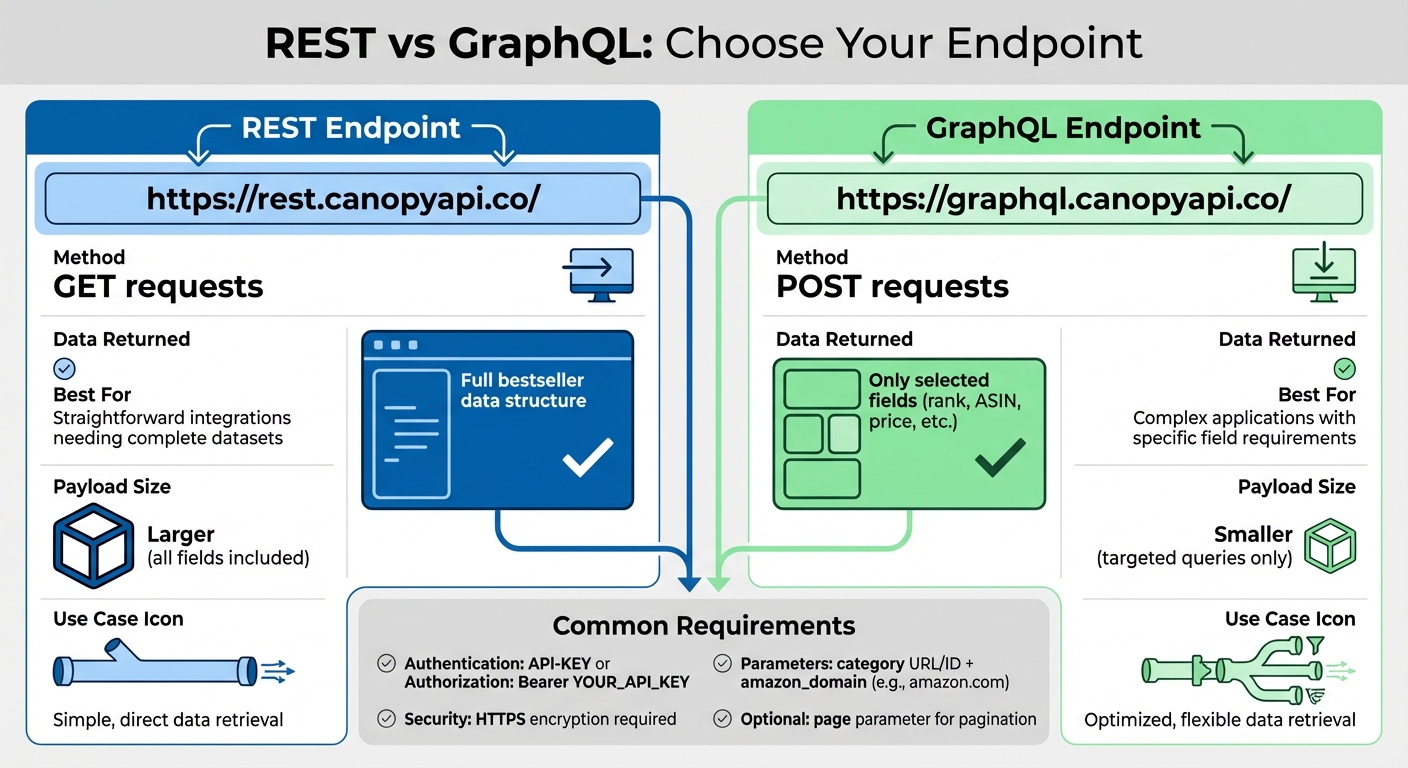
The Canopy API provides two base URLs for accessing the Amazon Bestseller endpoint. The REST endpoint is located at https://rest.canopyapi.co/ and uses standard GET requests to retrieve data. Meanwhile, the GraphQL endpoint is available at https://graphql.canopyapi.co/ and handles POST requests, allowing you to select specific fields.
If you need the full bestseller data structure for straightforward integrations, REST is your go-to option. However, if you're working on a more complex application and want to retrieve only certain fields - like rank, ASIN, or price - GraphQL is a better choice. It helps reduce payload size and speeds up response times by delivering just the data you need. Once you've chosen your endpoint, it's time to set up the required parameters for your API calls.
Required Parameters for Requests
To fetch data from the Amazon Bestseller API, you must provide an identifier for the specific bestseller list. This can be done using either an encoded category URL (e.g., https%3A%2F%2Fwww.amazon.com%2FBest-Sellers-Electronics%2Fzgbs%2Felectronics) or a category ID. Additionally, you need to include the amazon_domain parameter (e.g., amazon.com) to ensure the data is localized correctly, such as displaying prices in USD, dates in MM/DD/YYYY format, and measurements in imperial units.
You can also use optional parameters like page for pagination. For example, appending &page=2 to your request URL allows you to access additional results - especially helpful when working with large datasets.
Authentication and API Key Usage
Authentication is required for every API call. You’ll need to include your API key in the HTTP headers using one of these formats: API-KEY: YOUR_API_KEY or Authorization: Bearer YOUR_API_KEY. After signing up, you can find your API key in the Canopy API dashboard. The Hobby plan even includes 100 free requests per month to help you get started.
For security, always store your API key in environment variables instead of embedding it directly in your code. Use HTTPS to encrypt your requests and prevent data exposure. If you're handling a high volume of requests, implement rate-limiting measures to avoid hitting the 429 error threshold. Never expose your API keys in public repositories like GitHub or in client-side code. These precautions ensure your integration remains secure and efficient, supporting seamless e-commerce operations.
Response Structure and Data Fields
Data Fields in the Response
When the API processes a request, it delivers a JSON object that includes a bestsellers_info block. This block holds essential category details, such as the category's name and identifier, effectively mapping out the breadcrumb path from "Any Department" to the specific sub-category being queried [1].
Each product entry in the response contains key information: rank, ASIN, a direct link to the product listing, an image URL, average rating, and the total number of reviews [1]. The price field breaks down pricing into its components, including the currency symbol, numeric value, ISO code, and a formatted display string [6].
Additionally, the response includes a request_info block, which tracks API credit usage through fields like credits_used and credits_remaining [6]. This structured format ensures smooth handling of large datasets, offering built-in pagination support.
Pagination and Large Datasets
For handling extensive datasets, the API employs a next field in the JSON response. This field provides an encoded URL that allows you to fetch the next set of results seamlessly [1]. Alongside this, the pagination object displays the current_page and total_pages fields, giving a clear view of how many pages of data remain [6]. This method ensures efficient data management without overwhelming your application with excessive data in a single response.
Sample Response Format
Here’s an example of a typical response when querying Electronics bestsellers:
{
  "request_info": {
    "success": true,
    "credits_used": 1,
    "credits_remaining": 999
  },
  "bestsellers": [
    {
      "rank": 1,
      "position": 1,
      "title": "Samsung 128GB 100MB/s (U3) MicroSDXC EVO Select Memory Card",
      "asin": "B073JYC4XM",
      "link": "https://www.amazon.com/dp/B073JYC4XM",
      "image": "https://images-na.ssl-images-amazon.com/images/I/817wkPGulTL.jpg",
      "rating": 4.7,
      "ratings_total": 44828,
      "price": {
        "symbol": "$",
        "value": 19.49,
        "currency": "USD",
        "raw": "$19.49"
      }
    }
  ],
  "pagination": {
    "current_page": 1,
    "total_pages": 2
  },
  "bestsellers_info": {
    "current_category": {
      "name": "Memory Cards",
      "id": "516866"
    }
  }
}
This real-time response ensures accurate and up-to-date data, reflecting the current state of the Amazon marketplace. By avoiding caching delays, it supports essential e-commerce tasks like trend analysis and competitive benchmarking [4]. This level of precision and immediacy is crucial for businesses relying on timely insights.
Integration Examples with Canopy API
Fetching Bestsellers with REST
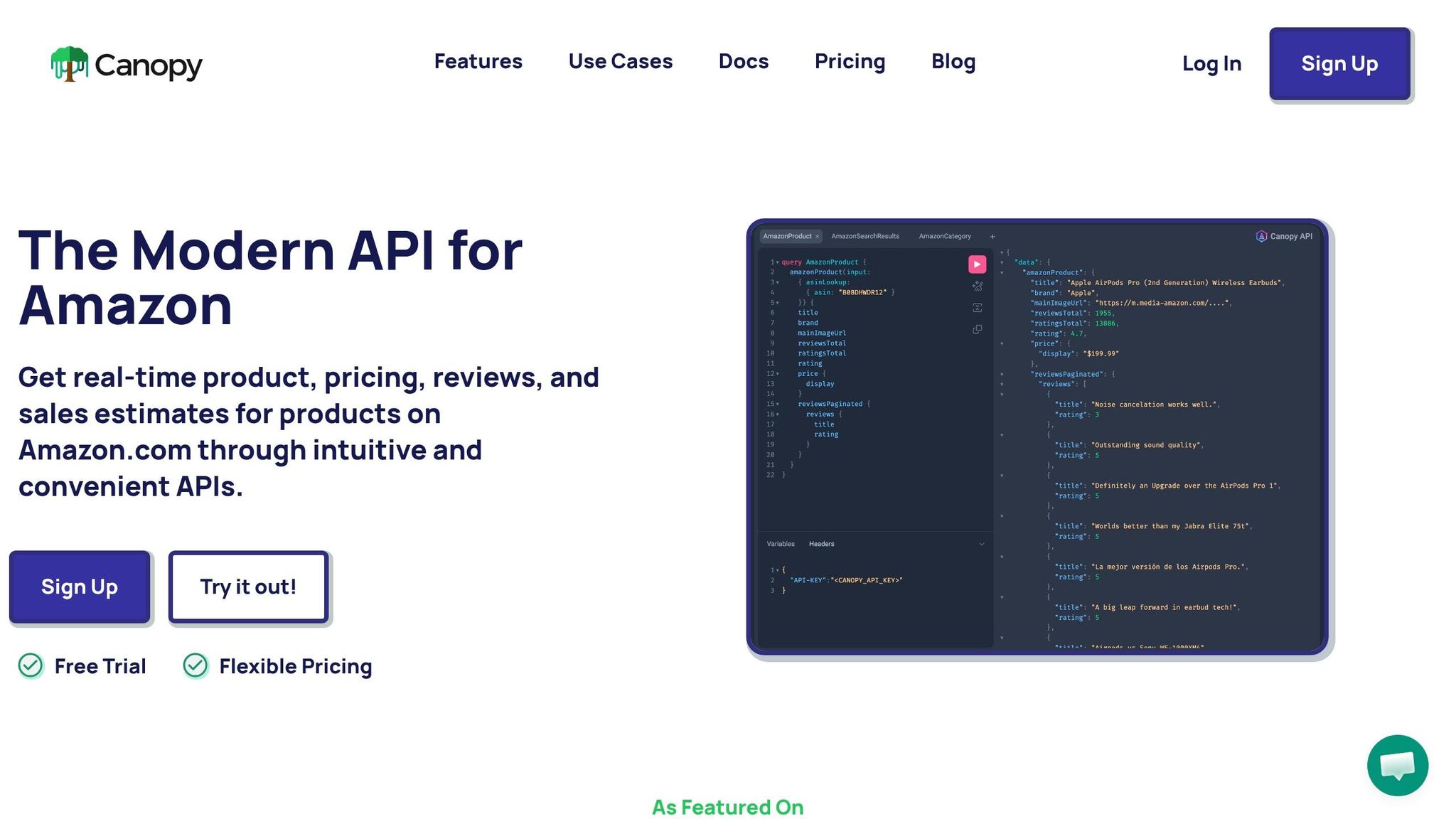
To retrieve Amazon bestseller data using the REST API, make a simple GET request to https://rest.canopyapi.co/api/amazon/bestsellers. Query parameters specify details like category, while authentication requires either an API-KEY header or an Authorization: Bearer YOUR_API_KEY header.
Here's how it works in JavaScript with the fetch API:
const apiKey = 'YOUR_API_KEY';
const category = '516866'; // Memory Cards category

fetch(`https://rest.canopyapi.co/api/amazon/bestsellers?category=${category}&domain=com`, {
  method: 'GET',
  headers: {
    'API-KEY': apiKey
  }
})
  .then(response => {
    if (!response.ok) {
      throw new Error(`HTTP error! Status: ${response.status}`);
    }
    return response.json();
  })
  .then(data => {
    console.log('Bestsellers:', data.bestsellers);
    console.log('Credits remaining:', data.request_info.credits_remaining);
  })
  .catch(error => {
    console.error('Request failed:', error);
  });
Make sure to check response.ok to handle any errors. If you need more specific data, consider using the GraphQL approach below.
Fetching Bestsellers with GraphQL
For greater flexibility, the GraphQL API allows you to specify exactly which fields to retrieve, reducing unnecessary data and improving efficiency. GraphQL requests are sent as POST requests to https://graphql.canopyapi.co/, with the query included in the request body.
Here's an example of fetching bestseller data with GraphQL:
const apiKey = 'YOUR_API_KEY';

const query = `
  query {
    amazonBestsellers(category: "516866", domain: "com") {
      bestsellers {
        rank
        title
        asin
        rating
        price {
          value
          currency
          raw
        }
      }
      request_info {
        credits_used
        credits_remaining
      }
      pagination {
        current_page
        total_pages
      }
    }
  }
`;

fetch('https://graphql.canopyapi.co/', {
  method: 'POST',
  headers: {
    'Content-Type': 'application/json',
    'API-KEY': apiKey
  },
  body: JSON.stringify({ query })
})
  .then(response => {
    if (!response.ok) {
      throw new Error(`HTTP error! Status: ${response.status}`);
    }
    return response.json();
  })
  .then(data => {
    console.log('Bestsellers:', data.data.amazonBestsellers.bestsellers);
  })
  .catch(error => {
    console.error('GraphQL request failed:', error);
  });
The Content-Type: application/json header is mandatory for GraphQL requests. Always validate response.ok to catch errors. Tools like the Canopy API Playground or Hoppscotch are helpful for testing queries before deploying them.
Best Practices for API Integration
Whether you're using REST or GraphQL, following these best practices will ensure smoother integration and better performance.
- Keep API keys secure: Store them server-side to prevent unauthorized access.
- Handle rate limits: Use exponential backoff to stay within your subscription limits and avoid disruptions.
- Cache responses: Save frequently requested data locally or in a distributed cache like Redis. This reduces redundant API calls, saves credits, and speeds up response times.
- Use pagination: For large datasets, rely on the
nextfield in the API response to handle pagination automatically. This avoids making separate requests for each page and keeps your code efficient. - Error handling: Implement robust error-checking for all network requests to ensure reliability.
| Feature | Best Practice Recommendation |
|---|---|
| Large Datasets | Use the next field in the response for pagination |
| Rate Limiting | Implement exponential backoff |
| Cost Control | Cache results to minimize API calls and credit usage |
| Security | Keep API keys server-side; do not expose them to clients |
| Reliability | Use robust error handling for all network requests |
Use Cases for E-commerce
Trend Analysis and Market Insights
The Amazon Bestseller API offers a powerful way to stay ahead of market trends. Instead of relying on static, outdated reports, you can track metrics like Best Sellers Rank (BSR) and review velocity to identify products gaining traction before the market becomes overcrowded. Momentum, reflected in these metrics, is often a better indicator of future demand than current sales figures [8].
With tools to monitor daily BSR and review growth, you can quickly pinpoint products with genuine market appeal [3]. For example, if a product climbs from #150 to #45 in just a week, it’s a signal worth exploring. The API also enables analysis of price-to-rank correlation, helping you find the balance between profit margins and sales speed [3]. Since the data updates hourly, you get near real-time insights [7].
This dynamic data not only helps you forecast trends but also lays the groundwork for analyzing competitors effectively.
Competitor Monitoring and Benchmarking
The API gives you the ability to track competitor metrics like BSR, pricing, and FBA inventory levels, helping you measure your products against top market performers. For instance, if a competitor’s rank improves suddenly, it might indicate a pricing adjustment or promotional strategy. This allows you to quickly adapt to market shifts.
Additionally, the API provides insights into seller ratings, delivery issues, and order limits, exposing potential weaknesses in your competitors’ operations [2]. If a leading competitor consistently flags delayed deliveries, that’s an opportunity to differentiate your own offerings through better service. With access to data across 30+ main categories and 25,000 subcategories, you can focus on specific niches using the sub_category_id for precise comparisons [7][3].
These competitor insights directly inform smarter, more proactive sales and marketing decisions.
Improving Sales and Marketing Strategies
With real-time bestseller data, the API helps you fine-tune your pricing, inventory, and advertising strategies. For instance, tracking BSR trends as a proxy for sales velocity can alert you to adjust inventory levels before stockouts occur [3]. Once your product reaches a target BSR, you can reduce PPC ad spend, letting organic visibility take over and optimizing your ad budget.
Studying top-selling products in your category can also reveal unmet demand - cases where search volume is high, but customer satisfaction (based on reviews) is low [8]. For example, recurring complaints like "connectivity issues" in reviews can guide your product development efforts. Amazon reports that sellers using tools like the Product Opportunity Explorer experienced a 1.79% increase in gross sales within 12 months, showing how actionable insights lead to tangible results [9].
Conclusion
Summary of Features and Benefits
The Amazon Bestseller API endpoint delivers real-time rankings, pricing details, and in-depth category data for over 350 million products [2]. The JSON responses include essential data points like BSR (Best Sellers Rank), ASINs, Prime eligibility, ratings, and delivery options. Both REST and GraphQL endpoints are available, offering flexibility for integration into various systems. Whether you're automating pricing decisions, tracking competitor inventory, or identifying emerging product trends, this tool provides consistent and up-to-date insights.
Its practical value lies in improving operational efficiency. You can automate inventory restocking, fine-tune ad spending as products hit desired BSR levels, and identify market opportunities before competitors. With pagination support, even large datasets are manageable, allowing you to access detailed market intelligence across Amazon's vast catalog while keeping costs under control. These capabilities help streamline workflows and provide actionable insights to boost e-commerce performance.
Getting Started with the API
Getting started is simple and accessible. Canopy API offers 100 free requests per month with its Hobby plan [5]. Begin by securing your API key and reviewing the documentation, which includes code examples in multiple programming languages. Start small - test with a single category to pull bestseller data, verify the response structure, and ensure ASINs and pricing align with live Amazon listings.
Once the data is validated, integrate the API into your e-commerce platform, analytics tools, or business intelligence systems. You can use the GraphQL endpoint (https://graphql.canopyapi.co/) to craft targeted queries that fetch specific fields or the REST endpoint (https://rest.canopyapi.co/) for standard JSON responses. For higher usage, Canopy's Pay As You Go plan starts at $0.01 per request beyond the free tier, with discounts available for larger volumes at 10,000 and 100,000 requests.
FAQs
How do I find the right Amazon category ID or encoded category URL?
To find the right Amazon category ID or encoded category URL, you’ll need to use the Amazon Categories API. This tool lets you query category details based on your specific search criteria. If you're working with the Canopy API's Bestsellers feature, you'll need the category_id parameter. You can get this by navigating through parent and subcategories using the categories endpoint. Simply choose the appropriate category from the hierarchy provided to locate the ID or URL you need.
When should I use REST vs GraphQL for bestseller tracking?
Choosing between REST and GraphQL comes down to your specific data requirements and workflow. GraphQL shines when you need flexibility and precision, allowing you to request exactly the data you want - nothing more, nothing less. This can lead to better performance, especially for complex queries. On the other hand, REST is straightforward and works well for simpler tasks like retrieving product details or pricing information. If you’re looking for tailored, efficient queries, GraphQL is a great fit. For standard tasks like bestseller tracking, REST’s simplicity makes it an easy choice.
How can I avoid rate limits and 429 errors in production?
When working with the Canopy API in production, it’s important to avoid hitting rate limits or encountering 429 errors. To do this, space out your requests and implement exponential backoff strategies - this means gradually increasing the delay between retry attempts when you hit a limit.
Start with the free plan, which allows up to 100 requests per month, and upgrade as your needs grow. Monitor your usage carefully and adjust the frequency of your requests as necessary. By scaling up to higher-tier pricing plans, you can handle larger volumes efficiently while maintaining reliable access to the data you need.