Amazon Keyword Search API: FAQs
How Amazon keyword search APIs deliver real-time rankings, ASINs, pricing and competitor insights via REST or GraphQL for scalable keyword research.
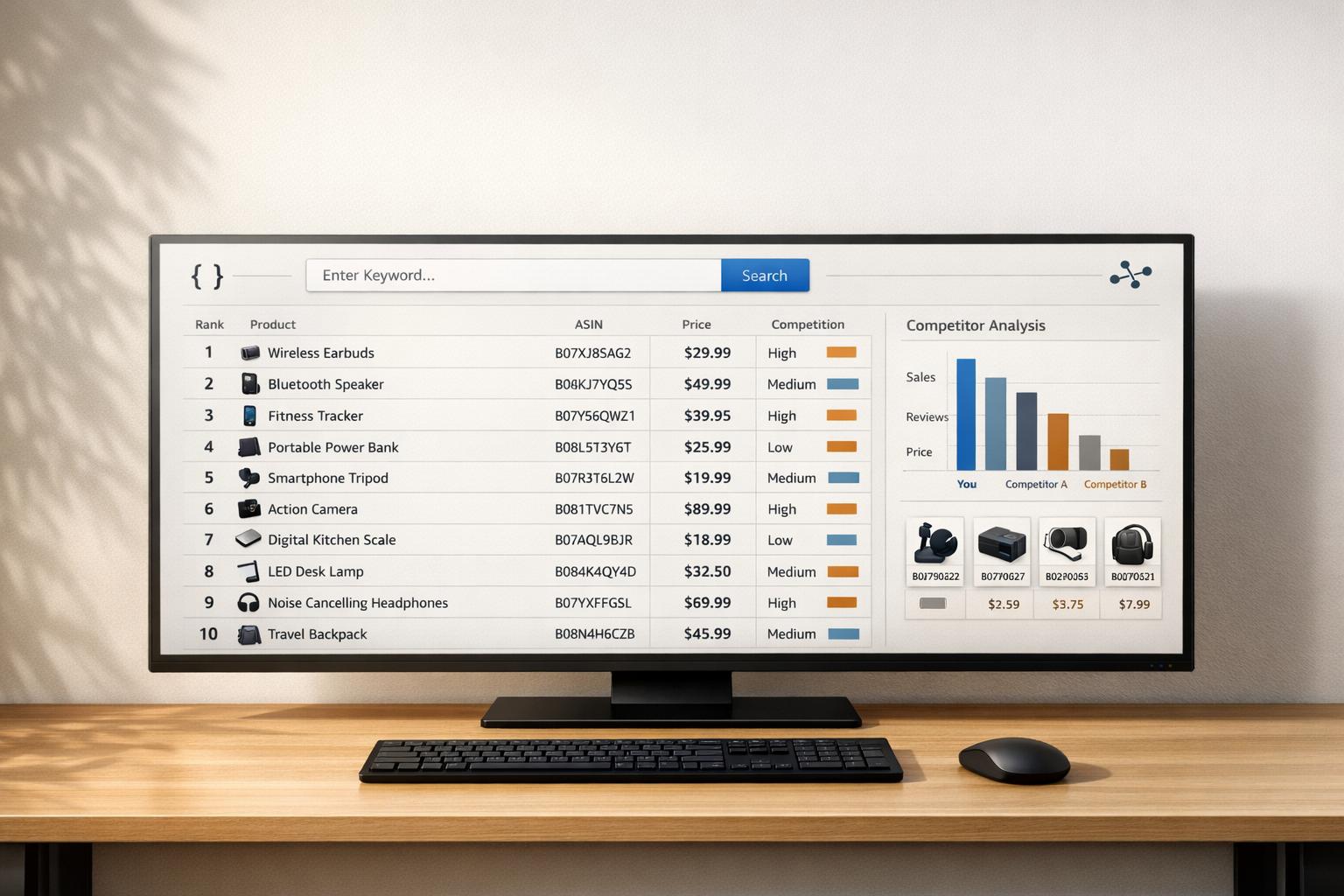
Amazon Keyword Search APIs simplify the process of gathering keyword and product data from Amazon, offering real-time insights like rankings, ASINs, prices, and customer reviews. These APIs are essential for automating keyword research, tracking competitor performance, and scaling e-commerce operations efficiently. They work via REST or GraphQL endpoints, delivering structured JSON data that’s easy to analyze.
Key Benefits:
- Automation: Save hours by automating keyword research for thousands of products.
- Scalability: Analyze entire catalogs or competitor listings in bulk.
- Real-Time Updates: Stay ahead with up-to-date keyword and ranking data.
Features:
- Extract data like ASINs, prices, badges (e.g., bestseller), and sales estimates.
- Use filters and parameters to refine results (e.g., target U.S. market with
amazon_domain=amazon.com). - Choose between REST (simple requests) and GraphQL (customized queries) for flexibility.
Practical Use Cases:
- Competitor Analysis: Discover top-performing keywords for competitor products.
- Listing Optimization: Improve product titles, bullet points, and backend keywords using high-volume terms.
- Automated Tracking: Monitor keyword rankings and adjust strategies instantly.
APIs like Canopy API provide access to over 350 million Amazon products across 25,000+ categories, starting with 100 free requests per month. Whether you’re optimizing listings or identifying untapped keyword opportunities, these tools are game-changers for e-commerce professionals.
Key Features of Amazon Keyword APIs

What Data Can You Extract Using Keyword APIs?
Amazon Keyword Search APIs offer real-time insights that go beyond just listing products. For example, searching for a keyword like "memory card" provides structured JSON data, including ranked positions, ASINs, indicators for sponsored products, Prime eligibility flags, and pricing in US dollars (e.g., "$39.98"). It also includes shipping details, such as "FREE delivery Fri, Apr 14" or "fastest Apr 11-12", total search result counts (e.g., "5,000"), and notes like "Results for exact spelling." Canopy API builds on this by adding metrics such as sales estimates, review counts, customer ratings, and product badges like "bestseller".
For competitive analysis, the API can pull crucial data points like Best Seller Rank (BSR), sales velocity, FBA inventory counts, and stock levels. With this combination of search performance and market demand data, you can monitor keyword visibility, measure competitor performance, and pinpoint high-traffic keywords to target.
How Filters and Parameters Customize API Requests
Once you've accessed the data, filters and parameters allow you to focus on the exact details you need. The API's parameters give you full control over what data is retrieved. Essential parameters include the search query (q), setting the engine to "amazon", specifying the request type as "search", and adding your api_key. Additional options like scroll_to_bottom, wait_for_video, and wait_for_offers simulate full browser behavior to ensure complete results.
For targeting the U.S. market, the parameter amazon_domain=amazon.com ensures results are tailored to the American marketplace, complete with USD pricing and local delivery estimates. Combining multiple parameters - such as query terms, device type filters, and wait flags - can improve accuracy by 20–30%. Post-processing filters let you refine the data further, such as isolating high-volume keywords (those with over 1,000 results) or excluding sponsored listings to focus on organic competition.
Canopy API supports both REST and GraphQL endpoints. GraphQL, in particular, offers more flexibility for customizing queries. Here’s an example of a basic REST request:
const apiKey = 'YOUR_API_KEY';
const keyword = 'memory card';
const url = `https://rest.canopyapi.co/search?q=${encodeURIComponent(keyword)}&domain=amazon.com`;

fetch(url, {
  headers: { 'Authorization': `Bearer ${apiKey}` }
})
  .then(response => response.json())
  .then(data => console.log(data.search_results));
This method provides localized data, including U.S. date formats (MM/DD/YYYY), dollar-denominated pricing, and delivery estimates tailored to American shoppers. It’s a straightforward way to analyze keywords for your target market effectively.
Amazon Search Report API Is Here and It’s So Easy!
REST vs. GraphQL: Choosing the Right Endpoint
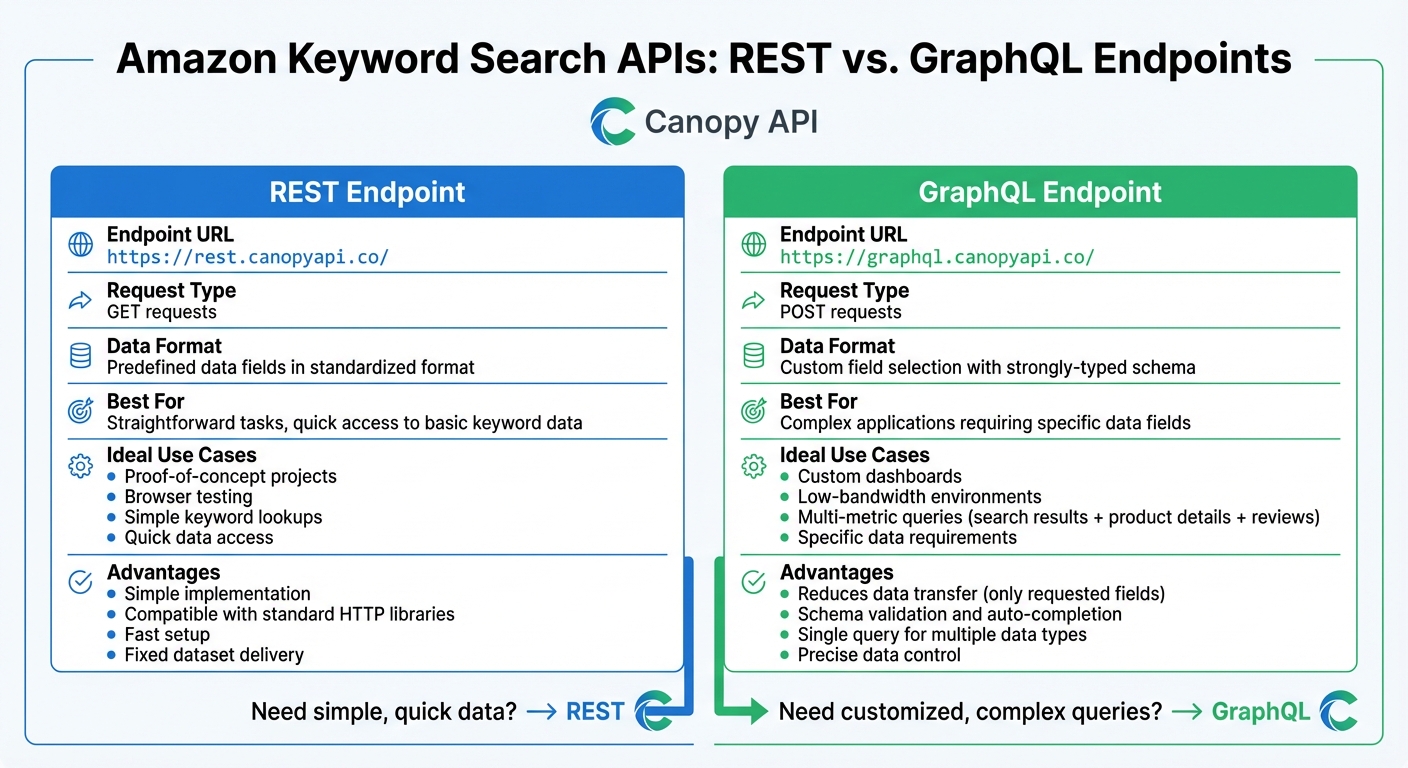
REST vs GraphQL API Endpoints Comparison for Amazon Keyword Research
Understanding REST and GraphQL Endpoints
The Canopy API offers two distinct endpoints - REST and GraphQL - for accessing Amazon keyword search data. The REST endpoint (https://rest.canopyapi.co/) operates with straightforward GET requests, delivering predefined data fields in a standardized format.
In contrast, the GraphQL endpoint (https://graphql.canopyapi.co/) uses POST requests, allowing you to specify exactly which fields you need. GraphQL’s strongly-typed schema ensures validation and supports auto-completion, making it ideal for precise data queries. For keyword research, GraphQL shines by reducing data transfer to only the fields you request, whereas REST offers quick access to a fixed dataset. This difference makes each endpoint suited to different development scenarios.
When to Use REST vs. GraphQL for Keyword Research
Now that the basics are clear, let’s discuss when to choose each option. REST is perfect for straightforward tasks where you need quick access to basic keyword data. If you’re working on a proof-of-concept or testing in a browser, REST’s simplicity and compatibility with standard HTTP libraries make it a convenient choice.
GraphQL, on the other hand, is better suited for more complex applications. For example, if you need data like search results, product details, and review counts in a single query, GraphQL handles this seamlessly. It’s especially useful in low-bandwidth environments or when building custom dashboards that require specific metrics, such as product ratings or sales estimates.
Here’s an example of a GraphQL query that retrieves only the product title and price for a keyword search:
const apiKey = 'YOUR_API_KEY';
const query = `
  query {
    searchResults(keyword: "wireless earbuds", domain: "amazon.com") {
      products {
        title
        price
      }
    }
  }
`;

fetch('https://graphql.canopyapi.co/', {
  method: 'POST',
  headers: {
    'Authorization': `Bearer ${apiKey}`,
    'Content-Type': 'application/json'
  },
  body: JSON.stringify({ query })
})
  .then(response => response.json())
  .then(data => console.log(data));
sbb-itb-d082ab0
How to Use Amazon Keyword APIs in Practice
Using APIs for Competitor Keyword Analysis
When it comes to competitor keyword analysis, the first step is figuring out which search terms drive traffic to your competitors' products. Amazon keyword APIs make this easier. For instance, you can input a competitor's ASIN, such as "B00WTDXSDM", along with details like location code 2840 (for the US) and language set to "en." The API then retrieves their top-ranking keywords, complete with search volumes and ranking positions.
To uncover untapped opportunities, focus on keyword gaps - terms your competitors rank for but you don't. By setting filters like search_volume < 500 and rank_absolute in [1,2,3,4,5], you can pinpoint low-competition keywords with strong potential. These keywords represent areas where your competitors have already demonstrated success, offering you a chance to step in and compete.
Here’s an example of how to use Canopy API's GraphQL endpoint in JavaScript for competitor keyword analysis:
const apiKey = 'YOUR_API_KEY';
const query = `
  query {
    amazonSearch(keyword: "screen protector", asin: "B00WTDXSDM", domain: "amazon.com") {
      keywords(limit: 10) {
        term
        searchVolume
        organicRank
      }
    }
  }
`;

fetch('https://graphql.canopyapi.co/', {
  method: 'POST',
  headers: {
    'Authorization': `Bearer ${apiKey}`,
    'Content-Type': 'application/json'
  },
  body: JSON.stringify({ query })
})
  .then(response => response.json())
  .then(data => {
    // Compare competitor keywords and identify gaps
    console.log(data);
  });
Once you’ve identified high-volume keywords, integrate them into your product titles and bullet points. For example, if the API shows a search volume of 2,400 for "iphone xr screen protector", with a CPC estimate of $2.32 and a difficulty score of 38.4, you can prioritize targeting that term.
Scaling Keyword Research Across Multiple Products
Manually researching keywords for numerous products can be a time sink. This is where Amazon keyword APIs shine - they allow you to handle bulk requests and automate the process across multiple ASINs. By using a depth-first search approach (with depth settings from 1 to 4), you can generate up to 1,554 related keywords for each ASIN. This method expands a single seed keyword into a detailed list, complete with search volume data.
Here’s an example of how to automate keyword collection for multiple products using JavaScript:
const apiKey = 'YOUR_API_KEY';
const asins = ['B00WTDXSDM', 'B08N5WRWNW', 'B07XJ8C8F5'];

asins.forEach(asin => {
  const query = `
    query {
      productDetails(asin: "${asin}", domain: "amazon.com") {
        title
        keywords {
          term
          searchVolume
          difficulty
        }
      }
    }
  `;

  fetch('https://graphql.canopyapi.co/', {
    method: 'POST',
    headers: {
      'Authorization': `Bearer ${apiKey}`,
      'Content-Type': 'application/json'
    },
    body: JSON.stringify({ query })
  })
    .then(response => response.json())
    .then(data => {
      // Process results for actionable insights
      console.log(`Keywords for ${asin}:`, data);
    });
});
After gathering the data, export the API responses to a spreadsheet or database. Deduplicate the keywords and prioritize them based on metrics like organic traffic potential and difficulty. Tools like Canopy API are built to handle high-volume requests, making it easier to integrate these automated workflows into your overall Amazon listing optimization efforts.
How to Integrate Keyword APIs into Your Workflow
Using Keyword Data to Optimize Amazon Listings
Once you've completed your keyword research, the next step is weaving that data into your Amazon listings. By leveraging API-driven keyword insights, you can refine titles, bullet points, and backend keywords to align with both Amazon's algorithm and customer search behavior.
Product Titles: Start with high-volume seed keywords at the beginning of your titles. This helps grab attention and improves visibility in search results. For instance, instead of writing "Premium Quality Screen Protector for iPhone XR", go with "iPhone XR Screen Protector Premium Quality." This small shift can make a big difference in search rankings.
Bullet Points: Use this space to naturally include secondary keywords while highlighting product benefits and addressing customer pain points. Amazon's algorithm evaluates how well your product matches customer intent, so tools like the Review API can help you identify common phrases or concerns in customer feedback. Incorporate these insights seamlessly into your bullet points to speak directly to potential buyers.
Backend Keywords: This field is ideal for synonyms, common misspellings, and niche variations. Remember, the field is limited to 249 bytes, and multi-byte characters (like accented letters) take up additional space. Avoid repeating keywords already used in your titles or bullet points, and focus on expanding your reach with less obvious terms.
Here’s a quick breakdown of how to optimize different listing elements using keyword APIs:
| Listing Element | Optimization Strategy | API Data Source |
|---|---|---|
| Product Title | Use high-volume keywords at the start; stay under 200 characters | Search API (Rankings), Product API (Competitor Titles) |
| Bullet Points | Add keywords naturally; emphasize benefits and customer needs | Review API (Customer Language), Product API |
| Backend Keywords | Include synonyms, misspellings, and translations; respect the 249-byte limit | Search Volume Planner, Competitor Reverse-Lookup |
| A+ Content | Incorporate conversational queries to align with AI-driven search trends | Q&A Data, Review Sentiment Analysis |
For A+ content, focus on conversational, question-style phrases like "what helps with joint pain", as more shoppers use natural language in their searches. Group related keywords (e.g., "eco-friendly", "non-slip", "waterproof") across titles, bullet points, and A+ content to create a consistent theme that reinforces relevance. Once your listings are optimized, use automation tools to monitor and adjust performance in real time.
How to Automate Keyword Analysis
Manual updates can only take you so far. Automating keyword tracking allows you to monitor rankings effortlessly and act quickly when changes occur. Start by setting up a schedule for automated data collection - daily for high-priority products and weekly for the rest of your inventory.
Here’s an example of how you can use Canopy API's REST endpoint to track keyword rankings with built-in error handling:
const apiKey = 'YOUR_API_KEY';
const keywords = ['iphone xr screen protector', 'wireless earbuds', 'yoga mat'];

async function trackKeywordRankings() {
  for (const keyword of keywords) {
    try {
      const response = await fetch(`https://rest.canopyapi.co/api/amazon/search?keyword=${encodeURIComponent(keyword)}&domain=amazon.com`, {
        method: 'GET',
        headers: {
          'Authorization': `Bearer ${apiKey}`,
          'Content-Type': 'application/json'
        }
      });

      if (response.status === 429) {
        // Retry with a random delay to handle rate limits
        const delay = Math.random() * 2000 + 1000;
        await new Promise(resolve => setTimeout(resolve, delay));
        continue;
      }

      const data = await response.json();

      // Trigger alerts for significant ranking drops
      if (data.organicRank > 20) {
        console.log(`Alert: ${keyword} dropped to position ${data.organicRank}`);
      }
    } catch (error) {
      console.error(`Error tracking ${keyword}:`, error);
    }
  }
}

// Schedule the function to run daily at 6 AM
setInterval(trackKeywordRankings, 24 * 60 * 60 * 1000);
To manage high volumes of data, consider using batch processing to handle multiple keywords at once. You can also cache frequently accessed data to minimize API calls and improve efficiency. Centralized logging is another critical tool for monitoring API performance and quickly addressing issues.
Set up automated alerts to notify you of significant ranking changes, such as when a product drops from page one to page three. For larger-scale operations, integrate keyword APIs with your ERP system or e-commerce platform using webhooks. This enables real-time updates and ensures your workflow stays seamless.
With more than 60% of shoppers beginning their product searches on Amazon instead of Google, keeping a close eye on keyword performance is crucial for staying competitive in this crowded marketplace.
Conclusion
Amazon keyword APIs have streamlined the way we approach keyword research. Forget manual tracking or unreliable scrapers - these APIs allow you to access real-time data on product performance, competitor activity, and market trends with a single API call. By automating this process, businesses can cut research time by as much as 70-80% while gaining insights they can immediately act on.
Take the Canopy API, for example. It provides both REST and GraphQL endpoints, giving users flexibility based on their needs. For straightforward data, you can use https://rest.canopyapi.co/. For more tailored queries, https://graphql.canopyapi.co/ offers access to detailed information on over 350 million Amazon products.
The real power lies in integration and automation. By linking API data to your dashboards or tools, you create a system that continuously updates, ensuring your listings remain optimized and your PPC bids stay competitive. Plus, with automated tracking, you can catch ranking drops early - before they impact your bottom line. Pricing is accessible, starting with 100 free requests per month and scaling at just $0.004 per request.
FAQs
How can Amazon Keyword APIs support competitor analysis?
Amazon Keyword APIs, such as the Canopy API, offer businesses real-time access to critical marketplace data, making them indispensable for competitor analysis. These tools simplify the process of gathering insights by automating data collection and delivering accurate, up-to-date information.
With these APIs, businesses can track key metrics like pricing trends, sales estimates, stock availability, and search rankings for products on Amazon. This means you can monitor keyword performance, uncover high-traffic search terms, and observe how competitors adjust their pricing or stock levels in response to market changes.
Additionally, real-time data on sales estimates and customer reviews provides a window into competitors' performance and customer sentiment. Armed with these insights, businesses can craft smarter strategies and maintain a competitive edge in the ever-changing marketplace.
What is the difference between REST and GraphQL endpoints?
REST and GraphQL endpoints handle data requests and responses in distinct ways. REST endpoints, like those offered by the Canopy API, rely on standard HTTP methods (such as GET) to fetch specific resources. These endpoints typically return fixed data structures, which can mean making multiple requests to gather related information.
In contrast, GraphQL endpoints let clients request precisely the data they need in a single query. This includes nested or related data, which minimizes the number of requests and boosts efficiency. The Canopy API supports both approaches, giving you the flexibility to choose the one that aligns best with your application's requirements.
How can I automate Amazon keyword tracking with an API?
You can simplify Amazon keyword tracking by using the Canopy API, which offers real-time data through both REST and GraphQL endpoints. This allows you to effortlessly monitor keyword rankings and performance.
Here’s how to get started:
-
Sign Up and Get Your API Key
Begin by signing up for the Canopy API and obtaining your unique API key. This key is essential for authenticating your requests. -
Fetch Keyword Data
Use the API to query live search results for specific keywords. You can retrieve keyword rankings, product details, and other relevant metrics. -
Automate Tracking
Schedule regular API requests using tools like cron jobs or serverless functions. This ensures continuous tracking without manual intervention. -
Analyze and Adjust
Once you have the data, analyze it to identify trends and refine your Amazon strategy based on performance metrics.
By following these steps, you can automate keyword tracking and gain actionable insights into Amazon search rankings with ease.