Need Amazon Search results? Try Canopy's Amazon Search API
Fetch Amazon.com product details—prices, reviews, stock and search rankings—via REST or GraphQL with a free tier and scalable pricing.

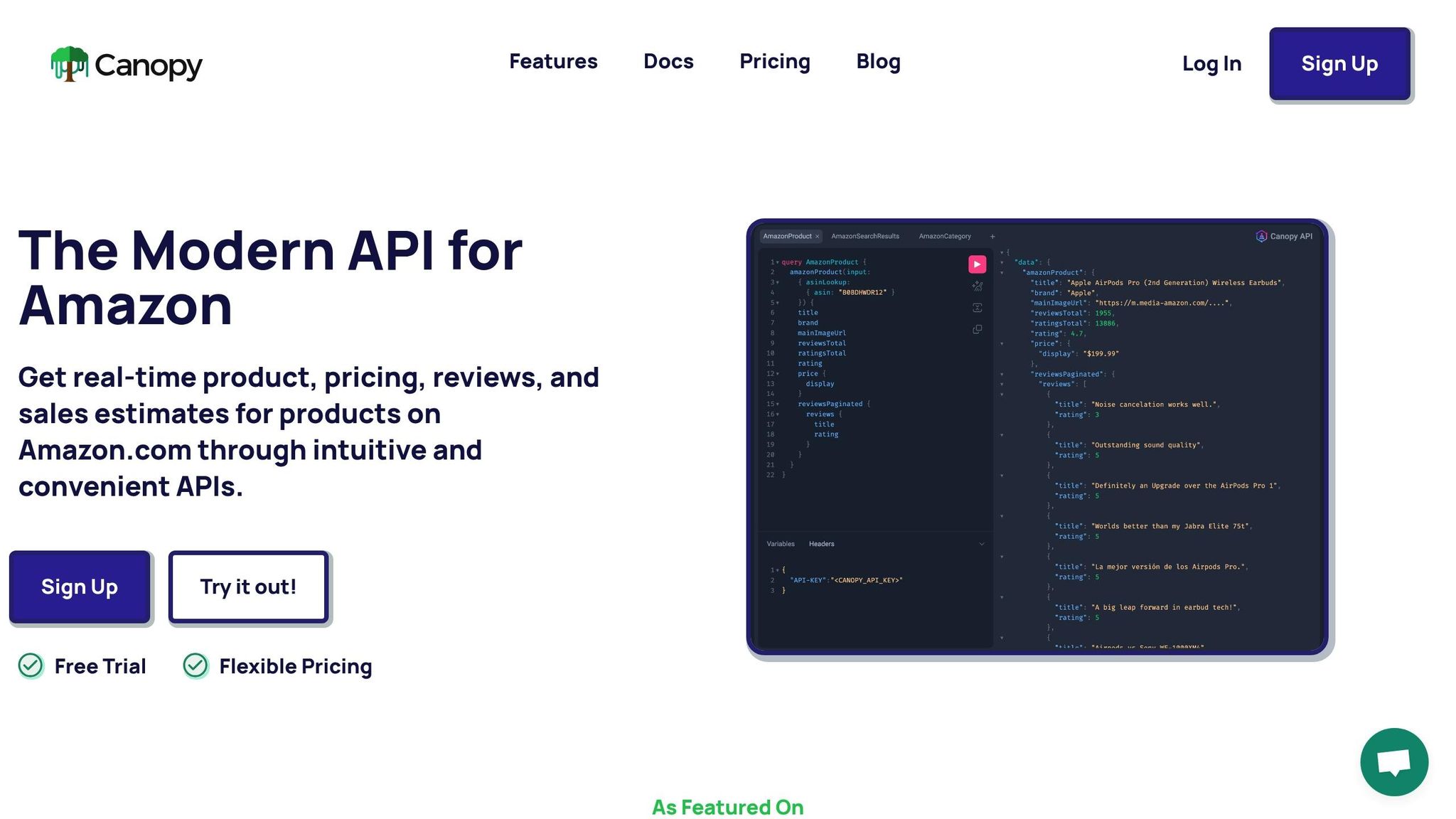
Looking to access Amazon product data effortlessly? Canopy's Amazon Search API delivers real-time product details like prices, reviews, and stock availability from Amazon.com. It’s a tool designed for businesses and developers who want to skip the hassle of building scrapers and focus on actionable insights.
Key Features:
- Real-Time Data: Get product titles, descriptions, prices in USD, reviews, and sales estimates instantly.
- Search Ranking Insights: Analyze keyword performance in Amazon search results.
- U.S.-Specific Formatting: Prices, dates, and text tailored for U.S. standards.
- Flexible Integration: Supports both REST and GraphQL endpoints for tailored data retrieval.
Why It’s Useful:
- Monitor competitor pricing and adjust strategies quickly.
- Research products with detailed sales and review data.
- Improve your listings using customer feedback insights.
Canopy offers scalable pricing plans starting with 100 free monthly requests, making it suitable for both small projects and high-volume needs. Whether you prefer REST for simplicity or GraphQL for precise queries, Canopy makes integrating Amazon data straightforward.
Ready to get started? Set up your account, grab your API key, and start fetching Amazon data in minutes.
Getting Started with Canopy's Amazon Search API
Canopy Amazon Search API Pricing Plans Comparison
Setting Up Your Canopy Account
First, head over to the Canopy API website and sign up to access your dashboard and API key. Once you're logged in, you'll find your API key displayed on the dashboard. Make sure to copy it and store it securely - this key is required for every API request you make.
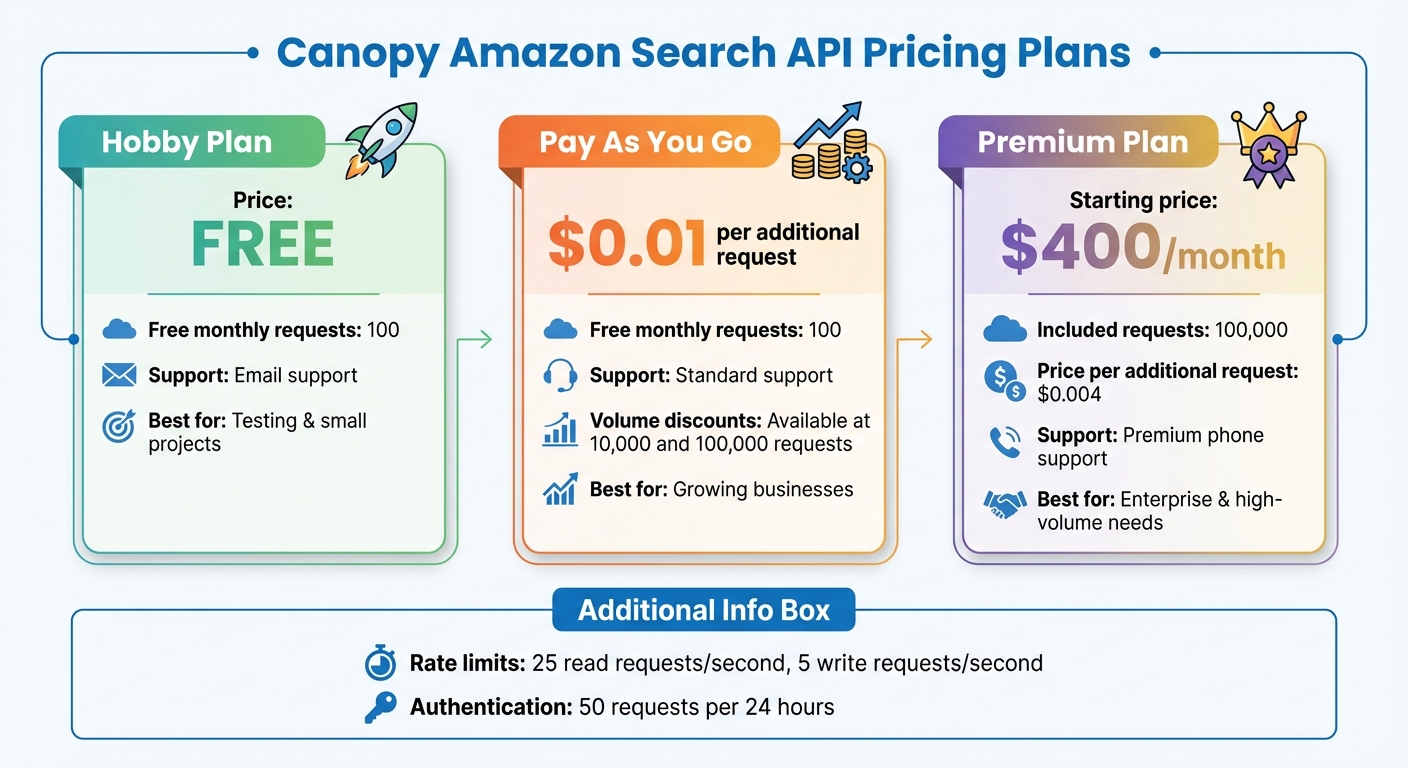
Canopy offers several pricing plans to suit different needs:
- Hobby Plan: Includes 100 free requests per month and email support.
- Pay As You Go: Provides 100 free monthly requests, with additional requests priced at $0.01 each. Discounts apply for higher volumes (10,000 and 100,000 requests).
- Premium Plan: Starts at $400 per month, offering 100,000 requests, premium phone support, and additional requests at $0.004 each.
After selecting a plan, take a moment to review the API documentation to understand the available features and endpoints.
Reading the API Documentation and Endpoints
Visit the official documentation at https://docs.canopyapi.co. This guide covers everything you need to know about querying Amazon data using either GraphQL or REST endpoints. The GraphQL endpoint is located at https://graphql.canopyapi.co/ (requires POST requests), while the REST endpoint is available at https://rest.canopyapi.co/api/amazon/product (uses GET requests).
To dive deeper, download the OpenAPI Specification files - CanopyPublicAPI.json or CanopyPublicAPI.yaml - from the documentation page. These files outline all available endpoints, parameters, and response formats in a machine-readable format. You can load them into API tools to experiment with requests and responses. The documentation also provides helpful examples for libraries like GraphQL Yoga, Apollo Server, and JavaScript fetch to simplify the integration process.
Once you're familiar with the documentation, you can move on to setting up your development environment.
Preparing Your Development Environment
Getting your environment ready is quick and easy. Start by installing Node.js version 14 or higher. You'll also need an HTTP client like axios, which you can install using npm install axios. If you're using a modern version of Node.js, the fetch API is built-in and can handle basic HTTP requests.
When making requests, include your API key in the headers. Here's a simple example of a REST request using fetch:
const response = await fetch('https://rest.canopyapi.co/api/amazon/product?asin=B08N5WRWNW', {
  headers: {
    'API-KEY': 'your_api_key_here'
  }
});
const data = await response.json();
With your account created, the documentation reviewed, and your environment set up, you're ready to start integrating Amazon search results into your application.
Using Canopy's REST API for Amazon Search
Building Search Queries with REST Endpoints
Canopy's REST API allows you to fetch Amazon product data using GET requests to https://rest.canopyapi.co/api/amazon/product. Each request requires an API key included in the request header. This endpoint is designed for efficient product lookups using identifiers like ASIN, delivering detailed data such as pricing, product titles, descriptions, customer reviews, and even sales estimates.
This REST-based approach is ideal for retrieving in-depth information about specific products. By querying products with their ASIN, you can access all relevant product details formatted for U.S. standards.
Parsing and Using Response Data
The API responds with data in JSON format, making it easy to extract the specific fields you need. Key fields include:
- ASIN: The product's unique identifier.
- Product title: The name of the product.
- Pricing: Displayed in USD (e.g., $XX.XX).
- Customer ratings: Average rating from buyers.
- Review count: The number of customer reviews.
- Image URLs: Links to product images.
Here's an example of how to parse the response:
const response = await fetch('https://rest.canopyapi.co/api/amazon/product?asin=B08N5WRWNW', {
  headers: {
    'API-KEY': 'your_api_key_here'
  }
});
const productData = await response.json();
const { asin, title, price, rating, imageUrl } = productData;
To streamline your process, extract only the fields essential for your application. If you're dealing with larger datasets, consider implementing pagination to enhance performance and reduce processing time.
Handling Pagination in REST API Calls
When working with larger datasets, pagination helps divide the results into smaller, more manageable chunks. Look for pagination-related fields in the API response, such as nextToken or hasNextPage.
To access additional pages, include the token from the previous response in your next API request. Continue this process until the response indicates there are no more pages. You can also specify the page size using parameters like limit or maxResults. A typical range is between 10 and 100 items per page, which balances efficiency and payload size effectively.
Using GraphQL for More Flexible Searches
Benefits of GraphQL for Amazon Data
If you're a developer aiming for more precise and efficient queries, GraphQL can be a game-changer. It allows you to retrieve only the data you need from Amazon in a single query. This means less unnecessary data transfer, which not only reduces bandwidth usage but also speeds up your application.
Instead of making multiple API calls, you can bundle various data points into one request. For instance, you can fetch product titles, prices (in USD), customer ratings, and image URLs all at once. This is especially helpful when building dashboards or reports that require pulling data from several Amazon product attributes. GraphQL’s flexibility makes it a great complement to the REST-based approach discussed earlier.
Writing GraphQL Queries for Amazon Search
To query Amazon data using GraphQL, send a POST request to https://graphql.canopyapi.co/. You'll need to include either an API-KEY header or an Authorization: Bearer YOUR_API_KEY header for authentication.
Here’s an example query using an ASIN:
fetch('https://graphql.canopyapi.co/', {
  method: 'POST',
  headers: {
    'Content-Type': 'application/json',
    'API-KEY': '<YOUR_API_KEY>',
  },
  body: JSON.stringify({
    query: `
      query amazonProduct($asin: String!) {
        amazonProduct(input: {asin: $asin}) {
          title
          mainImageUrl
          rating
          price {
            display
          }
        }
      }
    `,
    variables: { asin: "B0B3JBVDYP" }
  })
})
  .then(response => response.json())
  .then(data => console.log(data))
  .catch(error => console.error('Query failed:', error));
This query is designed to be dynamic, using variables for parameters like ASIN, keywords, or filters. The response will only include the fields you request - here, it returns the product title, image URL, rating, and price formatted in USD.
Pagination and Data Integration with GraphQL
GraphQL also offers a robust pagination system, which is particularly useful if you're dealing with large datasets. Unlike REST’s offset-based pagination, GraphQL uses cursor-based pagination with arguments like first, after, last, and before. This method is more reliable, as it avoids issues like duplicate or missed items when the catalog updates.
The pagination structure includes edges (representing individual items along with their cursors) and a PageInfo object. This object provides metadata, such as whether there’s a hasNextPage or hasPreviousPage, along with the startCursor and endCursor. For workflows in the U.S., such as creating reporting dashboards, these paginated results can be seamlessly integrated into analytics tools. This ensures that pricing is displayed in USD and dates follow the MM/DD/YYYY format.
sbb-itb-d082ab0
Filtering and Sorting Amazon Search Results
Available Filtering and Sorting Options
Canopy's Amazon Search API offers a range of tools to refine and organize search results with precision. You can filter by price using MinPrice and MaxPrice, where values are specified in the smallest currency unit (e.g., 2500 equals $25.00 in USD). Additional filters include customer review ratings (MinReviewsRating), product categories (SearchIndex or BrowseNodeId), brand, condition (like New, Used, or Refurbished), availability, and delivery preferences such as Prime or Free Shipping. Sorting options include Price:LowToHigh, Price:HighToLow, AvgCustomerReviews, NewestArrivals, and Relevance. These features allow for precise customization of search results.
Combining Multiple Filters for Targeted Results
Combining filters enables you to create highly specific product searches. For instance, if you're looking for items under $25 with a 4-star rating or higher, you can use MaxPrice set to 2500, MinReviewsRating set to 4, and optionally add DeliveryFlags set to "Prime" for faster shipping eligibility.
fetch('https://rest.canopyapi.co/v1/amazon/search?keywords=DSLR%20Camera&searchIndex=Electronics&brand=Sony&minReviewsRating=4&marketplace=www.amazon.com¤cyOfPreference=USD', {
headers: {
'API-KEY': '<YOUR_API_KEY>'
}
})
.then(response => response.json())
.then(data => console.log(data))
.catch(error => console.error('Search failed:', error));
This method generates a refined dataset that meets all specified criteria, saving time by eliminating the need for manual filtering after retrieval.
Storing and Normalizing Data
Once you’ve filtered and sorted your search results, proper data storage and normalization are key to smooth integration. Standardize field names and apply consistent formats - use YYYY-MM-DD for dates, two-letter abbreviations for state codes, and express measurements in standard U.S. units like pounds and inches.
For better search performance, consider a denormalized data model that embeds related details directly within product documents. This approach minimizes the need for database joins and speeds up analytical queries. Save products as unique JSON documents and use batch uploads to streamline the processing workflow.
Managing API Performance and Costs
Understanding Pricing Plans and Request Limits
Canopy provides three pricing tiers designed to scale with your needs. The Hobby plan includes 100 free monthly requests, while higher-volume plans start at $400 per month. These plans feature transparent per-request pricing and volume discounts. Rate limits are set at 25 read and 5 write requests per second, along with 50 authentication requests per 24 hours. If you exceed these limits, the API will return an HTTP 429 status code. Let’s explore practical ways to manage your API usage and keep costs under control.
Reducing API Usage and Costs
To stay within the authentication request limit, cache your access tokens until they expire. When handling HTTP 429 errors, use exponential back-off with jitter - this helps prevent multiple clients from overloading the API after hitting a rate limit. For data that is accessed frequently, consider caching responses locally to minimize redundant requests. You can also schedule bulk data retrieval during off-peak hours and combine multiple product lookups into a single request whenever possible.
Monitoring and Troubleshooting API Requests
In addition to reducing costs, monitoring and troubleshooting your API usage is essential. Build error-handling mechanisms into your application to manage rate limits effectively. When you encounter an HTTP 400 error, check the response.error_description.code field for a 429 rate limit error. The error response will include a rate_limit_refresh field that tells you when you can make your next authentication request.
Track your usage trends by monitoring JWT claims. You can check your current limit at https://umbra.space/rate_limit and view remaining authentication requests at https://umbra.space/rate_limit_remaining. Be sure to log all requests with U.S. local timestamps (e.g., EST, CST, MST, or PST) to identify patterns and troubleshoot effectively.
If you face access issues, verify that your network allows traffic to the following domains: app.canopytax.com, *.canopytax.com, *.amazonaws.com, *.cloudfront.net, and *.pusher.com. Avoid using IP-based allowlisting, as Canopy’s cloud infrastructure relies on dynamic IP addresses that change frequently. If problems persist after checking your firewall and proxy settings, consult your IT team for additional support.
Conclusion
Canopy's Amazon Search API provides U.S. businesses with real-time access to Amazon product data, making it easier to make quick, informed decisions. Whether you’re keeping an eye on pricing trends, digging into customer reviews, or tracking search rankings, the API eliminates the need to build and maintain your own scraper. This means you can focus entirely on your core business goals without the extra technical burden.
With support for both REST and GraphQL endpoints, the API integrates seamlessly into your existing systems. GraphQL is ideal when you need precise control over the data you’re retrieving, while REST offers a simpler option for standard queries. Both approaches come with thorough documentation and open-source examples to help you get started quickly.
As Canopy puts it:
"Our AI-powered APIs allow you to start fetching and processing Amazon data in minutes." – Canopy API
The pricing model is designed to scale with your needs. Whether you’re testing ideas on the free Hobby plan or operating at an enterprise level, the costs adjust as your usage grows, making it a cost-effective choice no matter the volume.
Built specifically for the U.S. market, Canopy handles Amazon.com data in formats tailored to your needs - like dollar-based pricing and local timestamp tracking for easier monitoring and troubleshooting. With infrastructure capable of handling over 10,000 cache hits daily, it ensures reliable, high-performance data retrieval at scale. These features make Canopy an essential tool for managing Amazon data efficiently in the U.S. market.
FAQs
How do I integrate Canopy's Amazon Search API into my current systems?
To begin, log in to your Canopy account and locate your API key. You can work with the API using either the GraphQL or REST endpoints by adding your API key to the request header. All you need to do is send POST requests with the necessary parameters to pull Amazon search results customized to your requirements.
For more detailed instructions and query examples, check out the documentation. It offers step-by-step guidance to help you integrate the API into your applications with ease.
What are the advantages of using GraphQL instead of REST with Canopy's API?
GraphQL lets you request just the data you need - nothing extra, nothing missing. This targeted approach reduces data transfer, which can significantly boost performance. It’s particularly handy when dealing with large datasets or pulling in detailed e-commerce information.
On top of that, GraphQL makes handling complex queries easier. You can retrieve related data in a single request, cutting down on multiple API calls. This streamlined process is ideal for real-time insights and advanced data analytics when working with Canopy's API.
What is Canopy's pricing structure for different API usage levels?
Canopy provides pricing options tailored to different levels of usage:
- Hobby Plan: Free, allowing up to 100 requests per month.
- Pay As You Go Plan: No monthly fee, with requests priced at $0.01 each.
- Premium Plan: Starts at $400 per month, covering 100,000 requests, with additional requests charged at $0.004 each.
With these options, Canopy ensures flexibility, making it suitable for everyone - from individual developers to businesses handling high-volume operations.