Tracking Competitor Inventory with Canopy's Amazon API
Use Canopy's Amazon API to monitor competitor stock, pricing, and sales estimates in real time via REST or GraphQL for smarter pricing and inventory planning.

Want to stay ahead on Amazon? Tracking competitor inventory is key. Knowing their stock levels helps you adjust prices, plan inventory, and secure the Buy Box. Canopy's Amazon API delivers real-time data, making this process faster and easier. Here’s how it works:
- Real-Time Data: Access competitor stock levels, pricing, and sales estimates instantly.
- Flexible Integration: Use REST or GraphQL endpoints based on your workflow.
- Scalable Plans: Start with 100 free requests/month or scale up with affordable pricing for higher volumes.
- AI Insights: Spot trends and automate alerts for smarter decisions.
With Canopy's API, you can automate inventory tracking, optimize pricing, and plan stock levels effectively. Whether you're monitoring one product or hundreds, this tool simplifies the process and supports your growth.
Setting Up Canopy's Amazon API for Inventory Tracking
Canopy Amazon API Pricing Plans Comparison
What You Need to Get Started
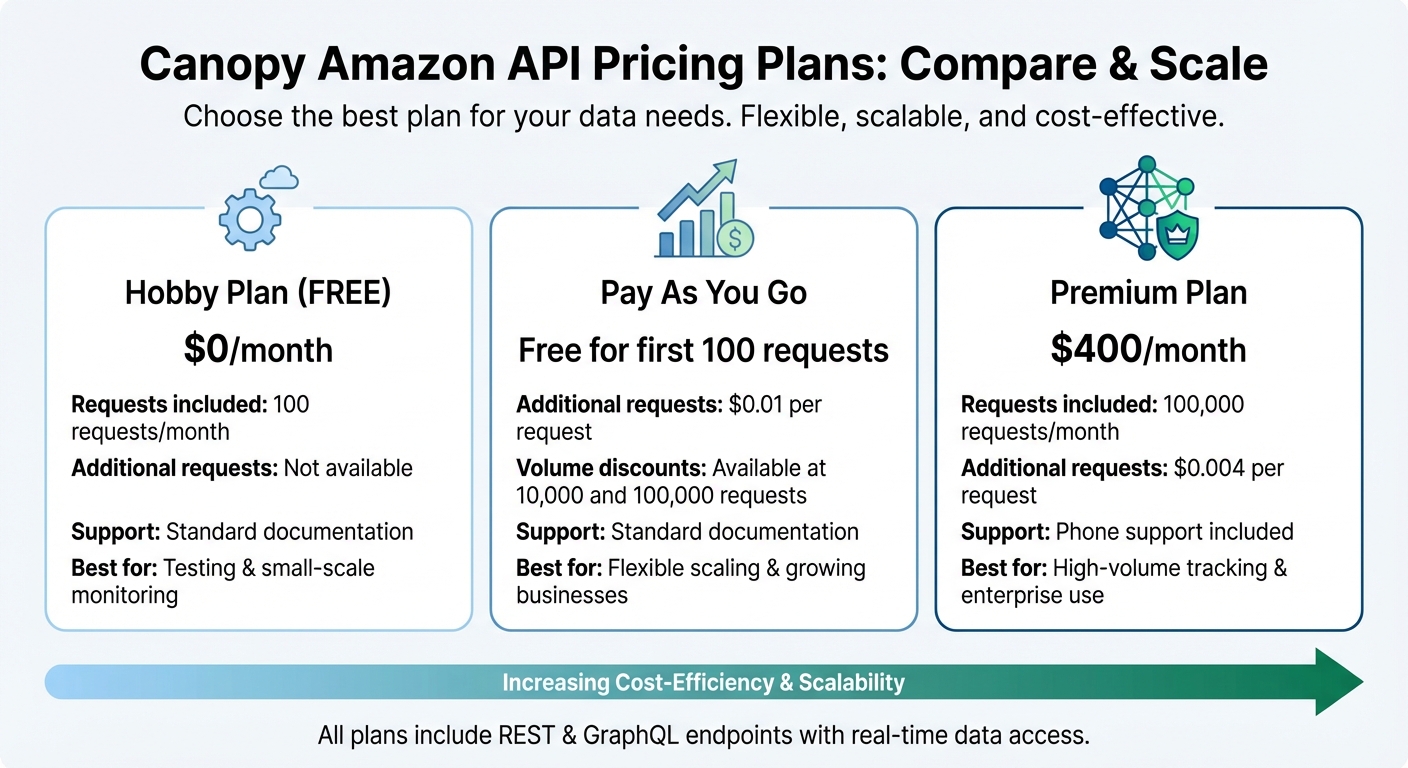
First, sign up for a Canopy account. If you're just testing the waters, the free Hobby Plan gives you 100 requests per month to work with.
Once you're signed up, head to your dashboard to grab your API key - this is essential for all API requests. If you're familiar with REST or GraphQL, you're already equipped to start making calls and handling responses.
If you need more than 100 requests, consider upgrading. The Pay As You Go plan is a flexible option: it’s free for the first 100 requests, then $0.01 per additional request, with discounts kicking in at higher volumes (10,000 and 100,000 requests). For heavy users, the Premium Plan starts at $400 per month, covering 100,000 requests, with additional requests costing $0.004 each. Premium users also get access to phone support.
Once your account is ready and you’ve chosen a plan, the next step is setting up API authentication to start tracking inventory.
Authentication and API Configuration
Log into your Canopy account and locate your API key in the dashboard. This key must be included in every API request.
For authentication, you can use either the API-KEY header or the Authorization: Bearer YOUR_API_KEY header. Depending on how you prefer to work, you can send requests to one of two endpoints:
- GraphQL endpoint:
https://graphql.canopyapi.co/(for POST requests) - REST endpoint:
https://rest.canopyapi.co/api/amazon/product(for GET requests).
Both endpoints provide the same real-time inventory data, so it’s all about what fits best with your workflow.
The integration process is quick and straightforward. Canopy offers detailed documentation and open-source examples in Python, JavaScript fetch, GraphQL Yoga, and Apollo Server to help you get up and running in no time.
Retrieving Competitor Inventory Data
Retrieving Inventory Data with REST and GraphQL
Canopy's Amazon API provides a way to access real-time inventory data using either REST or GraphQL endpoints. The REST endpoint (https://rest.canopyapi.co/api/amazon/product) is straightforward and accepts simple GET requests. On the other hand, the GraphQL endpoint (https://graphql.canopyapi.co/) allows you to request specific fields via POST requests, giving you more control over the data you retrieve.
Both endpoints deliver the same real-time stock and inventory details. Deciding between REST and GraphQL depends on your needs - REST is great for simple queries, while GraphQL is better suited for scenarios where you want to limit the data you pull. This flexibility ensures you can streamline your workflow before diving into implementation.
To authenticate, include your API key in all requests using either the API-KEY header or Authorization: Bearer YOUR_API_KEY. The API provides information like stock status, estimated inventory levels, and pricing for the products you query.
Example: Fetching Data for a Single ASIN
Tracking competitor products starts with their ASIN (Amazon Standard Identification Number). Here’s how you can retrieve inventory data for a single ASIN using JavaScript and the REST endpoint:
const apiKey = 'YOUR_API_KEY';
const asin = 'B08N5WRWNW'; // Example ASIN

fetch(`https://rest.canopyapi.co/api/amazon/product?asin=${asin}`, {
  method: 'GET',
  headers: {
    'API-KEY': apiKey
  }
})
  .then(response => response.json())
  .then(data => {
    console.log('Stock Status:', data.stockStatus);
    console.log('Inventory Level:', data.stockEstimation);
  })
  .catch(error => console.error('Error:', error));
If you prefer GraphQL, you can request only the fields you need:
const apiKey = 'YOUR_API_KEY';

fetch('https://graphql.canopyapi.co/', {
  method: 'POST',
  headers: {
    'Authorization': `Bearer ${apiKey}`,
    'Content-Type': 'application/json'
  },
  body: JSON.stringify({
    query: `
      query {
        product(asin: "B08N5WRWNW") {
          stockStatus
          stockEstimation
          price
        }
      }
    `
  })
})
  .then(response => response.json())
  .then(data => console.log(data))
  .catch(error => console.error('Error:', error));
Both approaches return details about the product’s availability, estimated stock levels, and pricing.
Tracking Multiple Products with Batch Requests
When monitoring multiple products, batch requests can save time and improve efficiency. Instead of making individual API calls for each ASIN, you can use GraphQL to query multiple products in one request:
const apiKey = 'YOUR_API_KEY';
const asins = ['B08N5WRWNW', 'B07XJ8C8F5', 'B09G9FPHY6'];

fetch('https://graphql.canopyapi.co/', {
  method: 'POST',
  headers: {
    'Authorization': `Bearer ${apiKey}`,
    'Content-Type': 'application/json'
  },
  body: JSON.stringify({
    query: `
      query {
        ${asins.map((asin, index) => `
          product${index}: product(asin: "${asin}") {
            asin
            title
            stockStatus
            stockEstimation
            price
          }
        `).join('\n')}
      }
    `
  })
})
  .then(response => response.json())
  .then(data => console.log(data))
  .catch(error => console.error('Error:', error));
This method is particularly useful for scaling operations when tracking several products, as it reduces the number of calls and optimizes data retrieval. By grouping requests, you can monitor multiple ASINs efficiently without adding complexity to your workflow.
sbb-itb-d082ab0
Analyzing Competitor Inventory Trends
Monitoring Stock Changes Over Time
Keeping an eye on how competitor inventory changes over time can reveal valuable patterns. By setting up automated API requests at regular intervals and storing the data, you can analyze trends like how often competitors run out of stock, how quickly they restock, and whether their inventory levels shift during specific seasons.
Tools like Canopy's Alerts / Notifications feature can provide real-time updates when there’s a notable change, such as a competitor’s stock dropping below a certain level or when they restock. This instant insight allows you to act quickly and adjust your strategy. Plus, AI-driven analysis can uncover less obvious trends, giving you a deeper understanding of the market. These insights are critical for making timely pricing adjustments.
Using Inventory Data to Adjust Your Pricing
Competitor stock levels can directly influence how you price your products. For instance, when a competitor’s stock runs low, demand may shift to your products, giving you an opportunity to raise prices slightly. On the other hand, if competitors are fully stocked, you might need to lower prices to stay competitive and maintain visibility, especially if you’re aiming to win the Buy Box.
By integrating this data with automated repricing tools, you can make smarter pricing decisions. For example, if a competitor frequently sells out of a popular item, you can adjust your prices during those periods to capture their missed sales and boost your market share.
Planning Your Inventory Based on Competitor Stock Levels
Competitor inventory data isn’t just useful for pricing - it’s also a powerful tool for planning your own stock levels. If competitors frequently sell out, it may indicate strong demand, signaling that you should prepare to meet that demand. Conversely, if their inventory remains consistently high, it could point to an oversupply in the market.
Conclusion
Why Use Canopy's API for Inventory Tracking?
To wrap things up, monitoring competitor inventory isn't just about keeping tabs on stock levels - it’s a smart strategy that can shape your entire e-commerce approach. With Canopy's Amazon API, you gain access to real-time data on inventory, pricing, sales estimates, and product details, all without the hassle of manual data collection. This means you can shift your focus to making strategic decisions that drive your business forward.
The API’s AI-powered insights are a game-changer. They help you spot trends that matter, like when to adjust prices due to competitor stockouts or how to plan your inventory based on market demand. Plus, the scalable setup ensures that the more you use it, the more cost-efficient it becomes - perfect for businesses of any size.
From competitor analysis and price adjustments to automated alerts, the API offers all the tools you need to stay ahead in a competitive market. With both REST and GraphQL endpoints, integrating it into your existing systems is seamless, ensuring it works smoothly with your current workflows.
How to Get Started with Canopy's API
Getting started is simple. Canopy offers a free Hobby plan, which includes 100 monthly requests - perfect for dipping your toes in. The documentation is thorough, featuring real code examples in JavaScript and other languages, so you’ll have no trouble setting up everything from authentication to batch requests.
Ready to scale? The Premium plan, priced at $400/month, gives you 100,000 requests and access to premium support. Whether you’re tracking a few key competitors or monitoring entire product categories, the API is built to handle it. Start small with a few ASINs, automate your tracking, and make data-driven decisions that transform your pricing and inventory strategies.
FAQs
How can Canopy's API help improve pricing strategies on Amazon?
Canopy's API gives you access to real-time pricing data straight from Amazon. With this data, you can keep an eye on competitor prices, spot emerging trends, and make well-informed decisions to maintain your edge in the market.
Using this insight, you can apply dynamic pricing strategies, adjusting your prices in response to market shifts. This way, your products stay appealing to customers while helping you boost profitability.
What makes GraphQL a better choice than REST for retrieving inventory data?
GraphQL brings some clear benefits compared to REST, especially when you're working with inventory data. One of its standout features is the ability to request only the data you need - nothing extra. This means less unnecessary data transfer, which can save both time and resources.
Another great aspect of GraphQL is its flexibility. You can tailor your queries to pull together multiple pieces of information in a single request. This streamlined approach can be incredibly helpful when analyzing competitor inventory or fine-tuning your own strategies.
How can tracking competitor inventory help improve my stock management?
Keeping an eye on your competitor's inventory can offer a wealth of insights into stock availability and shifting market trends. By studying this data, you can anticipate changes in demand, steer clear of overstocking or running out of key items, and make smarter decisions about your own inventory.
For instance, if you notice a competitor running low on a high-demand product, you might decide to tweak your pricing strategy or ensure your shelves are fully stocked to capture the potential surge in customers. Recognizing these patterns not only keeps you competitive but also helps streamline your supply chain operations.