Feature Launch: Amazon Deals API
Access real-time Amazon deals (prices, inventory, timing) via REST or GraphQL through Canopy API to automate promotions and monitor competitor pricing.

The Amazon Deals API is a new tool that provides real-time access to Amazon's deals, including discounts, promotions, and exclusive offers like Lightning Deals and Prime-only discounts. It simplifies how businesses track and use deal data, offering detailed insights into pricing, inventory, and timing. This API is especially useful for e-commerce businesses looking to improve pricing strategies, manage promotions, and stay competitive during events like Black Friday or Prime Day.
Key Highlights:
- Access live data on Amazon deals: pricing, discount percentages, deal types, and timing.
- Supported deal types: Lightning Deals, Best Deals, Coupons, Prime-exclusive offers, and more.
- Integration options: REST and GraphQL endpoints via Canopy API.
- Pricing: Free Hobby plan (100 requests/month) or Pay As You Go ($0.01/request).
- Features include fields for inventory updates, deal timing, and discount details.
This API is a practical tool for automating promotions, tracking competitor pricing, and creating urgency for customers with real-time data.
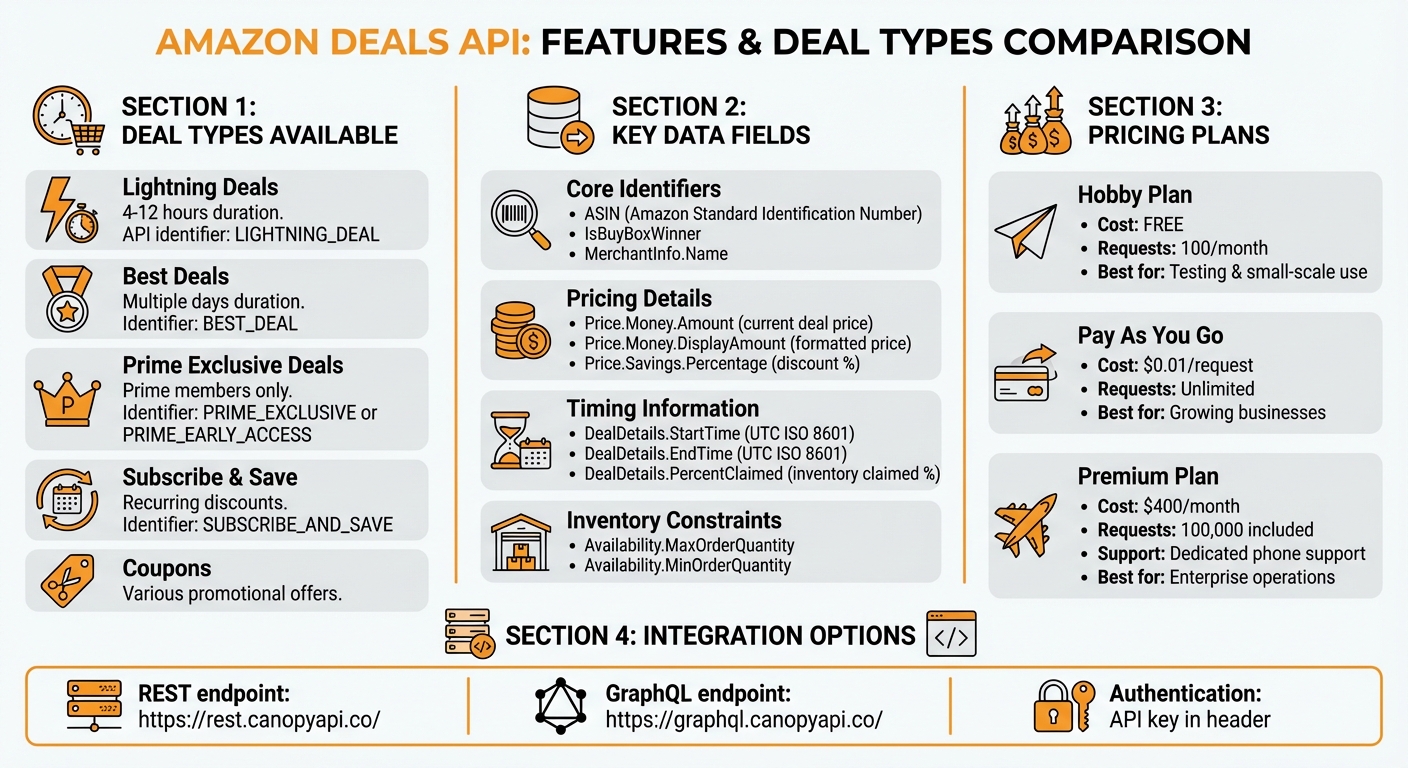
Amazon Deals API: Deal Types, Features, and Pricing Comparison
Amazon Deals API Features and Data Structure
Deal Types Available
The Amazon Deals API provides access to various deal types, each designed to cater to specific promotional strategies. Lightning Deals are short-term offers lasting between 4 and 12 hours, identified in the API by Listings.Type as LIGHTNING_DEAL. Best Deals run for multiple days and often feature promotional badges, categorized as BEST_DEAL. Prime Exclusive Deals are limited to Prime members and are marked by DealDetails.AccessType values like PRIME_EXCLUSIVE or PRIME_EARLY_ACCESS. The API also includes Subscribe & Save offers (tagged as SUBSCRIBE_AND_SAVE) and Coupons, covering a wide range of deal categories.
Each deal type comes with its own timing and eligibility criteria. For instance, Prime Early Access deals include a DealDetails.EarlyAccessDurationInMilliseconds field, indicating how long Prime members have exclusive access before the deal is open to all. Meanwhile, Lightning Deals feature a DealDetails.PercentClaimed field, which shows how much of the deal's inventory has been claimed (e.g., a value of 38 means 38% of the inventory is taken). These distinct features are reflected in the API's comprehensive data fields.
Data Fields Returned by the API
The API provides detailed JSON responses with essential fields for each deal. Key fields include:
- Core Identifiers: These include the ASIN (Amazon Standard Identification Number), IsBuyBoxWinner (indicating if the seller holds the Buy Box), and MerchantInfo.Name (the seller's name).
- Pricing Details: Information like
Price.Money.Amount(current deal price),Price.Money.DisplayAmount(formatted price, e.g., "$59.49"), andPrice.Savings.Percentage(discount percentage) are provided. - Timing Information: Deals include UTC timestamps in ISO 8601 format. For example,
DealDetails.StartTimemight be "2024-11-05T18:05Z" andDealDetails.EndTime"2024-11-06T05:35Z". - Descriptive Labels: The
DealDetails.Badgefield provides labels such as "Limited Time Deal", "Black Friday Deal", or "Ends In." - Inventory Constraints: Fields like
Availability.MaxOrderQuantityandAvailability.MinOrderQuantitydefine purchase limits.
Applying Deal Data to E-commerce Operations
The detailed data provided by the API can power a range of e-commerce strategies. For example, platforms can automate promotions using the DealDetails.StartTime and DealDetails.EndTime fields, ensuring deals are scheduled and removed at the right times without manual effort. Countdown timers combined with the DealDetails.PercentClaimed field can create urgency, encouraging faster purchases. Additionally, Price.SavingBasis fields allow for clear price comparisons, showing the original price, the discounted price, and the percentage savings.
Tailored promotions are another possibility. By segmenting deals based on DealDetails.AccessType, businesses can create exclusive landing pages for Prime members or highlight early access offers. Monitoring the IsBuyBoxWinner field can guide dynamic pricing strategies, helping sellers remain competitive during major sales events.
How to Use the Amazon Deals API with Canopy API
Authentication and Setup
To get started with the Canopy API, you'll first need to authenticate using your API key. Begin by signing up for an account at canopyapi.co and selecting either the Hobby or Pay As You Go plan, depending on your requirements. Once registered, you'll receive an API key, which must be included in the header of every request to access both REST and GraphQL endpoints.
Canopy API offers two main endpoints:
- REST endpoint:
https://rest.canopyapi.co/ - GraphQL endpoint:
https://graphql.canopyapi.co/
Make sure to store your API key securely. Avoid exposing it in client-side code or public repositories to keep your access safe. With authentication set up, you can now fetch real-time deal data seamlessly.
Fetching Real-Time Deal Data
Once authenticated, you can start retrieving live deal data by querying products using ASINs, keywords, categories, or brand names. For REST API calls, structure your request with the required parameters and include your API key in the x-api-key header. Here's an example in JavaScript for fetching deal data by ASIN:
const response = await fetch('https://rest.canopyapi.co/v1/products/B08N5WRWNW', {
  headers: {
    'x-api-key': 'your-api-key-here',
    'Content-Type': 'application/json'
  }
});
const dealData = await response.json();
If you're using GraphQL, you can specify the exact fields you want to retrieve, which helps minimize data overhead. Below is an example query that fetches pricing, deal timing, and availability details:
const query = `
  query {
    product(asin: "B08N5WRWNW") {
      asin
      price {
        amount
        displayAmount
        savings {
          percentage
        }
      }
      dealDetails {
        type
        startTime
        endTime
        badge
        percentClaimed
        accessType
      }
      availability {
        maxOrderQuantity
      }
    }
  }
`;

const response = await fetch('https://graphql.canopyapi.co/', {
  method: 'POST',
  headers: {
    'x-api-key': 'your-api-key-here',
    'Content-Type': 'application/json'
  },
  body: JSON.stringify({ query })
});
const data = await response.json();
You can refine your results using US-specific filters, such as marketplace region, currency (USD), and Prime eligibility. When searching by keywords or categories, adding filters for active deals ensures you focus on relevant promotions while reducing processing time.
Storing and Using Deal Data
Once you've retrieved the deal data, it's a good idea to normalize it for easier use. For example, convert UTC timestamps to local time zones like EST or PST, and format prices as $XX.XX. Store this data in a relational database like PostgreSQL or a NoSQL database such as MongoDB, depending on your needs.
To optimize performance, cache deal data with a time-to-live (TTL) of 15–30 minutes. This reduces the number of API calls and ensures faster response times. Cached data can be used to power real-time dashboards, displaying active deals, countdown timers based on the endTime field, and inventory updates using the percentClaimed value.
For e-commerce platforms, integrating this data with product management systems allows for automatic updates to prices and promotional badges. This ensures customers always see the most current deal information without requiring manual updates. By automating data handling, your platform can consistently display accurate and up-to-date promotions.
E-commerce Strategies Using Deal Data
Dynamic Pricing and Promotion Management
With real-time deal data, you can keep a close eye on competitor pricing and adjust your own prices instantly. For example, if Amazon launches a lightning deal or reduces prices on similar products, you can respond right away instead of discovering the change hours later. This is crucial because shoppers often compare prices across sellers, and even a small price difference can influence their choice.
Leverage the API's savings percentage and displayAmount fields to showcase customer savings - display a lower sale price alongside the original price (e.g., "$19.99" off "$39.99"). You can even automate price adjustments based on competitor activity. For instance, if you spot a significant price drop from a rival, your system can recalibrate your prices instantly while still maintaining profitability.
The dealDetails.badge field is another powerful tool, helping you identify products with promotional tags like "Limited Time Deal" or "Lightning Deal." By incorporating similar urgency-driven elements on your platform, you can nudge customers toward faster purchasing decisions, boosting conversions. These pricing strategies also lay the groundwork for more focused seasonal campaigns.
Planning for Seasonal Shopping Events
Seasonal shopping events, like Black Friday, Cyber Monday, and Prime Day, require a more strategic approach. These events often see a surge in deal activity on Amazon, making it essential to adapt your tactics. By tracking deal patterns in the weeks leading up to these events, you can anticipate which product categories are likely to see steep discounts.
The startTime and endTime fields are particularly useful for aligning your promotional schedule with competitors' deals. Additionally, the percentClaimed field reveals how quickly inventory is selling during promotions, helping you fine-tune your stock levels for peak shopping periods.
Geo-targeted promotions can also be a game-changer. By monitoring deal performance across ZIP codes and regions, you can direct your marketing efforts to areas where deals are driving the most engagement. This ensures your promotional dollars are spent where they’ll have the greatest impact.
Measuring Deal Performance
Real-time API insights don’t just optimize pricing - they also help you evaluate how well your deals are performing. Metrics like conversion rates, revenue, and units sold provide a clear picture of a deal’s effectiveness. For example, comparing your totalSales figures to the cost of running a promotion helps you calculate your return on investment.
Keep an eye on the averageUnitPrice across different deal types to see which discount strategies resonate most with US shoppers. Interestingly, moderate discounts often outperform deeper price cuts. Analyzing hourly and daily data can also help you identify when your deals perform best.
Finally, setting up dashboards to track real-time metrics like click-through rates, add-to-cart rates, and completed purchases allows for quick adjustments. This kind of agile deal management ensures you’re always optimizing for maximum results.
sbb-itb-d082ab0
Implementation Best Practices
Keeping Data Current and Accurate
Maintaining up-to-date data is essential, especially when dealing with frequent changes in prices, promotions, and inventory. To ensure your system reflects real-time updates, rely on event-driven notifications. For example, Amazon's Notifications API sends alerts directly to your system whenever there are price changes or updates to offer statuses. This approach is far more efficient than continuous polling, which can strain resources.
For high-priority updates, combine event-driven notifications with short-term caching. For instance, cache Offers data for 1 hour while storing less dynamic information, like product images and descriptions, for up to 1 day. Always check your cache first before making new API requests. If the data is still valid, serve it from local storage. Only fetch new or expired data from the API to optimize performance and reduce unnecessary calls.
Optimizing API Performance
Efficient API utilization is key to improving performance. Start by batching your requests. Use the getItemOffersBatch method to retrieve details for up to 20 items in one go. Similarly, you can include up to 10 ASINs in a single GetItems call, reducing the number of individual API calls and speeding up data retrieval.
Be mindful of rate limits to avoid triggering a 429 "Too Many Requests" error, which can disrupt operations. Spread out API calls evenly throughout the day rather than clustering them during peak times. To handle throttling, implement retry policies with jitter - randomized delays can help avoid further congestion. When using the Feeds API for bulk updates, ensure file sizes stay under 10 MiB and avoid submitting feeds of the same type more than once every 20 minutes. Keep in mind that processing times for feeds can extend up to eight hours during periods of high demand.
These practices not only improve efficiency but also help you stay within Amazon's operational guidelines.
Following Amazon Data Policies
Adhering to Amazon's data policies is non-negotiable for secure and efficient data management. Always comply with the Product Advertising API License Agreement & Terms and Conditions, which mandate directing sales to Amazon to earn Associate fees. Use your correct Associate (Partner) tag in every API request to ensure proper attribution. As Amazon emphasizes:
"Alterations of any kind to vended links will lead to missing attribution and loss of Associate fees".
Additionally, never cache customer information derived from Amazon, as this is strictly prohibited under the Terms and Conditions. Stick to the approved caching durations for different data types, and ensure your Amazon Associate account is fully approved before accessing the API. Non-compliance can result in your application being blocked.
Conclusion
Key Takeaways
The Amazon Deals API provides e-commerce businesses with the tools to stay ahead by using real-time data on competitor stock levels, market conditions, and demand trends. This approach transforms pricing strategies into proactive, data-driven decisions, helping you stay competitive in a fast-moving market.
Additionally, the API helps you track important metrics like Pure Profit Margin (PPM), allowing you to identify top-performing products and fine-tune your promotional and inventory strategies - especially during major shopping events like Black Friday.
To simplify the process, Canopy API offers an easy integration solution, giving you access to real-time deal data without the hassle of complex technical setups.
Getting Started
Ready to take your e-commerce strategy to the next level? Start by signing up for a Canopy API account. The free Hobby plan (100 requests per month) is perfect for testing and small-scale use. Once you're set up, you can integrate with Canopy API's REST endpoint at https://rest.canopyapi.co/ or the GraphQL endpoint at https://graphql.canopyapi.co/ to start accessing real-time deal data.
To unlock even more potential, connect your Amazon Seller Central account to Canopy API using the detailed documentation and code samples provided. If you outgrow the free plan, flexible pricing options are available - ranging from Pay As You Go at $0.01 per additional request to Premium plans starting at $400/month, which include 100,000 requests and dedicated phone support.
FAQs
How can businesses use the Amazon Deals API to improve pricing strategies during major sales events?
Businesses can use the Amazon Deals API to tap into live deal data, giving them a clear view of competitor pricing and emerging trends, especially during big sales events. This insight helps them adjust prices on the fly, staying competitive and drawing in more customers.
By integrating this API into their e-commerce systems, companies can fine-tune product listings and promotions, boosting visibility and driving more sales. The real-time adaptability also helps craft smarter pricing strategies, leading to better profit margins.
How can I securely store and manage my Amazon Deals API key?
To keep your API key safe, it's best to store it in environment variables or use an encrypted secrets management tool - never hardcode it into your application. Restrict access by implementing IAM policies and sticking to the least privilege principle. Make it a habit to rotate your API keys regularly and keep an eye on their usage for any suspicious activity. These measures can safeguard your key and reduce the risk of unauthorized access.
How does the Amazon Deals API handle different types of deals and promotions?
The Amazon Deals API gives users real-time access to a variety of discounts, including Prime Exclusive Deals, Prime Day offers, and regular promotions. It uses the DealDetails.AccessType field (like PRIME_EXCLUSIVE) to identify deals specifically for Prime members, and it also allows filtering to show either Prime-only deals or those available to all customers.
Beyond that, the API provides details such as deal duration and buy box winners, making it easier for businesses to incorporate a range of promotional offers into their e-commerce platforms. This enables sellers to fine-tune their product listings and promotional strategies more effectively.