5 Steps to Identify Amazon Market Trends
Follow a five-step system to track Amazon sales velocity, competitor keywords, search rankings, reviews, pricing, and inventory using real-time API data.

Amazon's marketplace is shifting. Rising ad costs, tougher rankings, and profitability challenges are reshaping how sellers compete. To stay ahead, you need real-time insights into product performance, competitor strategies, keyword rankings, customer feedback, and pricing trends. Here's how to do it:
- Track Product Metrics: Monitor sales velocity, pricing trends, and reviews to identify performance shifts.
- Analyze Competitor Keywords: Study competitor listings to refine your strategy and spot keyword opportunities.
- Monitor Keyword Rankings: Track search rankings to understand visibility and market demand.
- Review Customer Feedback: Use reviews to identify product improvements and emerging customer needs.
- Watch Pricing & Stock: Evaluate pricing patterns and inventory levels to gauge demand and competition.
Key Tip: Use tools like Canopy API for real-time data, enabling faster decisions and better market positioning. This approach helps you optimize strategies and maintain profitability in a competitive landscape.
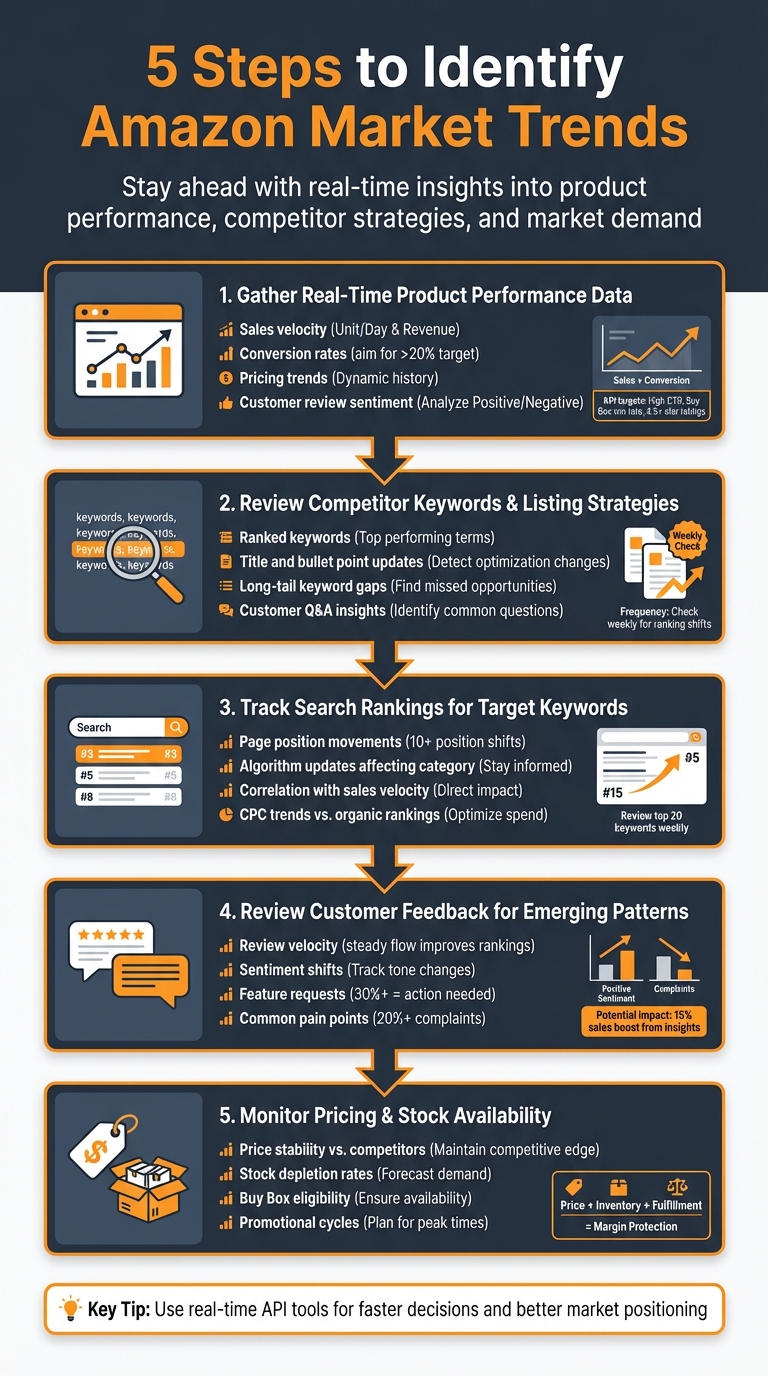
5-Step Process to Identify Amazon Market Trends
Best Amazon Trend Analysis Tool?
Step 1: Gather Real-Time Product Performance Data
Start by collecting real-time performance metrics to get a clear picture of your product's health. Key data points like sales velocity, conversion rates, pricing trends, and customer review sentiment provide valuable insights into how your product is performing.
Using Canopy API to Access Performance Metrics
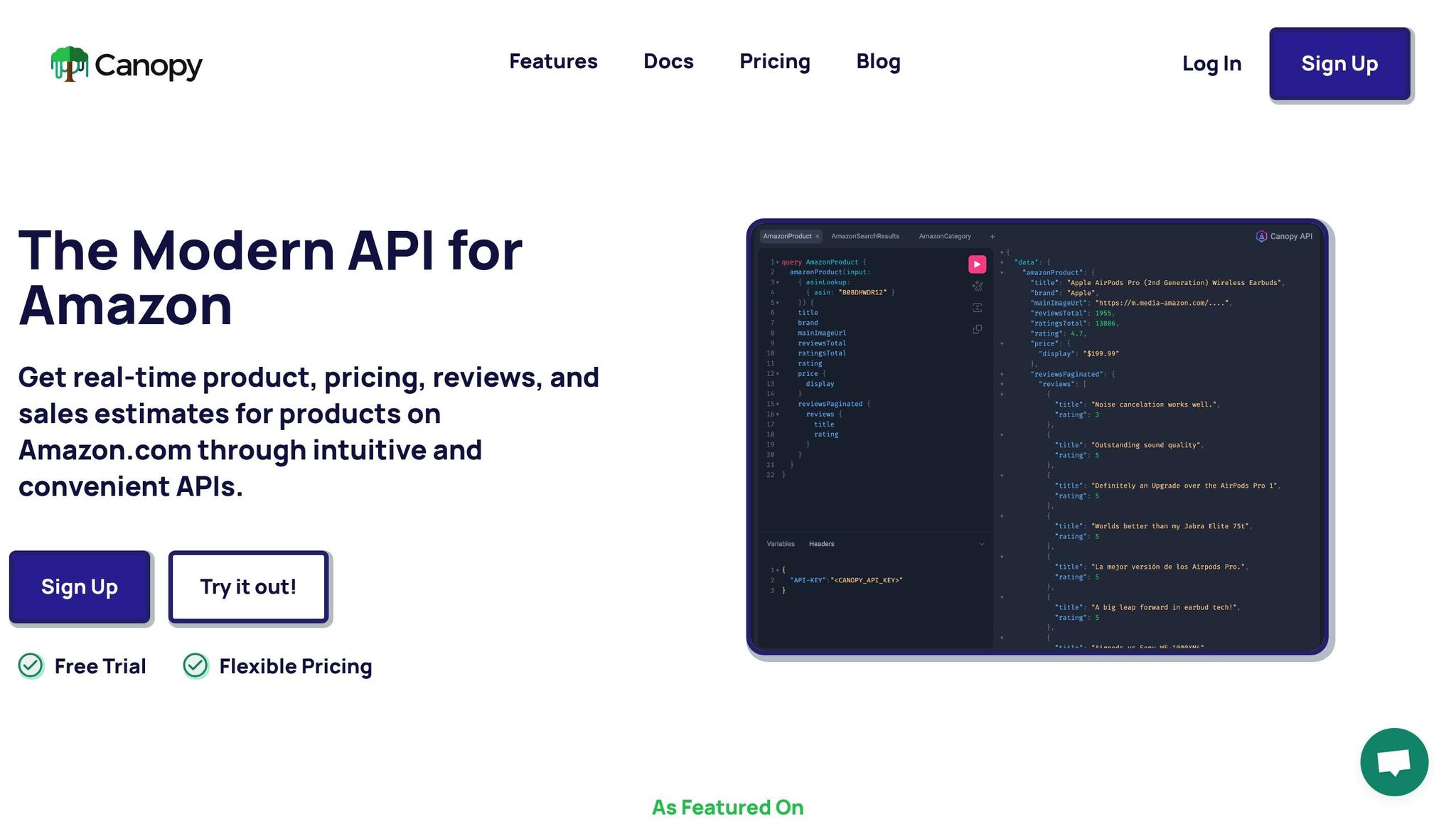
The Canopy API offers a GraphQL endpoint at https://graphql.canopyapi.co/ that allows you to fetch multiple data points in a single request. Here's an example of how to retrieve sales velocity and pricing information for a specific ASIN using JavaScript:
const query = `
  query GetProductMetrics($asin: String!) {
    product(asin: $asin) {
      asin
      title
      salesEstimates {
        velocity
        revenue
      }
      price {
        current
        lowest30Days
      }
    }
  }
`;

fetch('https://graphql.canopyapi.co/', {
  method: 'POST',
  headers: {
    'Content-Type': 'application/json',
    'Authorization': 'Bearer YOUR_API_KEY'
  },
  body: JSON.stringify({
    query,
    variables: { asin: 'B08N5WRWNW' }
  })
})
.then(res => res.json())
.then(data => console.log(data.data.product.salesEstimates.velocity));
This script retrieves real-time sales velocity and the lowest price in the past 30 days. If you prefer a simpler approach, you can use the REST endpoint for quick GET requests. For instance, a request to /products/{asin}?include=price,stock will return details about current pricing and inventory.
These metrics form the backbone of your performance tracking, helping you stay on top of critical trends.
Monitoring Key Performance Indicators (KPIs)
Keep a close eye on KPIs that reflect market dynamics. For example:
- Product ranking changes: These indicate whether your listing is gaining or losing favor with Amazon's algorithm.
- Click-through rates (CTR): A strong CTR shows that your title and main image are attracting shoppers.
- Buy Box win rate: A low win rate can directly hurt your conversions.
Review sentiment and velocity are also crucial. A boost in ratings (e.g., from 4.2 to 4.6 stars) combined with a 30% sales velocity increase is a strong signal of growing demand. On the other hand, stagnant sales paired with declining reviews might indicate market saturation or potential product issues.
To maintain healthy sales and rankings, aim for:
- High click-through rates
- Consistently positive reviews
- Frequent Buy Box wins
If your conversion rate drops below 15% while competitors are raising prices by 10%, it could signal listing fatigue. Strive for conversion rates above 20% with stable pricing to ensure your product stays competitive and appealing to customers.
Step 2: Review Competitor Keywords and Listing Strategies
Combining your own performance data with insights from competitors gives you a clearer picture of market trends. Competitors reveal their strategies through ranked keywords, updated titles, and optimized bullet points. By keeping an eye on these changes, you can identify which tactics are currently working in your category. Use this information alongside your real-time data to fine-tune your approach.
Focus on sellers targeting similar keywords and price points. A competitor's keyword usage provides a glimpse into how Amazon categorizes their product and aligns it with market demand. For instance, if a competitor starts ranking for terms like "eco-friendly" or "travel-sized", it could signal a shift in customer search behavior.
"A competitor's keyword footprint is the clearest map of how Amazon interprets their product."
– Chuck Kessler, Content and SEO Manager, Canopy Management
Look for gaps in competitors' titles, bullet points, and enhanced content to uncover untapped long-tail keywords or feature-specific phrases. These gaps can reveal opportunities. For example, if leading sellers often mention "BPA-free" but rarely highlight "dishwasher-safe", that could be your chance to stand out. Dive into customer Q&A sections and reviews to understand the language buyers use every day.
Check these updates weekly to catch shifts in rankings or creative adjustments early. When a competitor tweaks their title structure or adds new benefits to their product images, they’re testing what resonates with shoppers and Amazon’s algorithm. These changes can act as a guide for improving your own strategy without relying solely on trial and error.
Step 3: Track Search Rankings for Target Keywords
Tracking keyword rankings is a critical step in understanding market demand and your product's visibility on Amazon. These rankings reveal where your product stands in search results for specific keywords, providing insights into both current performance and future potential. For instance, if your product moves from page three to page one for a high-traffic keyword, it could indicate growing demand, better optimization, or an algorithmic shift. Such changes aren't random - they reflect shifts in buyer behavior, competition, or updates to Amazon's A9 algorithm. By monitoring these ranking movements, you can gain actionable insights before sales reports even come in.
Amazon's algorithm heavily favors products with strong conversion rates, increasing reviews, and consistent sales momentum. A sudden jump in rankings often signals higher customer engagement, while uniform ranking drops might point to algorithmic changes. Monitoring these fluctuations regularly helps you address potential issues before they affect your revenue.
Monitor Keyword Rankings with Canopy API
The Canopy API makes tracking keyword rankings straightforward. Its Search endpoint allows you to monitor where specific ASINs rank for your chosen keywords. By using the GraphQL endpoint (https://graphql.canopyapi.co/), you can query search results and keep tabs on ranking changes in real time - whether daily or even hourly:
fetch('https://graphql.canopyapi.co/', {
  method: 'POST',
  headers: {
    'Content-Type': 'application/json',
    'Authorization': 'Bearer YOUR_API_KEY'
  },
  body: JSON.stringify({
    query: `query {
      searchResults(keywords: "wireless earbuds", page: 1) {
        results {
          asin
          rank
          title
        }
      }
    }`
  })
})
.then(res => res.json())
.then(data => console.log(data));
For a more straightforward option, the REST endpoint (https://rest.canopyapi.co/) enables you to fetch ranked results with a single GET request:
fetch('https://rest.canopyapi.co/search?keywords=wireless%20earbuds&marketplace=US&page=1', {
  headers: {
    'Authorization': 'Bearer YOUR_API_KEY'
  }
})
.then(res => res.json())
.then(data => {
  data.results.forEach(item => {
    console.log(`ASIN: ${item.asin}, Rank: ${item.rank}`);
  });
});
By storing these results in a database, you can track changes over time, such as rank shifts of more than 10 positions. Setting up automated alerts for significant changes ensures you stay ahead of any trends. Additionally, combining ranking data with sales estimates from the API allows you to correlate improved visibility with revenue growth. This approach helps you identify ranking patterns that can inform your strategy.
Find Patterns in Ranking Shifts
Large ranking jumps - such as moving up 10 or more positions - often signal external factors like social media buzz or influencer endorsements. Recent trends show platforms like TikTok and YouTube driving traffic that boosts organic rankings, as Amazon rewards the resulting sales velocity. By aligning these spikes with your marketing campaigns, you can pinpoint which efforts are delivering results.
When multiple competitors experience ranking drops simultaneously, it could indicate broader algorithm updates rather than isolated issues. Amazon's machine-learning systems are increasingly prioritizing backend attributes, such as item type keywords and intended use. If your category sees uniform declines, it might be time to refine your data optimization. On the other hand, consistent ranking stability may reflect strong conversion rates and customer trust, while ranking volatility could highlight areas needing improvement - like reviews or conversion rates.
A regular review of your top 20 keywords - ideally on a weekly basis - can help you spot trends. Gradual ranking improvements often suggest steady demand growth, while abrupt drops might point to heightened competition or shifts in ad spend. If you notice rising CPCs alongside declining organic rankings, it may indicate that you're losing ground to better-optimized competitors. Addressing these issues promptly can help protect your profitability before margins take a hit.
sbb-itb-d082ab0
Step 4: Review Customer Feedback for Emerging Patterns
Once you've analyzed the numbers, it's time to dig into customer feedback for qualitative insights. Reviews are a goldmine of unfiltered market intelligence. When buyers mention things like "I wish it had USB-C" or "the battery life is too short", they're revealing trends and opportunities that savvy sellers can act on.
Customer reviews also play a big role in product visibility. A steady flow of new reviews - known as review velocity - can improve organic rankings and make your ads more effective. On the flip side, products with few reviews often struggle, facing higher ad costs and lower conversion rates. As Amazon continues to evolve as a search-driven platform, reviews will likely become even more critical for visibility and conversions. Tools like the Canopy API can help you quickly turn these qualitative insights into actionable data.
Analyze Reviews with Canopy API
The Canopy API is built to simplify the process of collecting and analyzing review data. It offers two interfaces - GraphQL and REST - so you can choose the one that works best for your needs. Here's how each can help:
Using the GraphQL endpoint at https://graphql.canopyapi.co/, you can fetch detailed review data, including ratings, review text, dates, and helpful votes:
const query = `query {
  productReviews(asin: "B08N5WRWNW") {
    items {
      rating
      reviewText
      date
      helpfulVotes
    }
  }
}`;

fetch('https://graphql.canopyapi.co/', {
  method: 'POST',
  headers: {
    'Authorization': 'Bearer YOUR_API_KEY',
    'Content-Type': 'application/json'
  },
  body: JSON.stringify({ query })
})
.then(res => res.json())
.then(data => console.log(data));
If you prefer REST, the endpoint at https://rest.canopyapi.co/ delivers the same data in a straightforward GET request:
fetch('https://rest.canopyapi.co/reviews/B08N5WRWNW', {
  headers: {
    'Authorization': 'Bearer YOUR_API_KEY'
  }
})
.then(res => res.json())
.then(data => {
  data.items.forEach(review => {
    console.log(`Rating: ${review.rating}, Text: ${review.reviewText}`);
  });
});
With this data in hand, you can track shifts in sentiment and spot potential problems early. For instance, if you notice a growing number of negative reviews, it could point to quality issues or unmet customer expectations that need addressing.
Identify Common Themes in Customer Feedback
To uncover recurring themes, aggregate the review text and use keyword analysis tools. For example, analyzing 100 recent reviews for wireless earbuds might reveal that "noise cancellation" is mentioned positively in 45 reviews, while 10 others suggest improvements. This kind of insight can guide product updates or listing optimizations that could boost sales by as much as 15%.
Tracking review velocity and sentiment is equally important. If a significant percentage of reviews - say, 30% - request a feature like a "longer cord", it might be time to prototype an updated version. Similarly, if multiple reviews flag a consistent issue, such as "charging is slow" in 20% of feedback, consider addressing it in your next product update or adjusting your listing to manage expectations.
Don't forget to look at competitor reviews, too. If their customers frequently complain about problems you've already solved, make sure to highlight those advantages in your product descriptions. Brands that use review insights effectively often outperform those relying solely on advertising.
Step 5: Monitor Pricing and Stock Availability
Pricing and stock levels offer a glimpse into market demand before trends fully take shape. If inventory sells out quickly while prices remain steady or climb, it’s a clear signal of strong demand and limited supply. On the flip side, when prices drop and stock lingers, it points to oversupply or waning interest. In 2026, pricing strategies are less about undercutting competitors and more about identifying market gaps while keeping profit margins intact.
Stock levels, combined with performance and ranking data, play a critical role in solidifying your market position. They directly affect your chances of winning the Buy Box and maintaining conversion rates. Amazon’s algorithm favors products with consistent inventory levels, rewarding sellers who avoid stockouts by treating inventory stability as a ranking factor. Running out of stock can disrupt your ranking momentum and eliminate your Buy Box eligibility. That’s why predictive inventory management is crucial for sustaining visibility and growth.
Balancing price, fulfillment, inventory, and seller performance metrics is key to preserving margins. Successful brands treat Amazon as a profit system, using tools to monitor competitor pricing trends and avoid discount battles that erode profits. Armed with these insights, you can make quick adjustments to stay ahead of the competition.
Track Pricing and Stock Data with Canopy API
To complement earlier data analysis, Canopy API provides real-time updates on pricing, inventory, and sales estimates for over 350 million Amazon products. With its GraphQL endpoint (https://graphql.canopyapi.co/), you can easily track competitor pricing and stock levels through a single query:
const query = `query {
  product(asin: "B08N5WRWNW") {
    price
    savings
    availability {
      status
      quantity
    }
    salesRank {
      overall
    }
  }
}`;

fetch('https://graphql.canopyapi.co/', {
  method: 'POST',
  headers: {
    'Authorization': 'Bearer YOUR_API_KEY',
    'Content-Type': 'application/json'
  },
  body: JSON.stringify({ query })
})
.then(res => res.json())
.then(data => console.log(data));
Alternatively, the REST endpoint can fetch current price and inventory data:
fetch('https://rest.canopyapi.co/api/amazon/product?asin=B08N5WRWNW', {
  headers: {
    'Authorization': 'Bearer YOUR_API_KEY'
  }
})
.then(res => res.json())
.then(data => {
  console.log(`Price: ${data.price}, Stock: ${data.availability.quantity}`);
});
You can even automate alerts for price drops or low stock levels. This real-time API monitoring enables data-driven decisions, helping you adjust pricing or restock inventory before opportunities slip away.
Interpret Pricing and Stock Patterns
To spot trends, keep an eye on price stability, undercutting patterns, and promotional cycles. When prices rise alongside stable or increasing sales, it’s a sign of strong demand and limited supply. On the other hand, falling prices paired with stagnant sales suggest oversupply or declining interest.
Pay attention to how pricing changes affect conversion rates. If a price drop leads to a big jump in conversions, your market may be price-sensitive. But if conversions stay flat despite price cuts, other factors - like reviews or product differentiation - might be driving demand. The best opportunities often lie where buyers are active, but competing products feel outdated or uninspired.
For a more complete picture, combine pricing and stock data with review trends. Rapid stock depletion alongside strong review growth and stable or rising prices signals a product with real traction and satisfied customers. On the other hand, slowing review growth, declining stock movement, and falling prices could mean the product is losing its edge and facing tougher competition. If stock sells out quickly but reviews don’t grow proportionally, it might point to quality issues or slipping customer satisfaction - problems that need immediate attention.
Conclusion
Keeping up with Amazon market trends is a continuous effort that separates successful sellers from those who fall behind. By following a structured five-step system, you can build a reliable framework to monitor your market, giving you a clear picture of emerging opportunities and potential challenges. This approach equips you to identify trends early, so you can act before they affect your performance.
With rising CPCs and tighter margins, having access to real-time data is crucial for making timely and profitable decisions. Early detection of shifts - like declining organic rankings, slower review growth, or competitor stockouts - can help you avoid sales slumps and maintain your competitive edge. Sellers who overlook these warning signs risk stagnation, while those who embrace advanced analytics gain an edge in areas like targeting, attribution, and margin optimization.
The Canopy API brings this process to life by integrating the five steps into real-time workflows. It provides instant access to essential data, including product details, pricing, reviews, sales estimates, and search rankings. This allows you to act quickly - whether it’s adjusting pricing, refining keywords, or restocking inventory - before your competitors can respond.
Take action now: Set up daily API pulls to track key metrics and automate alerts for significant changes, such as a 10% drop in rankings or inventory stockouts. By embedding these insights into your decision-making process, you’ll be able to forecast demand, maximize profitability, and seize market opportunities. Brands that act swiftly on real-time data are the ones that stay ahead.
FAQs
How does real-time data help improve my Amazon selling strategy?
Real-time Amazon data gives you the tools to react swiftly to shifts in the marketplace. By keeping an eye on ranking changes, price adjustments, stock availability, and sales estimates, you can make smarter decisions to fine-tune your pricing, manage inventory, refine advertising strategies, and enhance product listings.
Having immediate access to these insights allows you to stay ahead of the competition, boost your product visibility, and seize opportunities to increase profitability as market trends unfold.
What are the signs of a successful Amazon product listing?
A winning Amazon product listing often combines high organic search rankings, competitive pricing, and strong sales performance. But that's not all - positive customer reviews, adequate stock levels, and strategic keyword optimization are just as important for boosting visibility and driving conversions.
Keeping an eye on key metrics like sales velocity, pricing trends, and review ratings in real time can also make a big difference. This kind of monitoring allows you to fine-tune your listing and stay ahead of the competition.
How can I use customer reviews to improve my Amazon products?
Customer reviews offer a treasure trove of insights into what your buyers appreciate or dislike about your products. These insights can guide you in fine-tuning your offerings. To get started, you can use the Canopy API to pull recent reviews for your monitored ASINs. The API provides two options: a REST endpoint that delivers a JSON array of reviews and a GraphQL endpoint that lets you request specific fields like rating, title, and review text.
Here’s how you can use the REST API to fetch the latest reviews:
// REST example – fetch the last 100 reviews for an ASIN
fetch('https://rest.canopyapi.co/api/amazon/reviews?asin=B07XYZ1234&limit=100', {
  headers: { 'Authorization': `Bearer YOUR_API_KEY` }
})
  .then(r => r.json())
  .then(data => console.log(data.reviews));
Alternatively, the GraphQL API allows you to retrieve targeted data in a single call:
# GraphQL example – retrieve review text and rating in one call
{
  productReviews(asin: "B07XYZ1234", limit: 100) {
    rating
    title
    body
    createdAt
  }
}
Once you’ve gathered the review data, you can analyze it for sentiment or recurring themes using tools like Sentiment.js. Look for common issues - such as complaints about "battery life" or "packaging" - and use this feedback to prioritize product improvements. After implementing changes, keep an eye on new reviews to see if the updates have positively impacted customer sentiment or reduced complaints.
By automating this feedback loop with Canopy API, you can consistently refine your products based on up-to-date customer insights, ensuring that your offerings continue to meet buyers' expectations.