Amazon Data Skills for Agents and Agentic Workflows
Agent-driven e-commerce workflows are essential for automating pricing, review analysis, and inventory using live product data.

AI agents are changing how tasks are handled online. Instead of following rigid rules, these agents use a dynamic "Reason + Act" loop to plan, act, and refine tasks based on live data. When it comes to e-commerce, tools like Amazon's Canopy API allow these agents to pull real-time product data - like prices, sales trends, and reviews - enabling automated workflows for tasks like price tracking, competitor analysis, and inventory monitoring.
Here’s what you need to know:
- Agentic workflows: AI agents independently handle tasks like finding products or completing purchases.
- Canopy API: Provides real-time Amazon product data through REST and GraphQL endpoints.
- Applications: Automate pricing strategies, analyze reviews, track inventory, and more.
- Data access: Over 350 million products across 25,000 categories are available.
- Plans: Start free (100 requests/month), pay per request, or go premium for high-volume needs.
Why it matters: With tools like the Canopy API, businesses can automate complex processes, reduce manual effort, and make decisions based on up-to-date information. Whether you're running a small project or managing large-scale operations, these skills are essential for leveraging AI in e-commerce.
Data Retrieval Skills Using Canopy API
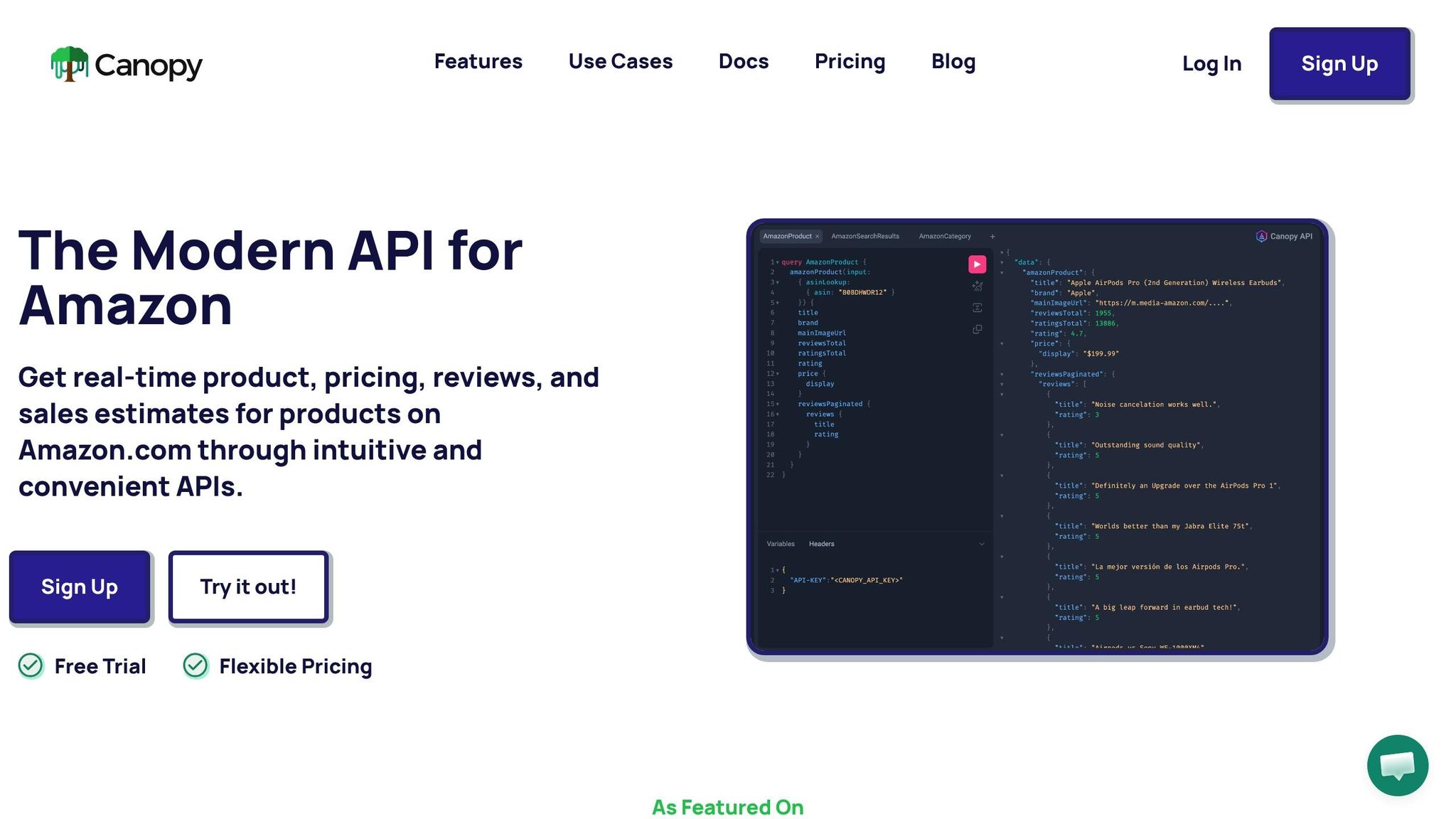
Using REST and GraphQL Endpoints
The Canopy API provides two main ways to access Amazon data: the REST endpoint at https://rest.canopyapi.co/ and the GraphQL endpoint at https://graphql.canopyapi.co/. Each has its strengths depending on the task at hand.
The REST endpoint relies on GET requests with URL parameters, making it a straightforward choice for tasks like fetching a single product by ASIN (Amazon Standard Identification Number). On the other hand, GraphQL uses POST requests with structured queries, allowing you to pull only the fields you need - such as price and reviews - without retrieving unnecessary data.
While REST is great for quick, targeted requests, it often requires multiple calls to gather related data. In contrast, GraphQL shines in scenarios where you need to fetch multiple pieces of information in one go, reducing bandwidth usage and response times. For workflows like comparing prices across several products, GraphQL’s flexibility can be a game-changer. Understanding these differences is key to mastering the data retrieval techniques outlined below.
Key Techniques for Data Retrieval
Using these endpoints effectively involves a few common methods, such as ASIN lookups, keyword searches, and product detail expansion. Below are some examples to get you started.
ASIN Lookup with REST
Here’s how to retrieve product details by ASIN using the REST API:
const asin = 'B08N5WRWNW';
const apiKey = '<YOUR_API_KEY>';
const response = await fetch(`https://rest.canopyapi.co/api/amazon/product?asin=${asin}&domain=US`, {
  method: 'GET',
  headers: { 'API-KEY': apiKey, 'Content-Type': 'application/json' }
});
const data = await response.json();
console.log(data.title, data.price);
Keyword Search with REST
To perform a keyword search, include parameters like q (query), category, and sorting options. For example, to search for Apple AirPods:
fetch('https://rest.canopyapi.co/api/amazon/search?q=apple%20airpods', {
  headers: { 'Authorization': 'Bearer YOUR_API_KEY' }
})
  .then(res => res.json())
  .then(data => console.log(data.results.map(r => r.asin)));
Nested Queries with GraphQL
GraphQL allows you to nest data requests, making it possible to fetch detailed information in a single call. For example, this query retrieves product details, pricing, and reviews for wireless earbuds:
const query = `query {
  products(search: "wireless earbuds", first: 5) {
    nodes {
      asin
      title
      price
      reviews(first: 3) {
        nodes {
          rating
          text
        }
      }
    }
  }
}`;

fetch('https://graphql.canopyapi.co/', {
  method: 'POST',
  headers: {
    'Authorization': 'Bearer YOUR_API_KEY',
    'Content-Type': 'application/json'
  },
  body: JSON.stringify({ query })
})
  .then(res => res.json());
You can also filter by category by adding parameters like &category=electronics to REST queries. For seller-specific information, use the seller object in the product response or query a dedicated seller endpoint.
Handling API Responses
All API responses are delivered in JSON format, so proper parsing is essential. Start by checking the HTTP status code. In JavaScript, use if (response.ok) to confirm success, or in Python, check if response.status_code == 200. For failed requests, log both the status code and the response text to identify issues like authentication errors or rate limits.
GraphQL responses encapsulate data in a data object, so you’ll typically access product details via data.amazonProduct. REST responses follow a fixed structure, with fields like data.product.title, data.product.pricing.amount, and data.product.rating.average. Always validate critical fields (e.g., ensuring price > 0) before processing the data.
If you encounter rate limits (status code 429), implement exponential backoff to retry requests. For large datasets, use pagination parameters like ?page=1&limit=50 to manage the volume efficiently. This approach ensures smooth handling of data, whether you’re cross-checking prices or analyzing reviews. Reliable and validated responses are crucial for integrating into workflows that require real-time decision-making.
sbb-itb-d082ab0
Integrating Canopy API into Agentic Workflows
Authentication and API Access
The Canopy API offers two header-based authentication options: the API-KEY header or the standard Authorization: Bearer YOUR_API_KEY format. Both methods function the same way across its REST endpoint (https://rest.canopyapi.co/) and GraphQL endpoint (https://graphql.canopyapi.co/).
To protect your API key, never include it in client-side code or public repositories. Instead, store it securely in environment variables. For instance, in Node.js, use process.env.CANOPY_API_KEY, while in Python, retrieve it with os.getenv('CANOPY_API_KEY'). This approach ensures your key remains secure and inaccessible to unauthorized users.
If a request fails, check the HTTP status code to diagnose the issue. A 401 Unauthorized error means your token is either expired or invalid, while a 429 error indicates you've exceeded the rate limits. The API is compatible with popular libraries like Python's requests and JavaScript's fetch, making integration straightforward.
Understanding how to handle request limits is crucial for maintaining consistent performance.
Managing Request Limits
The Canopy API enforces rate limits using a rolling window per organization. The standard limits are 25 read requests per second, 5 write requests per second, and 50 authentication requests per 24-hour period [23,24]. If you exceed these limits, you'll encounter an HTTP 429 error.
To avoid unnecessary API calls, cache your access tokens instead of generating a new one for each request. Tokens are valid for 24 hours (86,400 seconds), so reusing them helps you stay within the allowed limits. If you do hit a 429 error, implement exponential backoff with jitter to retry requests in a controlled manner.
For workflows requiring high data volumes, consider using GraphQL. Its ability to retrieve multiple data points in a single, compact query reduces payload size and optimizes performance.
Automation and Workflow Integration
Once secure authentication and rate management are in place, you can integrate the Canopy API into agentic workflows to streamline automation. By chaining API calls, you can create seamless, end-to-end processes that minimize manual intervention.
For example, the MCP Server allows AI agents, such as ChatGPT, to directly access real-time Amazon data. This setup enables automated workflows for tasks like product research, repricing, and inventory management. An agent could, for instance, fetch pricing data for a list of ASINs, compare the results, and trigger restocking alerts - all without manual input.
To build such workflows, start with a keyword search to identify ASINs. Use these ASINs in subsequent calls to gather detailed product information, pricing, and reviews. GraphQL is particularly useful here, as its nested queries can retrieve multiple data points in one request.
For asynchronous tasks, leverage tools like JavaScript's async/await or Python's asyncio to handle API responses efficiently without blocking other operations. Robust error handling, including retries, ensures your workflows remain stable and reliable.
Advanced Data Skills for Better Decision-Making
Retrieving Pricing and Sales Estimates
The Canopy API offers dynamic pricing capabilities through its REST and GraphQL endpoints, giving agents access to essential data for informed pricing strategies. For instance, if you query something like, "What’s the current price of Apple AirPods on Amazon?" the API responds with JSON data that includes the current price, Best Seller Rank (BSR), and buy box details.
From BSR data, you can estimate monthly sales using an Amazon sales estimate converter or this formula: monthly sales ≈ 10^(log10(BSR)/-2.5). This makes forecasting demand much faster. Picture this: an agent pulls pricing data for a list of ASINs, compares it to competitor averages, and triggers repricing logic automatically. For example, the agent might undercut competitors by 5% if the BSR is higher than 10,000.
For deeper pricing insights, the OffersV2 REST endpoint provides details like deal information, seller ratings, delivery options, and order limits across a database of 350 million products. Agents can monitor sales velocity and FBA inventory to evaluate competitor performance and uncover market gaps. Let’s say an agent identifies a pricing gap of more than 15% between similar products - this could flag underpriced items that might improve margins by up to 18%.
Once pricing data is in hand, agents can further refine their strategies by diving into review analysis.
Aggregating Product Reviews
Customer reviews provide more than just feedback - they’re a goldmine of qualitative insights. Using the Canopy API’s review endpoints, agents can access top reviews, ratings distributions, and review counts, which can then be aggregated into actionable metrics like average sentiment or Net Promoter Score (NPS).
If you query, “What are the top reviews for wireless earbuds?” the API delivers JSON data with excerpts of reviews. By analyzing this data, agents might discover trends like 82% of reviews praising battery life or 30% of negative feedback focusing on comfort issues. By chaining agents, you can retrieve reviews, calculate aggregate sentiment scores, and identify key customer preferences. This approach helps turn raw review data into precise recommendations for inventory decisions and product development.
Using AI-Powered Insights
When pricing and review data come together, AI-powered insights take decision-making to the next level. The Canopy platform’s AI features process this data to uncover market trends and highlight potential opportunities.
Once data retrieval tasks are set up, AI models can analyze trends automatically. For example, an agent tasked with analyzing earbuds data might uncover insights such as:
“Opportunity: AirPods alternatives with 4.6-star ratings show a 20% discount potential”.
Through the MCP Server, AI agents like ChatGPT can directly connect to Amazon data, enabling automated workflows for research, repricing, and sentiment analysis. With this setup, agents can predict outcomes, such as a 25% increase in sales if a product is priced below the category average. By combining robust data access with AI-driven analysis, static information is transformed into actionable strategies.
How to Connect an AI Agent to Any System Using APIs (+MCP Breakdown)
Choosing the Right Canopy API Pricing Plan
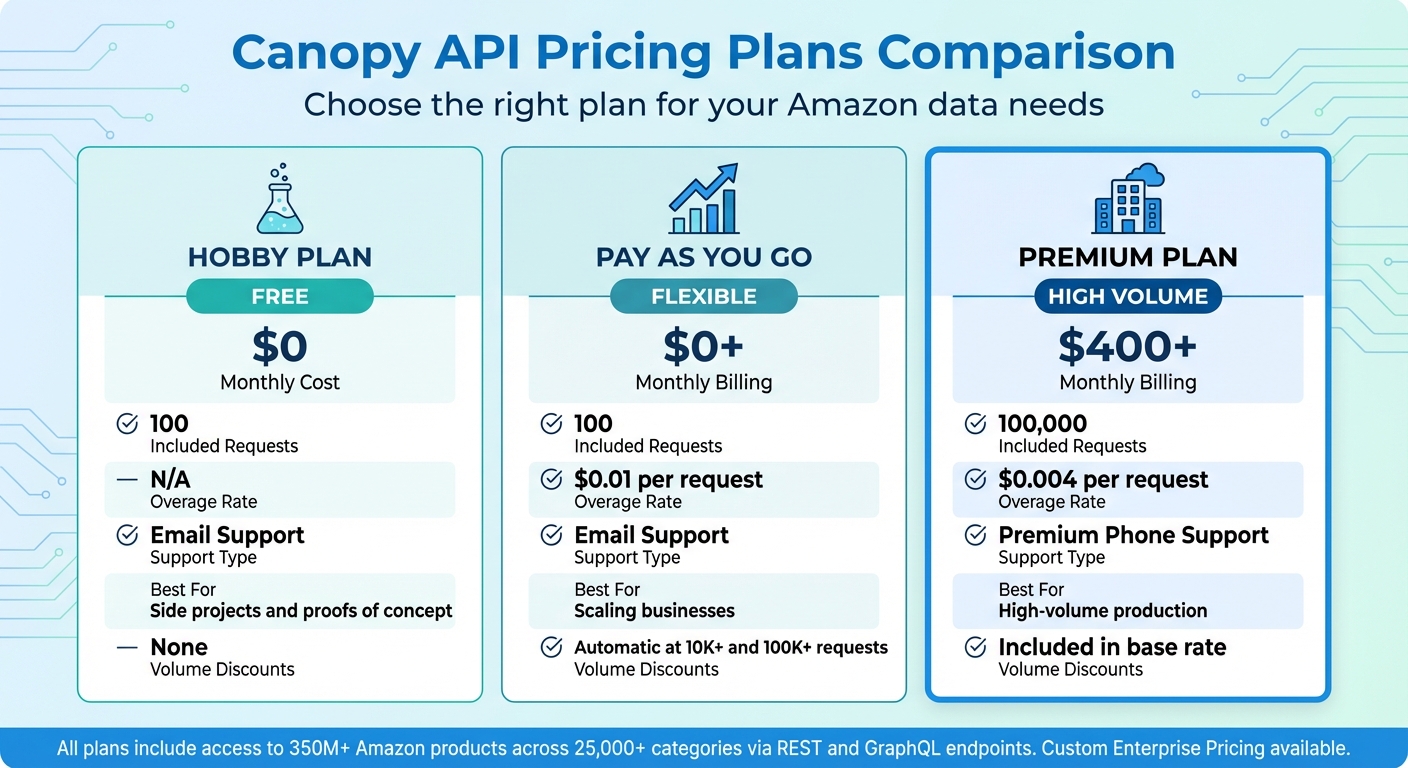
Canopy API Pricing Plans Comparison: Features and Costs
Comparison of Pricing Plans
Canopy API provides three pricing tiers designed to meet various needs, whether you're experimenting or managing large-scale workflows. These plans grant access to real-time data from more than 350 million Amazon products across 25,000 categories.
The Hobby Plan is completely free and includes 100 requests per month along with email support. It's a great choice for testing agent prompts or validating data structures without spending a dime.
The Pay As You Go Plan also includes 100 free monthly requests, but additional requests cost $0.01 each. It comes with volume discounts once you exceed 10,000 or 100,000 requests, making it a flexible option for businesses with varying data demands or those transitioning from pilot projects to full-scale production.
The Premium Plan costs $400 per month and includes 100,000 requests, with additional requests priced at $0.004 each. This tier is ideal for high-volume workflows, offering significant cost savings as usage scales. It also includes premium phone support, which is crucial for quick resolution of issues in mission-critical workflows. For example, if your usage exceeds 40,000 requests per month, the Premium Plan becomes more cost-effective compared to paying $0.01 per request under the Pay As You Go Plan.
| Feature | Hobby Plan | Pay As You Go | Premium Plan |
|---|---|---|---|
| Monthly Cost | Free | $0+ (Monthly Billing) | $400+ (Monthly Billing) |
| Included Requests | 100 | 100 | 100,000 |
| Overage Rate | N/A | $0.01 per request | $0.004 per request |
| Support Type | Email Support | Email Support | Premium Phone Support |
| Best For | Side projects and proofs of concept | Scaling businesses | High-volume production |
| Volume Discounts | None | Automatic | Included in base rate |
All plans support both REST and GraphQL endpoints, allowing you to choose the best format for your workflow. For businesses requiring even higher volumes, dedicated support, or custom integrations, Canopy API also offers Custom Enterprise Pricing. These options ensure you can scale your workflows seamlessly and efficiently.
Building End-to-End Agentic Workflows
Step-by-Step Workflow Design
Creating an agentic workflow with Canopy API begins with understanding user queries to determine the necessary Amazon data. For example, if someone asks, "Get me the top search results for wireless earbuds", the agent identifies this as a search query and uses the appropriate tool to fetch results.
The agent then chains API calls to handle multi-step tasks. It follows a cycle of reasoning, acting, observing, and iterating until the task is complete. For instance, if a user requests, "Get me the current price of Apple AirPods on Amazon", the agent can first retrieve search results, extract the ASIN, and then make another call to fetch real-time pricing.
Handling responses effectively is key to ensuring smooth execution. This includes parsing JSON responses for critical fields like ASIN, price, currency, rating, and review count. It also means implementing error handling techniques like exponential backoff and validating schemas before proceeding. For example, after identifying the top five wireless earbuds, the agent could fetch detailed reviews for each product and calculate aggregated sentiment scores. These techniques not only streamline tasks but also improve workflow efficiency.
Recurring tasks can be automated through scheduled or event-driven workflows. Take price monitoring as an example: the system could check daily prices for the top five products in a category, compare them with historical data, and send alerts when prices drop by 10% or more. Using serverless architectures like AWS Lambda helps manage high-volume operations, while databases like DynamoDB can store results. Notifications configured through SNS ensure users receive real-time updates.
Best Practices for Workflow Optimization
To improve workflow performance, break down complex tasks into smaller, manageable steps. For example, divide a request into sub-tasks like search, product lookup, review aggregation, and sales estimation. Each sub-task can be handled by a dedicated tool, with data passed between steps using standardized JSON formats. For larger datasets, such as detailed product catalogs, store data in S3 instead of passing it through the agent’s context window. This reduces latency and token usage.
Protect your API keys by avoiding exposure in client-side code or browser-based fetch calls. Always make Canopy API requests from secure server-side environments. Use the Authorization: Bearer YOUR_API_KEY header for all requests to endpoints like https://rest.canopyapi.co/ or https://graphql.canopyapi.co/.
When efficiency is a priority, opt for GraphQL over REST. This allows you to request only the specific fields you need, such as title, price, and rating, instead of retrieving full product objects. Smaller payloads lead to faster processing times and reduce costs per workflow execution.
Finally, track usage and scale wisely. Start with the Hobby Plan, which offers 100 free requests per month, to test and refine your workflow. Once you’re ready for higher volumes, switch to the Pay As You Go plan or the Premium plan for more flexibility. Monitoring usage in your agent’s dashboard can help identify bottlenecks and improve tool selection based on response times and success rates.
Conclusion and Key Takeaways
Core Skills and Tools in Action
Gaining expertise in Amazon data handling through the Canopy API equips agents to tackle a variety of e-commerce tasks. Key skills include retrieving data via REST and GraphQL endpoints, securing access through API keys, and managing API responses effectively. These abilities allow agents to perform tasks like fetching pricing and sales data, conducting sentiment analysis on product reviews, and chaining API calls to build workflows for price monitoring and product research.
Whether you're searching for the top results for wireless earbuds or tracking the current price of Apple AirPods, these skills turn raw data into actionable insights. With automated tools and ReAct loops, you can streamline complex tasks efficiently.
Canopy API’s access to over 350 million Amazon products across 25,000+ categories ensures agents work with up-to-date, real-time information rather than outdated cached data. Paired with AI-driven insights, this data reliability supports workflows ranging from competitive analysis to automated repricing strategies. These foundational skills are essential for creating efficient, data-driven e-commerce operations.
Steps to Get Started
Ready to put these skills into practice? Here’s how you can begin building your first agentic workflow.
Start by signing up for the Hobby Plan at canopyapi.co, which offers 100 free requests per month. After retrieving your API key from the dashboard, experiment with basic queries to see how data flows through your agent’s reasoning process. Once you’re comfortable, consider scaling up to the Pay As You Go plan at $0.01 per request or the Premium plan starting at $400+ per month for higher usage needs.
Focus on creating one complete workflow first - like automated price tracking or detailed product research. Use GraphQL to request only the data you need, implement error-handling techniques like exponential backoff, and monitor your usage to manage costs effectively. Canopy’s detailed documentation and open-source examples will guide you from concept to deployment in no time.
FAQs
When should I use REST vs GraphQL?
When deciding between REST and GraphQL, consider the nature of your workflow and data requirements. REST is ideal for simpler workflows with consistent and predictable data structures. It relies on standard HTTP methods, making it a reliable choice when working with fixed data formats.
On the other hand, GraphQL shines in scenarios involving dynamic or complex data needs. It allows clients to request exactly the data they need in a single query, minimizing over-fetching and improving efficiency.
With Canopy API, you have the flexibility to use either approach. Opt for REST when simplicity is key, or leverage GraphQL for more tailored and efficient data handling.
How do I avoid rate limits (429)?
To prevent hitting rate limits (429) with the Canopy API, you should space out your requests, lower the request frequency, and implement exponential backoff strategies. The API typically allows up to 25 read operations and 5 write operations per second per organization. Staying within these limits is crucial to avoid throttling and maintain smooth operations.
How do I keep my API key safe?
To keep your API key safe, think of it as a sensitive password. Never share it publicly or with anyone who shouldn’t have access. Avoid hardcoding it into your code or exposing it in client-side environments where it can be easily accessed. Instead, store it securely as a secret using tools designed for secure storage. Use platforms that allow you to create, revoke, and monitor keys to maintain control. Following these steps helps protect against unauthorized access, misuse, and unexpected charges.