Changelog: Amazon Product Offers REST Endpoint
OffersV2 overview: the updated Product Offers REST endpoint with JSON responses, deeper pricing and deal data, and migration steps for developers.

The new Amazon Product Offers REST Endpoint (OffersV2) is now live, replacing the older "Offers" resource in Amazon's Product Advertising API (PA-API) 5.0. It’s designed to provide real-time access to detailed product offer data, including pricing, availability, merchant info, and Buy Box status. Key updates include:
- Expanded Offer Details: Access merchant IDs, detailed condition notes, and availability types like "Preorder" or "In Stock Scarce."
- Improved Pricing Data: A standardized price structure with savings details, discount percentages, and cost per unit.
- Promotion Tracking: New fields for deal types (e.g., Lightning Deals, Prime Early Access) with timing and progress metrics.
- Batch Operations: Handle up to 20 ASINs in one request for efficient data retrieval.
This update simplifies integration by switching to JSON formatting and HTTPS-POST with JSON-RPC. Users must migrate from the older API, update credentials, and adjust their applications for the new structure. The OffersV2 resource is essential for businesses focused on pricing strategies, deal tracking, and competitive analysis.
Quick Migration Tips:
- Update to SDK version 1.2.4 or later.
- Use Amazon’s Scratchpad tool to test JSON responses.
- Replace
OffersAPI calls withOffersV2and adjust parsing for new data fields.
The new endpoint streamlines operations, offering clearer, more detailed insights into Amazon's product offers.
Guide to Amazon Product Advertising API using NodeJs | PAAPI
What's New in the Amazon Product Offers REST Endpoint
The introduction of OffersV2 brings a host of updates that make retrieving product offer data more straightforward and efficient. These changes tackle common challenges like incomplete pricing information, unclear deal details, and limited seller insights. Let’s break down the key updates and how they improve clarity and functionality.
Enhanced Offer Listings and Summaries
The revamped endpoint now provides more detailed data fields, offering a clearer picture of product offers. For instance, you can now access merchant identification through both a unique Id and Name, making it easier to track and identify sellers. The availability system has also been expanded, introducing new Type values such as IN_STOCK_SCARCE, LEADTIME, PREORDER, and OUT_OF_STOCK. Additionally, a Message field offers customer-facing text that can be displayed directly.
For used or refurbished items, the endpoint includes detailed condition data with SubCondition values like LikeNew, VeryGood, or Acceptable, along with a ConditionNote that describes the item's state. The getCompetitiveSummary operation has been upgraded to display the top 20 lowest-priced offers across all marketplaces, rather than just the single lowest price. This broader view helps businesses refine their pricing strategies and conduct more effective competitive analyses.
Updated Price Object and Savings Details
The new Price structure standardizes how pricing data is presented. Each price is now provided as a Money object with three components: Amount (a precise BigDecimal number for calculations), Currency (e.g., USD), and DisplayAmount (a pre-formatted string like "$59.49" ready for use in your interface). This consistency allows for accurate pricing displays and smoother integration into e-commerce systems.
Savings details have also become more transparent. A dedicated Savings structure now specifies the dollar savings and discount percentage (e.g., 15%). The SavingBasis field identifies the reference price Amazon used for the discount, such as LIST_PRICE, WAS_PRICE, or LOWEST_PRICE. This added context helps you better understand the nature of each deal. For bulk products, the PricePerUnit field breaks down the cost per item, with formatted outputs like "$29.75 / Count".
Advanced Promotions Tracking
The new DealDetails object makes tracking promotions much easier. It identifies promotional types, including LIGHTNING_DEAL and SUBSCRIBE_AND_SAVE offers. A Badge field provides ready-to-display labels like "Limited Time Deal", "Black Friday Deal", or "Ends In", allowing for seamless integration into customer-facing platforms.
For time-sensitive promotions, fields like StartTime and EndTime provide precise timing, while the PercentClaimed metric shows how much of a lightning deal’s inventory has been claimed. The endpoint also supports PRIME_EARLY_ACCESS deals, with an EarlyAccessDurationInMilliseconds field highlighting exclusive Prime member windows. The AccessType field further clarifies whether a deal is open to all customers or limited to Prime members, enabling more targeted messaging. These updates empower businesses to optimize promotions in real-time and engage customers more effectively.
Breaking Changes and How to Migrate
Amazon OffersV2 API Migration Guide: 3-Step Process
Removed and Changed Features
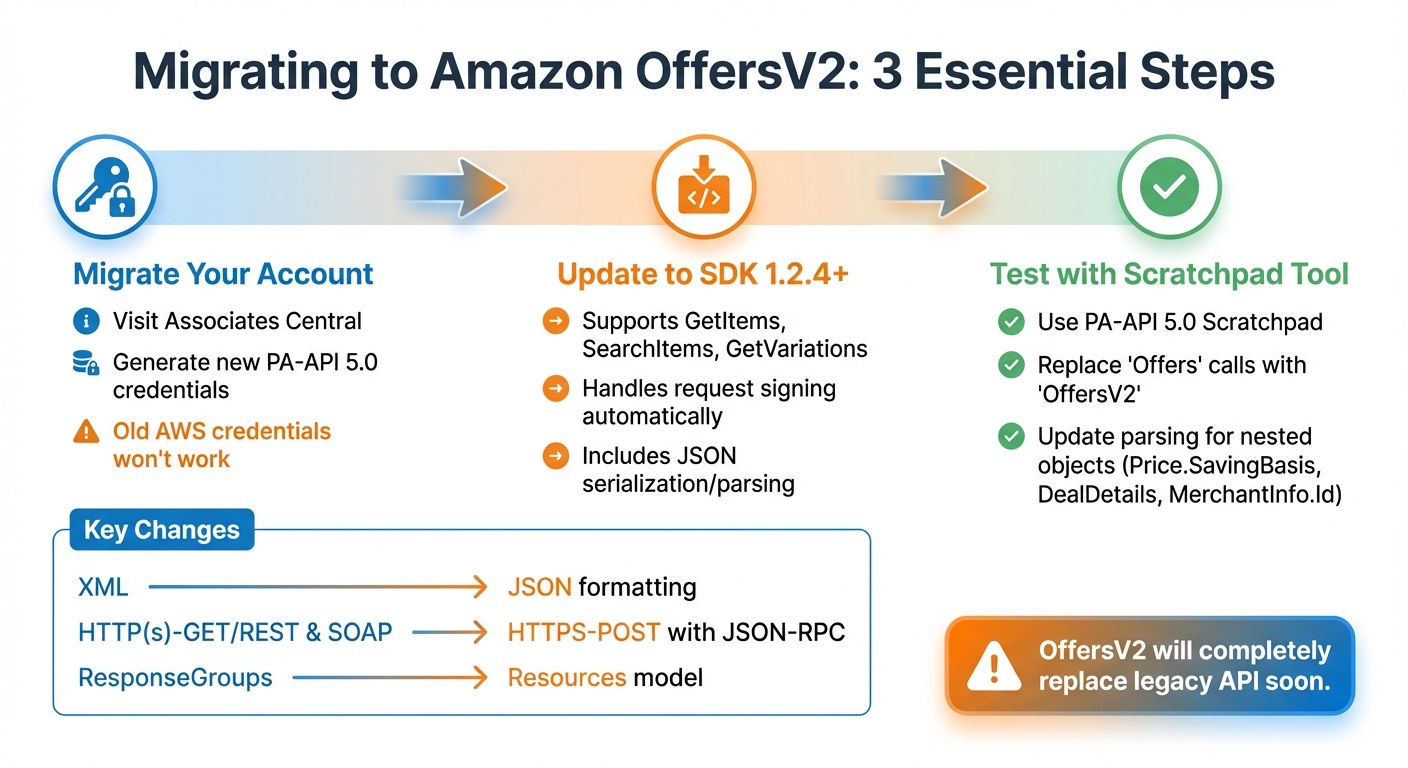
The transition from the legacy Offers resource to OffersV2 comes with some major updates that will require adjustments to your application. One of the biggest changes is the switch from XML to JSON for data formatting. This means you'll need to modify your response parsers and data handling processes to align with the new format.
The communication method has also been overhauled. The previous system supported HTTP(s)-GET/REST and SOAP, but the new version exclusively uses HTTPS-POST with JSON-RPC. Additionally, the AWS credentials you used for the older API won't work with PA-API 5.0. You'll need to migrate your account through Associates Central to generate new credentials specifically for PA-API.
Another key difference is how you request data. The old ResponseGroups system has been replaced by a Resources model in OffersV2. However, some functionality is currently limited. For instance, the Condition parameter only supports results for items listed as "NEW", and the Merchant parameter doesn't allow filtering for Amazon-only sellers - it returns all sellers by default. If your application relies on filtering used or refurbished items, you'll need to account for these restrictions as you update your integration.
Migration Steps
To begin the migration process, visit Associates Central to update your PA-API account and obtain new credentials. After that, make sure to upgrade to SDK version 1.2.4 or later to ensure full compatibility with OffersV2 operations like GetItems, SearchItems, and GetVariations. These official SDKs simplify tasks like signing requests, serialization, and response parsing.
Before fully deploying your updated integration, test it using the PA-API 5.0 Scratchpad tool to confirm that your JSON response handling works as expected. Update all API calls from Offers to OffersV2 and adjust your parsing logic for nested objects such as Price.SavingBasis, DealDetails, and MerchantInfo.Id. According to Amazon's documentation, OffersV2 will soon completely replace the older API, so these updates are essential.
sbb-itb-d082ab0
How to Use the Amazon Product Offers REST Endpoint
Authentication and Endpoint Setup
To get started, you'll need to sign up for a Canopy API account and grab your unique API key from the product dashboard. This key is your ticket to accessing data on over 350 million Amazon products across more than 25,000 categories. The main REST endpoint for retrieving product data is: https://rest.canopyapi.co/api/amazon/product.
All requests to this endpoint use the GET method and require two key query parameters:
asin: The Amazon Standard Identification Number for the product.domain: Specifies the marketplace (e.g.,'US'for the United States).
Additionally, you must include your API key in the request headers. You can do this by either:
- Adding it as
API-KEY. - Using
Authorization: Bearer YOUR_API_KEY.
For testing purposes, the free Hobby tier gives you 100 requests per month. If you need more, the Pay As You Go plan starts at $0 per month, with 100 free requests and a charge of $0.01 for each additional request. For larger-scale needs, the Premium plan offers 100,000 requests for $400 per month, and extra requests cost $0.004 each. With this setup, you’re ready to integrate the API and start pulling Amazon product data seamlessly.
JavaScript Code Example
Here’s a JavaScript snippet using Axios to fetch product offer details like pricing, availability, and seller data:
const axios = require('axios');
require('dotenv').config();

const API_KEY = process.env.CANOPY_API_KEY;
const BASE_URL = 'https://rest.canopyapi.co/api/amazon/product';

async function getAmazonOffers(asin) {
  try {
    const response = await axios.get(BASE_URL, {
      params: {
        asin: asin,
        domain: 'US'
      },
      headers: {
        'Authorization': `Bearer ${API_KEY}`,
        'Content-Type': 'application/json'
      }
    });
    return response.data;
  } catch (error) {
    console.error('Authentication or Request failed:', error.response?.status || error.message);
  }
}
This example includes error handling to log any issues, such as authentication errors or failed requests, along with the relevant status codes or error messages. Up next: tips for fine-tuning your request parameters and handling rate limits effectively.
Tips for Using the Endpoint Effectively
Request Parameters and Filtering
To get the most out of your data retrieval, fine-tuning your request parameters is key. The Condition parameter is a powerful tool for narrowing down results, allowing you to filter by categories like New, Used, Collectible, Refurbished, or Any. You can also specify a particular Merchant to focus on offers from specific sellers. This is especially handy if you're running a niche platform, like a used book marketplace or a refurbished electronics store.
For applications where price matters, use MinPrice and MaxPrice to define your price range. Keep in mind that price values need to be submitted in the smallest currency unit - so, for example, $32.41 should be entered as 3241. If you're targeting users who prioritize fast shipping or Prime benefits, the DeliveryFlags parameter can help you filter for options like Prime, FreeShipping, or FulfilledByAmazon. Additionally, the MinSavingPercent parameter allows you to focus on deals that meet a specific discount percentage.
To keep responses manageable and minimize payload sizes, the Resources parameter is your go-to. By specifying exactly what data you need, you can avoid unnecessary information and streamline your API responses. Once your parameters are optimized, focus on managing your request pacing effectively.
Rate Limits and Request Management
The SearchItems operation caps each request at a maximum of 10 items. To navigate larger datasets, use the ItemCount (set between 1 and 10) and ItemPage (also between 1 and 10) parameters to paginate through results without overloading the API. If you're working on a larger scale, consider batching requests with the GetItems operation, which lets you query up to 10 ASINs in a single call.
Keep an eye on the Errors container in API responses. This will alert you to invalid or inaccessible ItemIds, helping you avoid wasting your request quota on items that can't be retrieved. By planning your request strategy carefully, you can stay within your budget while ensuring you get the data you need efficiently.
Conclusion
The updated Amazon Product Offers REST Endpoint brings significant improvements for e-commerce businesses and developers managing product data. By switching to OffersV2, users benefit from increased reliability, better data accuracy compared to the older version, and access to future enhancements.
For businesses prioritizing automation and efficiency, these updates remove the need for manual calculations. The new Price object simplifies processes by automatically calculating savings percentages and identifying the SavingBasis (e.g., List Price or Was Price). Beyond automation, the endpoint enhances real-time deal tracking, offering access to features like Prime Early Access windows, Lightning Deal progress (including PercentClaimed), and detailed deal badges such as "Limited Time Deal". This detailed data enables tools like countdown timers and urgency messaging, which can help boost conversions. Additionally, with the IsBuyBoxWinner flag, it’s easier to identify the featured offer that appears first on product detail pages.
FAQs
What are the key advantages of using the Amazon Product Offers REST Endpoint?
Switching to the Amazon Product Offers REST Endpoint opens up a more streamlined way to access product offer data such as pricing, availability, and seller details. Designed with REST architecture, it works smoothly with any technology that can make HTTP requests, making integration with your current tools and workflows a breeze.
The updated OffersV2 resource takes things further by delivering more detailed information, including buy-box status, deal specifics, and improved pricing accuracy. Amazon is continuously refining these features to close data gaps and eliminate the need for complicated coding workarounds.
On top of that, this endpoint can be managed via Amazon API Gateway, which comes with built-in features like monitoring, security controls, and scalable performance. This allows you to concentrate on optimizing your e-commerce strategies while Amazon takes care of the infrastructure, offering a solution that adapts as your business grows.
How do I smoothly transition from the old Offers API to OffersV2?
To switch to OffersV2, you'll need to update your current API calls by replacing outdated request URLs, parameters, and field names with those specified in the OffersV2 schema. After making these changes, it's important to thoroughly test your integration to confirm everything functions as intended. With the original Offers API now deprecated, OffersV2 delivers a more dependable and efficient way to access product offer data, including pricing, availability, and seller information.
What features does OffersV2 include for tracking promotions and deals?
The DealDetails structure in OffersV2 brings a set of essential fields to help you keep tabs on promotions and deals. These fields include:
- AccessType: Defines who can access the deal.
- Badge: Highlights the promotional badge associated with the deal.
- EarlyAccessDurationInMilliseconds: Tracks how long early access lasts.
- StartTime and EndTime: Specify when the deal begins and ends.
- PercentClaimed: Shows how much of the deal has already been taken.
These tools make it easier to track deal availability, timing, and customer response, giving businesses the insights they need to fine-tune their promotions and improve their e-commerce strategies in real time.