Deal Hunting with Canopy's Amazon Deal API
APIs replace fragile scrapers for finding real-time prices, discounts, and sales estimates across millions of products.

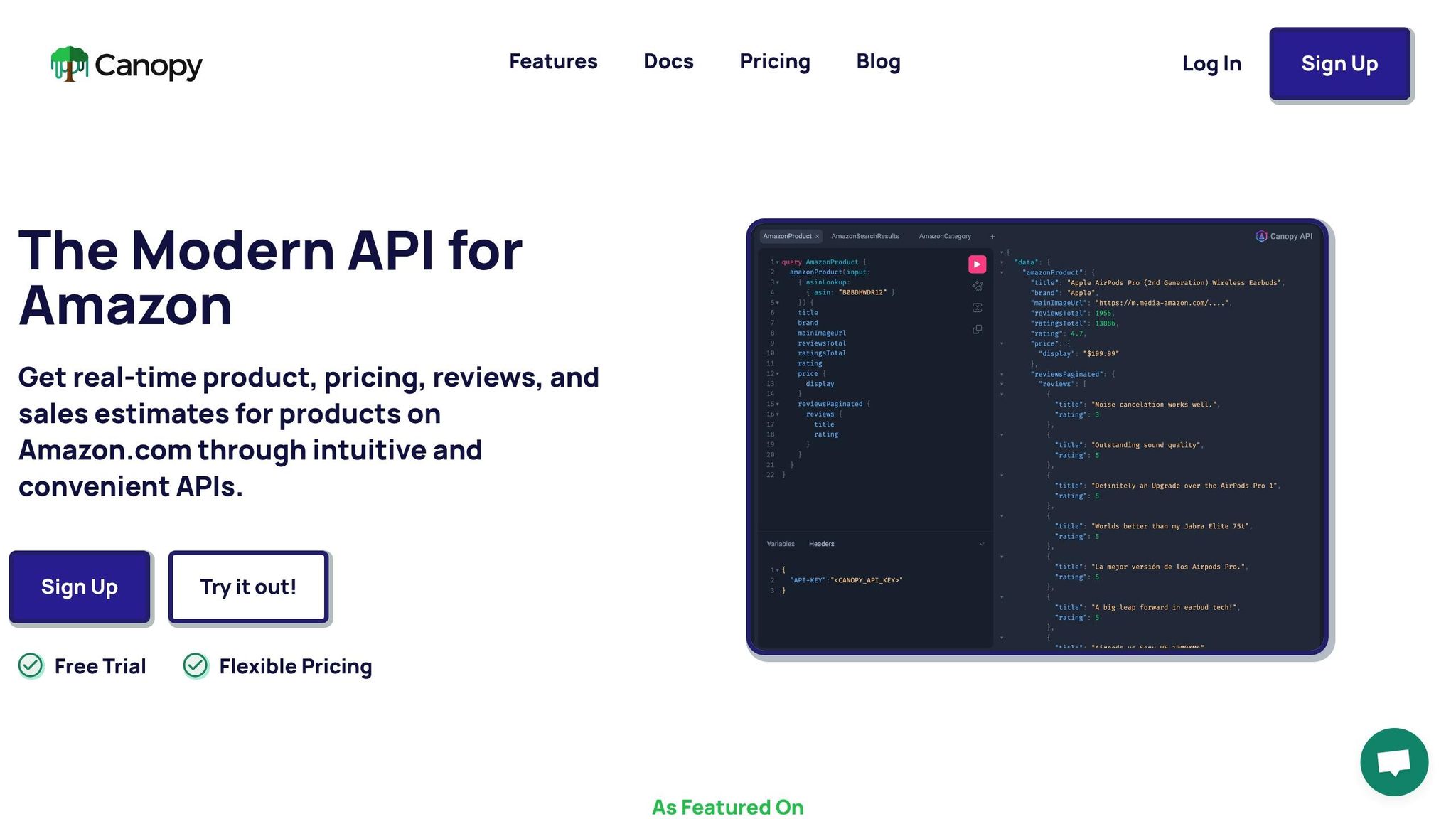
Canopy's Amazon Deal API makes finding discounts on Amazon simple. Instead of manually searching through millions of products, this tool provides real-time data on prices, reviews, and sales estimates. It supports both REST and GraphQL interfaces, offering flexibility for developers to retrieve and analyze deal data efficiently. Whether you're an e-commerce business tracking competitor prices or a shopper looking for the best discounts, this API streamlines the process.
Key Highlights:
- REST API: Use simple GET requests for single product details.
- GraphQL API: Ideal for complex queries and tailored data requests.
- Free Plan: Includes 100 requests monthly; paid plans start at $0.01/request.
- Essential Data: Access current price, availability, and sales estimates.
- Security Tip: Always keep your API key server-side.
You can start by signing up for an API key and using provided code examples in JavaScript or Python to integrate deal hunting into your workflow. The API supports filtering by ASINs, keywords, and categories, making it a powerful tool for identifying timely discounts and price drops.
Setting Up Canopy's API
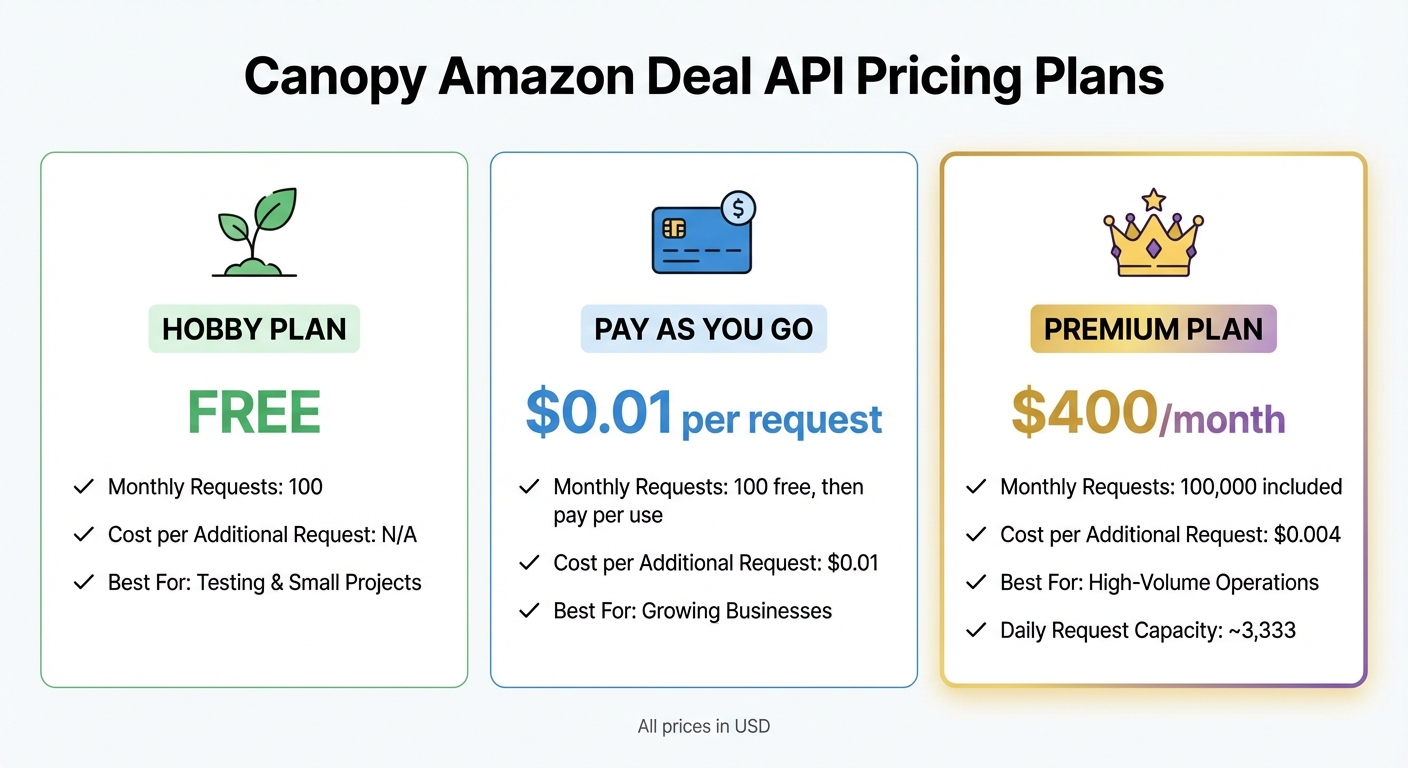
Canopy Amazon Deal API Pricing Plans Comparison
Getting started with Canopy's API is a crucial step if you're looking to streamline your Amazon deal-hunting process.
Creating an Account and Choosing a Plan
Head over to the Canopy API website and create an account. Once you're logged in, you'll find your API key displayed on the product dashboard. Make sure to copy it and store it in a secure location.
Canopy offers three pricing plans to suit different needs:
- Hobby: Free, includes 100 requests per month.
- Pay As You Go: $0.01 per request after the first 100 free requests.
- Premium: Starting at $400 per month, includes 100,000 requests and charges $0.004 for any additional requests.
All prices are in USD. After selecting the plan that fits your usage, you're ready to move on to configuring your development environment.
Setting Up Your Development Environment
With your API key in hand, it's time to configure your development environment. If you're working on a JavaScript project, you can use either the native fetch API or a library like axios to manage HTTP requests.
To keep your API key safe, store it in a server-side environment variable rather than embedding it directly into your client-side code. For instance, you can create a .env file with the following content:
CANOPY_API_KEY=your_key_here
Access the key in your code using process.env.CANOPY_API_KEY or a similar method, depending on your setup.
For authentication, include your API key in the request headers. You can use either of these formats:
API-KEY: YOUR_API_KEY
or
Authorization: Bearer YOUR_API_KEY
This ensures secure communication with the API without exposing sensitive information to the client-side.
Key Product Data for Deal Hunting
The Canopy API provides a wealth of information about products, but for deal hunting, you'll want to focus on a few critical data fields:
- Current Price: Displays the product's listing price in USD.
- Availability: Indicates whether the product is in stock.
- Sales Estimates: Offers valuable insights into how well a product is performing.
All monetary values are formatted according to standard U.S. conventions (e.g., $1,234.56), making it easy to interpret pricing data at a glance.
Finding Deals with the REST API
Once your environment is set up, you can dive into retrieving deal data using Canopy's REST API. This approach provides a simple and efficient way to access Amazon product details and uncover the best deals available. It leverages your configured environment to fetch deal information seamlessly.
Building REST Requests
To fetch product data, you'll need to send a GET request to https://rest.canopyapi.co/api/amazon/product. Each request requires two key parameters: the ASIN (Amazon Standard Identification Number) and the domain (e.g., "US" for Amazon.com).
Here’s a quick example of how to format your request:
const asin = 'B0B3JBVDYP';
const domain = 'US';
const apiKey = process.env.CANOPY_API_KEY;

fetch(`https://rest.canopyapi.co/api/amazon/product?asin=${asin}&domain=${domain}`, {
  headers: {
    'API-KEY': apiKey
  }
})
  .then(response => response.json())
  .then(data => console.log(data))
  .catch(error => console.error('Error:', error));
This basic setup is your starting point for more advanced deal searching. The API supports additional parameters, like keyword searches, to help you discover a wider range of deals.
Reading and Formatting API Responses
The API returns data in JSON format, with key fields like price, price_raw (the original list price), title, rating, and deal status. To spot deals, compare the current price to the list price to calculate the discount percentage, and look for deal-specific labels in the response.
Here’s how you can extract and format deal information:
fetch(`https://rest.canopyapi.co/api/amazon/product?asin=${asin}&domain=${domain}`, {
  headers: {
    'API-KEY': apiKey
  }
})
  .then(response => response.json())
  .then(data => {
    const currentPrice = data.price;
    const listPrice = data.price_raw;
    const discountPercent = ((listPrice - currentPrice) / listPrice * 100).toFixed(2);
    const savings = (listPrice - currentPrice).toFixed(2);

    console.log(`Product: ${data.title}`);
    console.log(`Current Price: ${currentPrice.toLocaleString('en-US')}`);
    console.log(`List Price: ${listPrice.toLocaleString('en-US')}`);
    console.log(`You Save: ${savings} (${discountPercent}%)`);
    console.log(`Deal Status: ${data.deal || 'No special deal'}`);
  });
With this data formatted, you can move on to refining your search results through sorting and filtering.
Sorting and Filtering Your Results
Once you’ve gathered product data, sorting and filtering allow you to focus on the best deals. If you're working with multiple products from a search query, you can organize them by discount percentage, maximum savings, or the best price that fits within a specific budget.
Here’s an example function to filter and sort your results:
async function findBestDeals(searchResults, maxPrice = 100) {
  const deals = searchResults
    .filter(product => product.price_raw && product.price < product.price_raw)
    .filter(product => product.price <= maxPrice)
    .map(product => ({
      title: product.title,
      currentPrice: product.price,
      listPrice: product.price_raw,
      savings: product.price_raw - product.price,
      discountPercent: ((product.price_raw - product.price) / product.price_raw * 100).toFixed(2),
      dealLabel: product.deal
    }))
    .sort((a, b) => b.discountPercent - a.discountPercent);

  return deals.slice(0, 10);
}
This function filters out products that don’t meet the deal criteria, sorts them by the highest discount percentage, and returns the top 10 results. You can adjust the maxPrice parameter to set a budget limit or modify the sorting logic to prioritize the largest dollar savings instead.
Using the GraphQL API for Deal Hunting
The REST API may offer simplicity, but GraphQL steps up the game by delivering the flexibility you need for tailored deal searches. With GraphQL, you can pinpoint exactly which data fields to request, making it a powerful tool for deal hunters.
Why Use GraphQL for Deal Hunting
One of GraphQL's standout features is its ability to minimize payload size. Imagine combing through hundreds of products for deals - if you only pull the essential details like title, price, and rating, instead of the full product data, you save on bandwidth and boost performance. This is especially important when dealing with Canopy's massive database, which spans over 350 million Amazon products across 25,000+ categories.
GraphQL also lets you simplify your requests by combining complex queries into a single call. For example, you can fetch multiple products by their ASINs, include nested data, and even reuse queries by leveraging variables. This means fewer requests and faster results.
Writing and Running GraphQL Queries
To fetch product data using GraphQL, send a POST request to https://graphql.canopyapi.co/ with your query in the request body. Here's a basic example in JavaScript to get you started:
const query = `
  query amazonProduct($asin: String!) {
    amazonProduct(input: {asin: $asin}) {
      title
      mainImageUrl
      rating
      price {
        display
        listPrice
      }
    }
  }`;

const response = await fetch('https://graphql.canopyapi.co/', {
  method: 'POST',
  headers: {
    'Content-Type': 'application/json',
    'API-KEY': process.env.CANOPY_API_KEY,
  },
  body: JSON.stringify({
    query,
    variables: { asin: "B0B3JBVDYP" }
  }),
});

const data = await response.json();
console.log(data);
For security, make sure your API key is stored securely on the server. Once your query is up and running, you can fine-tune the results to focus on the best deals.
Filtering and Aggregating Data
After retrieving product data, you can refine your results with client-side filtering. For instance, you might want to find items priced under $100.00 with at least a 20% discount. Here's a handy filtering function to help you do just that:
function filterDeals(products, minDiscount = 20, maxPrice = 100) {
  return products
    .filter(product => {
      const currentPrice = parseFloat(product.price.display.replace(/[^0-9.]/g, ''));
      const listPrice = product.price.listPrice;

      if (!listPrice || currentPrice >= listPrice) return false;

      const discountPercent = ((listPrice - currentPrice) / listPrice) * 100;
      return discountPercent >= minDiscount && currentPrice <= maxPrice;
    })
    .map(product => ({
      title: product.title,
      currentPrice: parseFloat(product.price.display.replace(/[^0-9.]/g, '')),
      rating: product.rating,
      imageUrl: product.mainImageUrl
    }));
}
For larger datasets, server-side aggregation can save you time and resources. By grouping products by categories using database functions like groupBy, you reduce the need for client-side processing. This approach is especially useful for identifying which categories hold the most discounted items without sifting through thousands of individual records in your application.
sbb-itb-d082ab0
Adding Deal Hunting to E-commerce Workflows
Incorporating deal data into your e-commerce systems can enhance your platform's appeal to U.S. shoppers. Whether you're creating a custom storefront or building an internal dashboard, Canopy's API simplifies the process of displaying real-time deals.
Displaying Deals in Storefronts and Dashboards
Once you have access to deal data, integrating it into your storefronts or dashboards is straightforward. Canopy's GraphQL endpoint lets you pull key fields like title, price, mainImageUrl, and rating. This is especially useful when working with Canopy's extensive database of over 350 million products.
For showcasing prices effectively, refer to earlier sections. You can also highlight special promotions by identifying fields like deal: "Limited time deal" or coupon (e.g., "Save $2.00 with coupon") in the API response. These details help draw attention to offers that shoppers won’t want to miss.
Automating Deal Retrieval
To keep your deal data fresh, set up automated updates using tools like cron jobs or serverless functions. For example, a Python script running hourly can fetch the latest price reductions while staying within your API usage limits. On the Premium plan ($400/month), you get 100,000 requests per month - enough for about 3,333 daily requests, making hourly updates across multiple product categories entirely feasible.
You can refine your deal retrieval by applying category filters like "electronics" or "home-kitchen" and setting minimum discount thresholds, such as 20% off. Sorting by recent or daily ensures you prioritize the newest price drops.
After retrieving deals, it’s important to evaluate their quality before displaying them to shoppers.
Assessing Deal Quality
To ensure you're promoting offers that resonate with shoppers, establish a scoring system that evaluates deals based on factors like discount percentage, customer ratings (e.g., 4.5 stars or higher), and the number of reviews (e.g., at least 100 ratings). Canopy's API provides the data needed for this kind of analysis, allowing you to focus on high-quality deals that U.S. customers are more likely to trust.
"The most valuable reviews include specific use-case context, quantifiable performance metrics, environmental details, and outcome descriptions with comparative elements." - Chuck Kessler, Content and SEO Manager, Canopy Management
Filter out products with limited social proof by using the total_ratings field, and identify trending deals by analyzing sales velocity. If a product is selling quickly but has low stock, it’s a clear signal to feature it prominently before it sells out. This strategy ensures you're surfacing deals that combine real savings with proven quality, giving shoppers more reasons to buy.
Conclusion
Canopy's API takes the hassle out of deal hunting, turning it into an efficient and manageable process.
Why Choose Canopy's API for Deal Hunting?
With Canopy's Amazon Deal API, you get access to real-time pricing, stock estimates, and detailed product information. Say goodbye to maintaining custom scrapers - this API ensures you can dedicate your time to creating features that truly matter to your users. Whether you prefer REST or GraphQL, the API offers the flexibility to craft queries that fit seamlessly into your workflow.
As your business grows, Canopy's scalable infrastructure adapts, lowering costs per request as your usage increases. Plus, with over 10,000 daily cache hits, you’ll benefit from fast response times, ensuring your deal displays are always current. By combining real-time data with customizable query options, you can focus on refining your deal-hunting experience without worrying about backend data collection.
"Time is a precious resource, do not spend it maintaining your Amazon scraper, build your product!" – Canopy API
How to Get Started
Want to make deal hunting easier? Start with the Hobby plan, which includes 100 free requests per month. Simply sign up, grab your API key from the dashboard, and use the provided Python and JavaScript examples to integrate it into your system. Whether you're building a deal aggregator, improving an e-commerce site, or automating price tracking, Canopy's API provides the tools you need to deliver value to U.S. shoppers on the hunt for Amazon's best deals. Use these strategies to seamlessly incorporate deal hunting into your workflow and enhance your offerings.
FAQs
How can Canopy's API help me track Amazon deals in real-time?
Canopy's API offers real-time access to Amazon's pricing, stock levels, and sales data through straightforward REST or GraphQL endpoints. This means you can instantly track price drops and deal updates, ensuring you always catch the best offers as they happen.
By providing accurate and current data, Canopy's API simplifies deal tracking for both personal shoppers and businesses, giving you the edge in spotting and taking advantage of savings opportunities.
What are the advantages of using GraphQL instead of REST with Canopy's API?
GraphQL provides a level of flexibility and efficiency that sets it apart from REST when working with Canopy's API. One of its standout features is the ability to request exactly the data you need in a single query. This eliminates the common issues of over-fetching or under-fetching that often occur with REST's fixed endpoints. For instance, you can pull product titles, prices, stock details, and reviews all in one go, simplifying workflows and cutting down on server requests.
Another advantage is GraphQL’s strongly typed schema, which ensures smoother adaptation as new data becomes available - without the risk of breaking existing integrations. Its single-endpoint design also streamlines development. Instead of juggling multiple REST URLs, you just connect to the GraphQL endpoint and include your API key. These features combine to deliver faster performance and a more seamless user experience, making GraphQL an excellent tool for efficiently discovering and processing Amazon deals through Canopy's API.
How do I keep my Canopy API key secure?
To keep your Canopy API key safe, handle it with the same care as any sensitive credential. Once you generate your key, securely store the client_id and client_secret, using tools like environment variables or a secrets manager. Never share these details or include them in source control. Since the client_secret is only visible during the initial popup, make sure to back it up securely before closing.
When interacting with the API, always make requests from server-side code and include your key in the API-KEY or Authorization: Bearer header. Avoid exposing your key in client-side scripts or browser-based calls, as this could lead to a security breach. If you believe your key has been compromised, revoke it immediately through the Canopy Connect dashboard and generate a replacement.