Is Scraping Amazon Legal? Practical Alternatives in 2026
What to know before you scrape Amazon, and structured alternatives. The comparison page covers Amazon scraper API and Amazon scraping API options.
Amazon scraper API, compared
If the question is which Amazon scraping API to call, the comparison lives on Amazon scraper API vs a purpose-built API. That page covers ScraperAPI, Bright Data, and Oxylabs next to Canopy, including what “scrape Amazon” means when the response is already structured JSON.
If I need Amazon product data, I should assume this: direct scraping can work for a test, but it often becomes a legal, maintenance, and cost problem at scale. Public product pages are usually lower risk than account-only or personal data, but Amazon still restricts automated access through its terms. That means I can face IP blocks, CAPTCHAs, cease-and-desist letters, or account trouble even when I only pull public listing data.
Here’s the short version:
- Legal side: Public product data is generally lower risk than private or login-only data, but it is not risk-free.
- Technical side: Direct scraping often breaks because of CAPTCHAs, IP bans, rate limits, and HTML changes.
- Cost side: Building an in-house scraper can take about 80 engineering hours and around $12,000 in labor at $150/hour.
- Monthly upkeep: Many teams spend another 5 to 10 hours per month, or about $750 to $1,500/month, just keeping it working.
- Alternative: A managed Amazon scraping API handles proxies, CAPTCHA workarounds, and parser fixes, with pricing starting around $0.01 per request in the example covered here.
- Data covered: Price, Buy Box offers, titles, images, rankings, reviews, seller data, and ASIN lookup.
If I boil the whole article down to one point, it’s this: the problem is not just getting Amazon data once - it’s getting it every day without broken output, extra labor, or added legal exposure.
| Option | Time to start | Main cost | Main problem |
|---|---|---|---|
| Direct scraping | Days to weeks | Build + monthly upkeep | Blocks, broken selectors, legal risk |
| Managed scraper API | Minutes | Per-request pricing | Vendor cost and dependency |
So if I want Amazon data for price tracking, catalog updates, search monitoring, or review tracking, the safer path is often to avoid running my own scraper stack and use an API that returns structured JSON instead.
Is scraping Amazon legal in the United States?
In the U.S., the answer depends on what data you collect and how you collect it. That distinction matters most when the data is public.
Public product pages versus protected data
Scraping public product data - titles, prices, ratings, review counts, ASINs, images, and availability - is usually lower risk than scraping login-protected or personal data. You’re not getting into private accounts, personal details, or account-only systems. That’s why many teams start with public listing data when they have a commercial use case.
Things change fast if you move into login-protected pages or other data tied to individual users. At that point, the legal and privacy stakes go up quite a bit.
Terms of Service, automated access, and practical risk
Even when public scraping isn’t outright illegal, Amazon’s Terms of Use restrict automated access. Amazon can ban IPs, trigger CAPTCHAs, and serve blocking pages instead of content [1]. Amazon can also send cease-and-desist letters, which can add legal review costs. And if the scraping activity is tied to a seller or affiliate account, it can put that account at risk.
That gap between “not always illegal” and “still restricted” is where things get messy. For any production workflow, direct scraping can be risky. Legal exposure is one part of it, but the bigger headache is often the technical failure rate and cost.
Why scraping Amazon directly is fragile and costly to maintain
Even before legal risk enters the picture, scraping Amazon tends to fall apart when you try to run it at scale. A scraper might look fine over a weekend test on Amazon’s public pages. Then traffic goes up, the page layout shifts, and things start breaking.
CAPTCHAs, IP bans, and rate limits
Amazon’s anti-bot systems look at request patterns, not just one request at a time. So as volume climbs, product requests can turn into CAPTCHAs, robot checks, or block pages in a hurry. At that point, you’re not just running a scraper anymore. You’re also managing proxies, retries, pacing rules, and health checks. That’s a whole extra layer of infrastructure sitting on top of the scraper itself.
It also makes the whole setup slower. Conventional live-scrape systems usually return data in 2 to 50 seconds per request [3]. Why so slow? Because each query has to be queued, sent through proxies, retried after blocks, and then parsed. Every fix adds one more moving part. That’s usually the moment teams stop treating scraping as a simple script and start looking for alternatives to scraping Amazon instead.
DOM changes and broken selectors
Getting past blocks doesn’t fix the second problem: Amazon’s HTML changes all the time. One day, your CSS selector grabs the price field just fine. The next day, the same selector returns nothing - or, worse, the wrong value without any warning.
That’s where scraping gets sneaky. Failures aren’t always loud. Sometimes the parser still runs, but the data is off.
Each page type has its own markup, and any layout shift can break parsing with no notice. If you’re scraping across 20+ regional Amazon domains [1], you’re not maintaining one parser. You’re maintaining a stack of separate parsers for each version of the site.
And that’s the part people often miss: the upfront build is only the entry fee. The bigger cost shows up later, in maintenance. That’s why the build-vs-buy decision matters.
Build vs. buy: the real cost of an in-house Amazon scraper
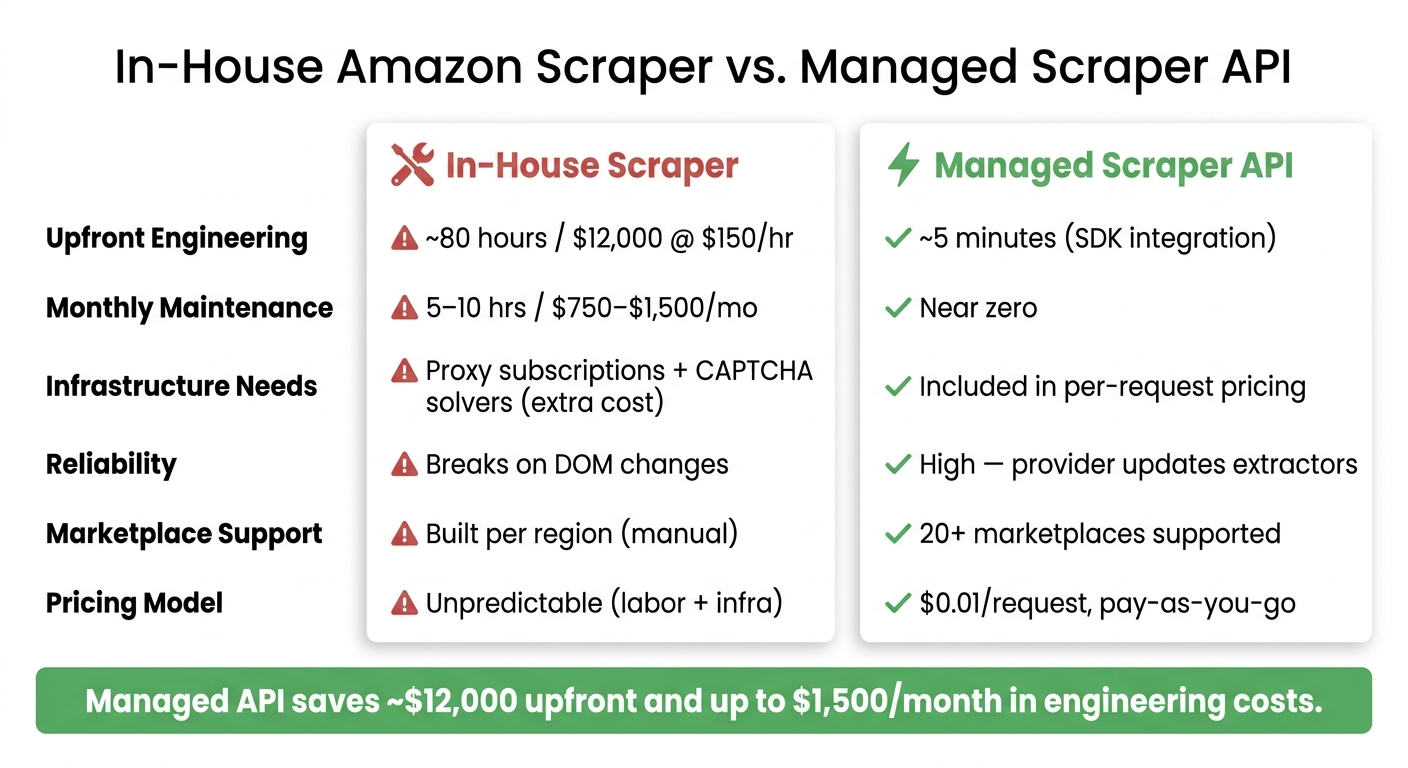
Once a scraper goes live, instability stops being a technical annoyance and starts hitting the budget. In practice, those maintenance headaches show up in two places: the time it takes to build the scraper and the time it takes to keep it working.
Engineering-hours cost model for small and mid-sized teams
Building a production-grade Amazon scraper from scratch takes about 80 engineer-hours, or roughly 2 to 4 weeks of focused work [1]. That includes crawler logic, proxy management, CAPTCHA handling, parsing, and the infrastructure for rate-limit retries, concurrent threading, and structured JSON output [1].
At a standard U.S. senior engineer rate of $150/hour, that adds up to $12,000 in upfront labor [1].
And that’s just to get it off the ground.
Keeping an Amazon scraper running usually takes 5 to 10 hours of maintenance per month. That works out to another $750 to $1,500 per month in engineering time, before you even add proxy subscriptions and CAPTCHA-solving services [1].
What changes when you use a managed Amazon scraper API
A managed API flips that cost model on its head. Instead of spending 80 hours building from scratch, a team can get started in as little as 5 minutes with an existing SDK [1]. Developers can quickly implement these solutions using REST API code examples for common data tasks. The provider handles proxy rotation, anti-fingerprinting, CAPTCHA handling, and parser updates on their side [1].
When you compare Amazon scraper APIs side by side, the gap is hard to miss.
| Factor | In-House Scraper | Managed Scraper API |
|---|---|---|
| Upfront engineering | ~80 hours ($12,000 @ $150/hr) [1] | ~5 minutes (SDK integration) [1] |
| Monthly maintenance | 5–10 hrs ($750–$1,500/mo) [1] | Near zero [1] |
| Infrastructure needs | Proxy subscriptions, CAPTCHA solvers | Included in per-request pricing [1] |
| Reliability | Breaks on DOM changes [1] | High; provider updates extractors [1] |
| Marketplace support | Built per region | 20+ marketplaces supported [1] |
There’s also a planning angle here. API pricing is usage-based and predictable. You pay per successful request, not for failed proxy attempts or broken parses. That makes costs easier to forecast than a self-built scraper, where labor and infrastructure expenses keep showing up long after launch.
For teams that need Amazon product data without the monthly upkeep, a managed API changes the equation fast.
A lower-maintenance alternative: using Canopy API for Amazon product data
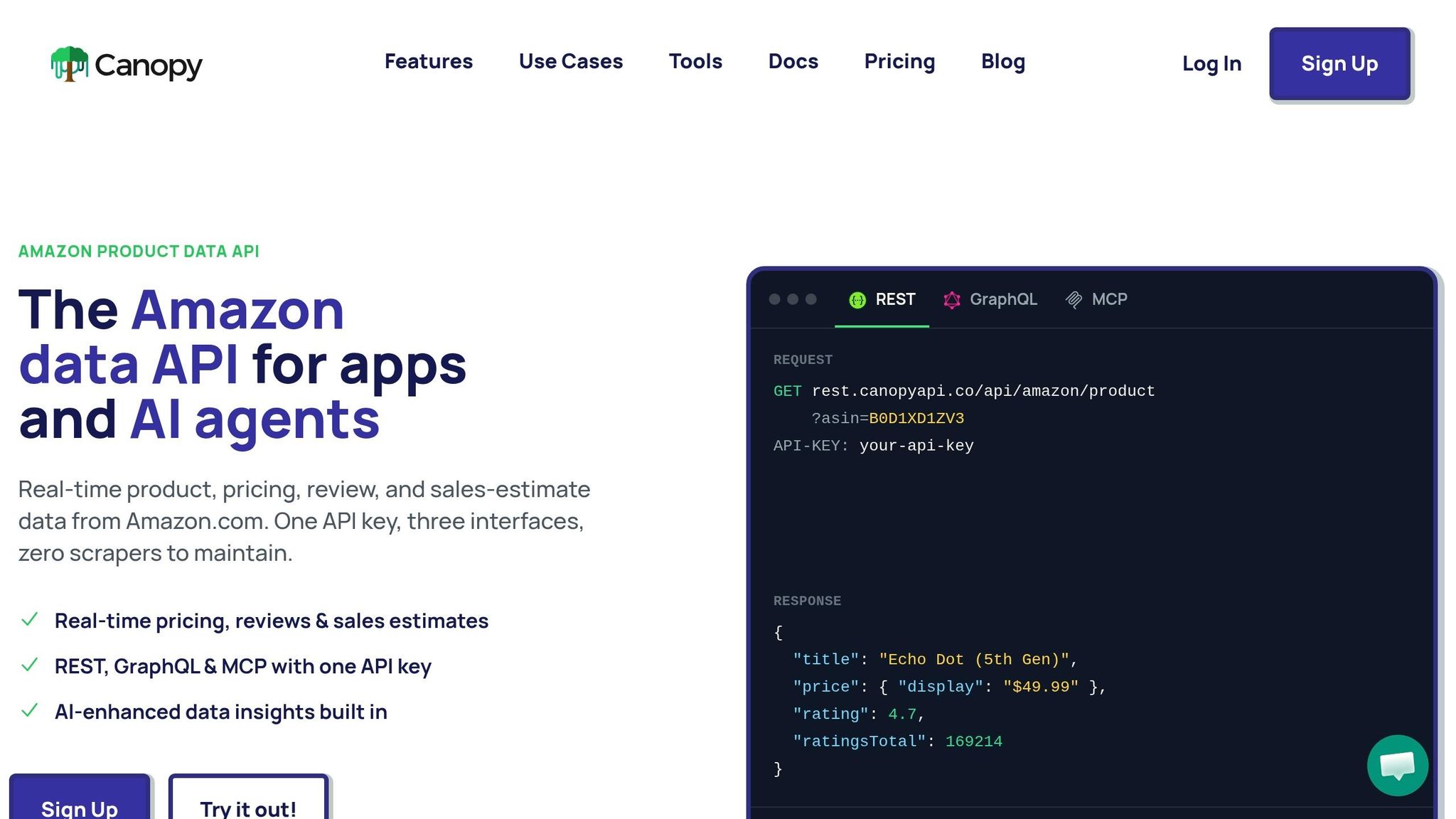
Once the cost math is out of the way, the next thing people want to know is simple: what do you actually get back from the API?
Canopy API connects your app to Amazon's product catalog. You send a request with an API key, and it returns structured JSON. That means no proxy rotation, no CAPTCHA handling, and no constant parser fixes.
What data you can get through Canopy API
Here’s the core Amazon data most teams pull.
| Use Case | Data Available |
|---|---|
| Price tracking | Live price, Buy Box offers, current deals |
| Product details | Title, brand, images, description, variants, category |
| Search monitoring | Search results, search autocomplete suggestions, Best Sellers rankings, category rankings |
| Customer reviews | Full review text, review images, review videos, ratings |
| ASIN lookup | UPC, EAN, GTIN to ASIN |
| Seller data | Seller profiles, third-party offer details |
If you want endpoint docs or need to convert product identifiers, check the Amazon Product API page and the ASIN lookup tool.
GraphQL as the primary option, REST as the alternative
GraphQL is the default pick when you need nested queries or only want certain fields. It returns just the fields you ask for, which helps keep payloads lean [2].
Here’s a minimal GraphQL fetch in JavaScript:
const response = await fetch('https://graphql.canopyapi.co/', {
  method: 'POST',
  headers: {
    'Content-Type': 'application/json',
    'X-API-KEY': 'YOUR_CANOPY_API_KEY'
  },
  body: JSON.stringify({
    query: `
      query GetProduct($asin: String!) {
        amazonProduct(asin: $asin) {
          title
          price { current currency }
          inventory { inStock }
        }
      }`,
    variables: { asin: "B09HN3Q81F" }
  })
});
const { data } = await response.json();
console.log(data.amazonProduct);
If your stack is REST-first, you can use the REST endpoint instead. Pricing starts at $0.01 per request on a pay-as-you-go model, and there’s a free tier with 100 requests per month [2].
Conclusion: legal risk, technical fragility, and the lower-risk choice
At this point, the tradeoff is less about data coverage and more about upkeep and risk. For most teams, a managed API is the faster, lower-risk way to get Amazon product data.
If you want a side-by-side look at reliability, cost structure, and data coverage, see Canopy API vs. Amazon scraping APIs.
FAQs
When does Amazon scraping become legally risky?
Amazon scraping gets legally risky when you ignore Amazon’s robots.txt or Terms of Service. Trouble also starts when you collect private or sensitive user data, or try to get around security controls like paywalls.
The risk is lower when scraping stays focused on publicly available product data for things like research, analytics, or price comparison. It also helps when your activity lines up with the laws in your jurisdiction.
How much Amazon data volume justifies using an API?
An API usually makes sense once your Amazon data needs move past manual work or a homegrown setup.
Why? Because those setups often take about 80 engineering hours to build in the first place. Then the work keeps coming: CAPTCHAs, IP bans, and site layout changes all need attention.
At 40,000 requests per month, a premium API tier often costs less than paying per request. You also skip the maintenance burden, which can save time and a lot of headaches.
What should I test before replacing my scraper with an API?
Before you swap out a custom scraper for an API, use the free tier to see if it actually fits your setup.
First, check whether the API can return all the fields you need in a single request. That sounds small, but it matters. If you need to stitch together data from several endpoints just to match your current output, the change may add friction instead of removing it.
You’ll also want to make sure it works with your integration flow. In plain terms: does it slot into your app without a bunch of awkward workarounds?
A few basics matter here:
- Store the API key securely on the server side
- Check response status codes before you process data
- Add exponential backoff when you hit HTTP 429 rate limits
That last part is easy to skip when things are quiet. But once request volume grows, rate limits can hit like a brick wall. If your code doesn’t pause and retry the right way, you can end up with failed jobs, partial data, or both.