Developer Guide: Fetch Product Details by ASIN (2026)
How to look up an ASIN and read price, image, and bullet fields. Field reference for the Amazon product API lives on the product page.

Start with the product page
Field names, sample requests, and the free tier are on the Amazon product API page. That page is also the Amazon ASIN API lookup: pass asin, a product URL, or a GTIN, one identifier per request.
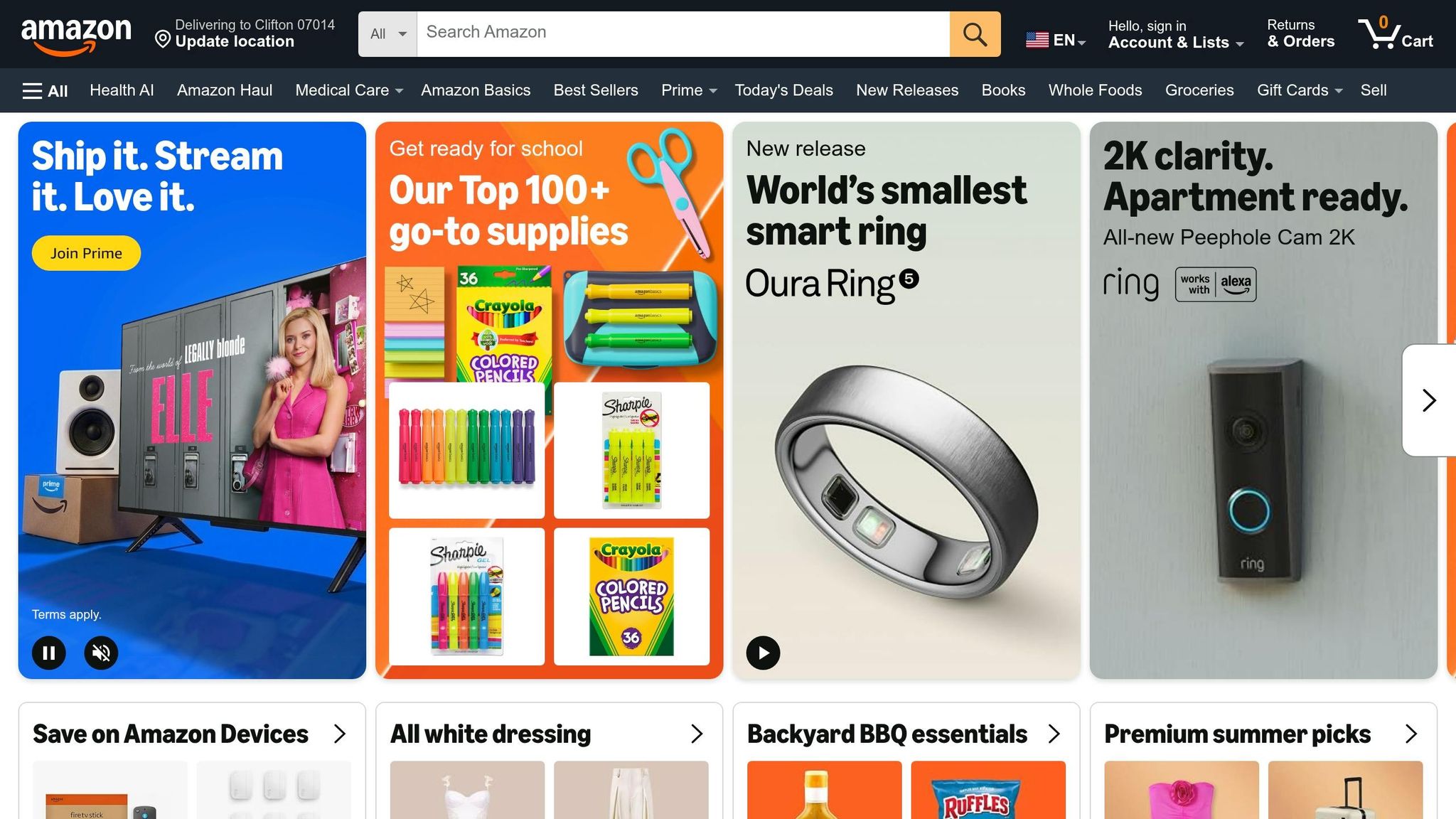
If you need Amazon product data in 2026, you usually have 3 choices: PA-API, scraping, or a third-party API. And for most U.S. teams, the tradeoff comes down to this: official access is restrictive, scraping is high-maintenance, and developer-ready APIs are the fastest to start.
Here’s the short version in plain English:
- Amazon does not offer a general-purpose product data API for all developer use cases.
- PA-API 5.0 works mainly for affiliate-driven setups and requires 10 qualified sales in the last 30 days to keep access.
- Scraping can pull public page data, but parser breakage, proxies, and bot checks add a lot of work.
- Canopy API uses a single API key, supports GraphQL and REST, covers 12+ marketplaces, and starts with 100 free requests/month and $0.01 per request after that.
- Common data types include product details, identifiers, pricing, offers, reviews, search results, autocomplete, best sellers, and deals.
- For production use, I’d split refresh jobs by change rate:
- Price, stock, and Buy Box: every 5–60 minutes
- Ratings, review counts, BSR: every 6–24 hours
- Titles, images, brand, dimensions, identifiers: weekly or monthly
Guide to Amazon Product Advertising API using NodeJs | PAAPI
Quick Comparison
| Option | Access | Best for | Main limit | Setup |
|---|---|---|---|---|
| Amazon PA-API | Associates account | Affiliate use cases | 10 sales / 30 days, 24-hour retention, lower request limits | Slower |
| Direct scraping | Public web pages | Small tests, custom extraction | Bot checks, page changes, parser upkeep | Hard |
| Canopy API | API key | Apps, analytics, monitoring, catalog work | Paid usage after free tier | Fast |
A few numbers matter here: Amazon’s catalog spans about 350 million products across 25,000+ categories, and the official route starts with a base limit of 1 TPS and 8,640 requests per day. So before I build anything, I’d first match the access path to the job, the refresh rate, and the volume.
If I were choosing today, I’d keep it simple: use PA-API only if the project is tied to affiliate sales, use scraping only if the scope is small and short-term, and use a third-party API if I need structured data fast with less setup.
Amazon product API options: official access, scraping, and developer-ready APIs
Here’s a quick side-by-side view of the three main paths. If you just want the short version before getting into the details, this table makes the tradeoffs pretty clear.
| Official PA-API | Direct Scraping | Canopy API | |
|---|---|---|---|
| Access path | Amazon Associates account | Public web pages | Single API key |
| Setup effort | High (weeks for approval) | High (build parsers + proxies) | Low (minutes) |
| Maintenance | High (sales quotas, compliance) | Very high (anti-bot, parser fixes) | Zero (managed service) |
| Data coverage | Limited (affiliate-focused) | Full page content (unstructured) | Full, structured, real-time |
Official Amazon Product Advertising API
PA-API 5.0 is Amazon’s official option for pulling product data. On paper, that sounds like the safe route. In practice, there are a lot of strings attached.
You need an active Amazon Associates account, and Amazon requires at least 10 qualified affiliate sales within the trailing 30 days to keep your API key active [4]. If you miss that mark, Amazon returns AssociateNotEligible, which cuts off access. Amazon also limits data retention to 24 hours [2].
That setup is geared toward affiliate use cases, not general product-data apps. So if you're building a tool for research, pricing, catalog work, or analytics, the approval wait and the constant quota pressure can make this route hard to justify.
Scraping Amazon pages directly
Scraping gives you access to public Amazon pages, but it comes with a catch: the page markup changes often enough to break parsers [2].
Then there’s anti-bot friction. Add proxies, retries, parser fixes, and constant monitoring, and the upkeep starts to pile up fast. For a small one-off project, scraping can still work if the scope is tight. At production scale, though, keeping it running can turn into a job by itself.
Using Canopy API for real-time Amazon data
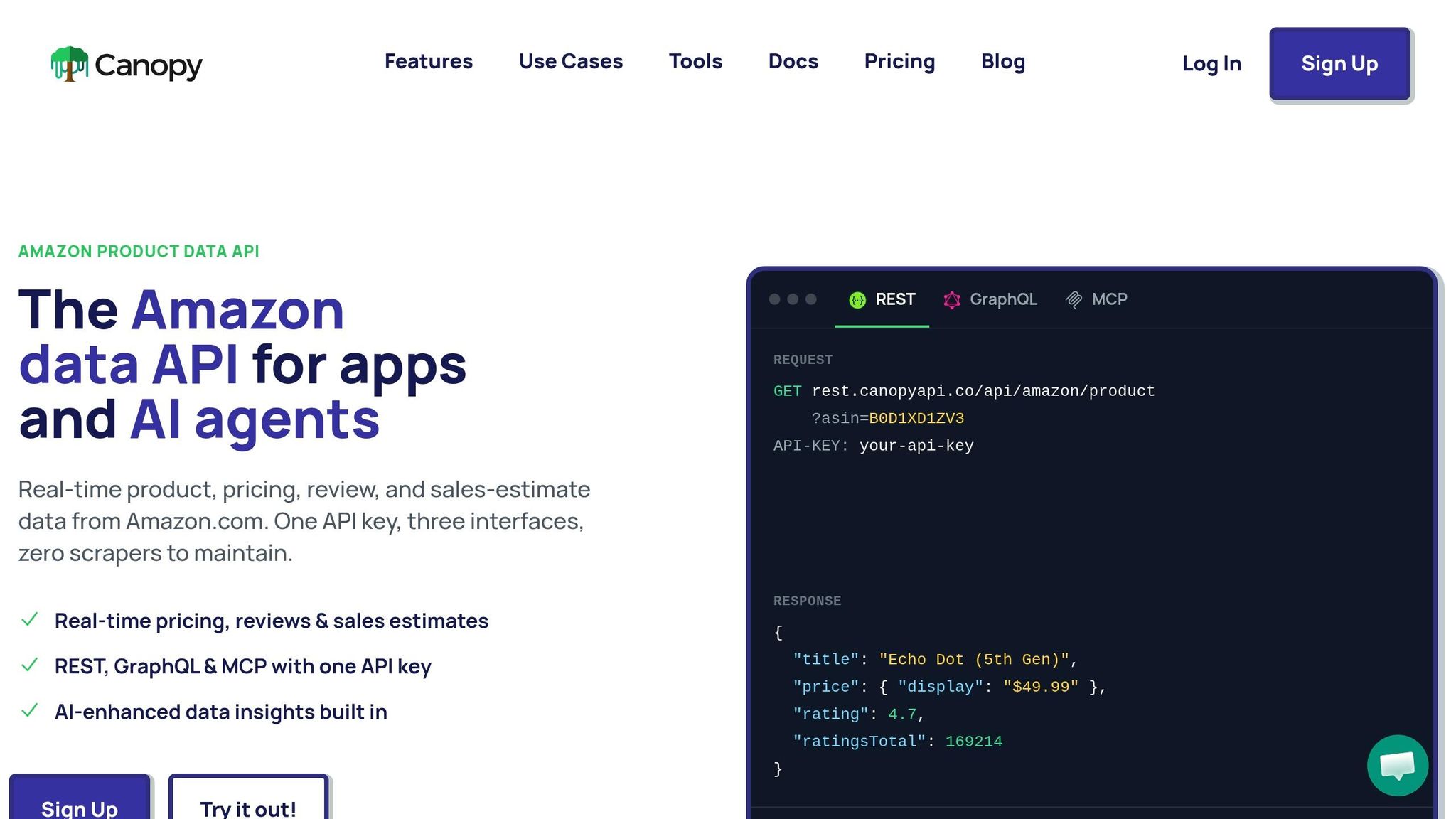
Amazon Product API by Canopy takes a much simpler path for developers who want structured Amazon data without dealing with approvals or scraper upkeep.
There’s no sales quota. You sign up, get an API key, and can start making requests in minutes. The API supports 12+ global marketplaces: US, UK, DE, FR, IT, ES, CA, MX, BR, IN, JP, and AU [1][2]. Data is fetched in real time.
It also goes past standard product details. You can get fields the official API does not provide, including sales estimates, full review text, deals, and GTIN/UPC/EAN to ASIN conversion in both directions. On top of that, it supports both GraphQL for pulling only the fields you want and REST for standard GET requests [2][3].
Pricing is straightforward:
- 100 requests per month on the free tier
- $0.01 per request after that on pay-as-you-go
If you want to dig into the docs, head to docs.canopyapi.co. If you'd rather try it first, you can test it at canopyapi.co/try-it-out.
Next, compare the product fields, pricing, reviews, and search data each path can return.
What Amazon product data you can retrieve
Amazon product data usually fits into four buckets: catalog and identifiers, content, commercial signals, and discovery signals. Each one lines up with a different dev job.
| Data type | Typical use case | API surface |
|---|---|---|
| Product details & identifiers | Catalog enrichment, SKU/ASIN mapping, UPC/EAN conversion | /product endpoint or GraphQL product(asin: "…") field |
| Pricing & offers | Price monitoring, Buy Box tracking, competitive analysis | offers on product or /offers endpoint |
| Ratings & reviews | Sentiment analysis, quality monitoring, merchandising | reviews field or /reviews endpoint |
| Search & autocomplete | Keyword research, assortment planning, on-site search tuning | /search, /autocomplete endpoints |
| Best sellers & deals | Trend tracking, promotional intelligence, category benchmarking | /bestsellers, /deals endpoints |
Once those groups are clear, the next step is simple: know what each one gives you in actual API responses.
Product details, identifiers, and category data
The ASIN is the 10-character Amazon Standard Identification Number that holds the catalog together. It’s the main key for retrieval and mapping. Along with ASIN, you can pull external identifiers like UPC, EAN, GTIN, and ISBN, which helps match your internal SKU codes to Amazon listings in both directions.
Content fields cover the product page basics: title, brand, bullet points, full description, main image, gallery images, and attributes like size, color, dimensions, and materials. Category data comes back as a taxonomy path, which is handy when you need to line up your own catalog structure with Amazon's more than 25,000 categories [2]. You can also retrieve variant links, including parent and child ASINs, to model product families cleanly.
Pricing, offers, ratings, and reviews
Buy Box price, stock status, and seller offers can shift fast, so they’re good candidates for near-real-time polling. The Buy Box winner flag (IsBuyBoxWinner) tells you which offer shoppers see first [1].
Offer-level data includes condition, Prime eligibility, fulfillment type such as FBA or FBM, and availability states like IN_STOCK, OUT_OF_STOCK, PREORDER, and IN_STOCK_SCARCE [1]. On the review side, you can retrieve the average star rating, total review count, rating distribution across all five star levels, and individual review objects with title, body text, date, and helpfulness metrics.
Search, autocomplete, best sellers, and deals
Keyword search results return a ranked list of ASINs, which makes it possible to track which products hold the top spots for a query over time. Autocomplete suggestions show the exact phrases Amazon presents while users type, making them useful for long-tail keyword research and on-site search tuning.
Best Seller Rank (BSR) appears with category data and shows rank inside a given category. You can also estimate monthly sales from BSR to gauge product performance. Deal metadata, including deal type, discount percentage, and start and end times, adds promo data for tracking Lightning Deals or coupons on target ASINs. Those fields start to matter a lot more once you know how to authenticate and request them.
Next: how to authenticate and pull these fields with your first request.
Getting access and making your first request
How API key authentication works
Once you know which fields you need, the next step is simple: authenticate and send your first request.
Canopy API uses one API key across both its GraphQL and REST interfaces [2]. After you sign up, you get that key right away. There’s no approval process and no affiliate quota standing in the way before you can start making requests.
Send your key in the API-KEY header for both https://graphql.canopyapi.co/ and https://rest.canopyapi.co/. If you want to click around before writing code, the REST root URL includes a browser-based Swagger UI for in-browser testing [3].
With the key set, you’re ready for a first GraphQL call.
GraphQL example: fetch Amazon product details
The GraphQL endpoint accepts a POST request to https://graphql.canopyapi.co/ with a JSON body that includes your query and variables. Here’s a minimal example for one ASIN:
const response = await fetch('https://graphql.canopyapi.co/', {
  method: 'POST',
  headers: {
    'Content-Type': 'application/json',
    'API-KEY': 'YOUR_API_KEY'
  },
  body: JSON.stringify({
    query: `query GetProduct($asin: String!) {
      amazonProduct(asin: $asin) {
        title
        images { url }
        price { displayString }
        rating
      }
    }`,
    variables: { asin: "B0D1XD1ZV3" }
  })
});
const result = await response.json();
console.log(result.data.amazonProduct);
This request asks for a small set of fields for a single product: title, image URLs, display price, and rating. Nice and clean.
The GraphQL playground at graphql.canopyapi.co also includes a built-in Docs panel in the sidebar, so you can browse types and fields right in the browser [3].
If you’d rather stick with REST, you can use the same key with a GET request or explore more REST API code examples.
REST alternative and official API onboarding
The REST version is as direct as it gets:
GET https://rest.canopyapi.co/api/amazon/product?asin=B0D1XD1ZV3
API-KEY: your-api-key
That returns the same product data through a query string setup [3]. Both interfaces return the same data, so the choice comes down to how you like to work: use GraphQL when you want field-level control, or REST when you want the most straightforward request flow.
The official Amazon route is stricter. Access is revoked if you don’t generate at least 10 qualified affiliate sales within any trailing 30-day window, which triggers an AssociateNotEligible error [4]. PA-API also uses AWS Signature V4 for authentication [2].
| Canopy API | Amazon PA-API 5.0 | |
|---|---|---|
| Setup time | Minutes [2] | Days to weeks [2][4] |
| Requirements | Email signup [2] | Active Associates account [2][4] |
| Maintenance | None | 10 sales per 30 days [4] |
| Authentication | API key in header [3] | AWS Signature V4 [2] |
| Free tier | 100 requests/month [2] | Yes, if sales quota is met [4] |
Building a reliable Amazon product data pipeline
Refresh intervals, request volume, and marketplace coverage
Start by setting refresh cadence based on how often each field changes. Not all product data moves at the same pace, so putting everything on one schedule usually wastes calls and clutters the pipeline. The way you set this up has a direct effect on whether your Amazon product data stays usable as volume grows.
A simple way to handle it is to split fields into three tiers.
- Prices, buy box offers, stock status, and availability change the most. For top products, many teams aim for refreshes every 5 to 15 minutes. For the rest of the catalog, every 30 to 60 minutes often works, depending on how competitive the category is.
- Ratings, review counts, and bestseller rankings tend to shift daily, so a 6 to 24 hour window is usually enough.
- Titles, images, bullet points, brand, category, dimensions, and identifiers rarely change once a listing is live, so a weekly or monthly sync is often fine.
This schedule also shapes request volume. An hourly full-payload refresh can turn into millions of calls per day. That adds up fast. Pulling only the fields needed for each job helps keep volume under control, and GraphQL makes that easy. You should also tag every record with its marketplace and currency so reports never mix prices from different regions, such as amazon.com / USD and amazon.co.uk / GBP [1][5].
Once cadence is in place, the next step is clean ASIN mapping so refresh jobs stay steady across systems.
ASIN mapping and GraphQL vs REST: how to choose
Most retail, ERP, and PIM systems are built around UPC, EAN, GTIN, or ISBN, not ASINs. So if you want Amazon data to line up with your internal systems, you need a canonical ID map.
A common setup is a canonical table that stores both your internal ID and the ASIN. From there, run a nightly enrichment job to fill in product identifiers from the API's upc, ean, and isbn fields. If an ASIN comes back without a UPC, don't just throw it out. Flag it for fallback matching based on brand, title, and model.
Once identifiers are lined up, pick the interface that fits the job. This choice is critical for building dynamic search capabilities that respond to real-time market shifts.
| Workload | Recommended interface | Why |
|---|---|---|
| Bulk catalog sync | GraphQL | Select only needed fields and avoid over-fetching |
| Identifier and taxonomy enrichment | GraphQL | Nested data in one pass and strong typing |
| Simple price/availability monitors | REST | Clean endpoint per resource and easy to wire into alerts |
| Legacy microservices or quick scripts | REST | Standard GET pattern and no GraphQL client needed |
Conclusion: choose the right Amazon product API path
After cadence and mapping, the last call is the interface and, under that, the access path that fits your workload. The official Product Advertising API gives official access to Amazon data, but affiliate sales requirements, approval hurdles, and a 1 TPS / 8,640 TPD base limit [6][7] can slow things down before you even start to scale. Scraping avoids approvals, but it brings a different mess: layout changes, bot detection, and upkeep that gets heavier as your catalog grows. A developer-ready API cuts through both issues with one key, GraphQL and REST interfaces, 12+ marketplaces [1], and access to product details, pricing, offers, Amazon search results, reviews, and taxonomy - without any affiliate quota.
For production use, start with the Amazon Product API landing page to review the full data model and plan options. You can run a live query right now at try it out, or head straight to the docs to see every available field.
FAQs
Which Amazon API option fits my use case?
It depends on your technical resources, data needs, and business requirements.
Canopy API is the best fit if you want a streamlined, reliable option with real-time product data through REST and GraphQL, without messy approvals or scraping upkeep. Official Amazon APIs work well for registered sellers and affiliates, but they come with tighter requirements and limits. Custom scraping gives you more flexibility for niche use cases, but it also demands a lot more engineering work.
When should I use GraphQL instead of REST?
Use GraphQL when you need precise data retrieval and better performance. It lets you ask for only the fields you need in a single query. With REST, you may need several calls to pull related data.
That can cut bandwidth use and improve response times, which matters a lot for mobile apps, high-volume operations, and complex e-commerce workflows. Use REST for simple, single-resource requests when keeping things straightforward matters more.
How often should I refresh Amazon product data?
Refresh product data whenever your app needs the latest pricing, stock status, and product details. The data comes straight from Amazon with no caching, so you don't have to deal with manual cache expiration to keep things accurate.
For dynamic use cases, you can automate new queries on a schedule that fits your business needs. Just keep your API rate limits in mind.