10 Apps to build with Canopy's MCP Server
10 practical e-commerce app ideas using Canopy's MCP Server to pull real-time Amazon product data via REST/GraphQL and power AI-driven features.

Canopy's MCP Server, launched in December 2025, connects AI tools like ChatGPT with real-time Amazon product data. With access to over 350 million products and 25,000+ categories, it offers reliable APIs (REST and GraphQL) for creating data-driven e-commerce applications. Here are 10 app ideas you can build using this server:
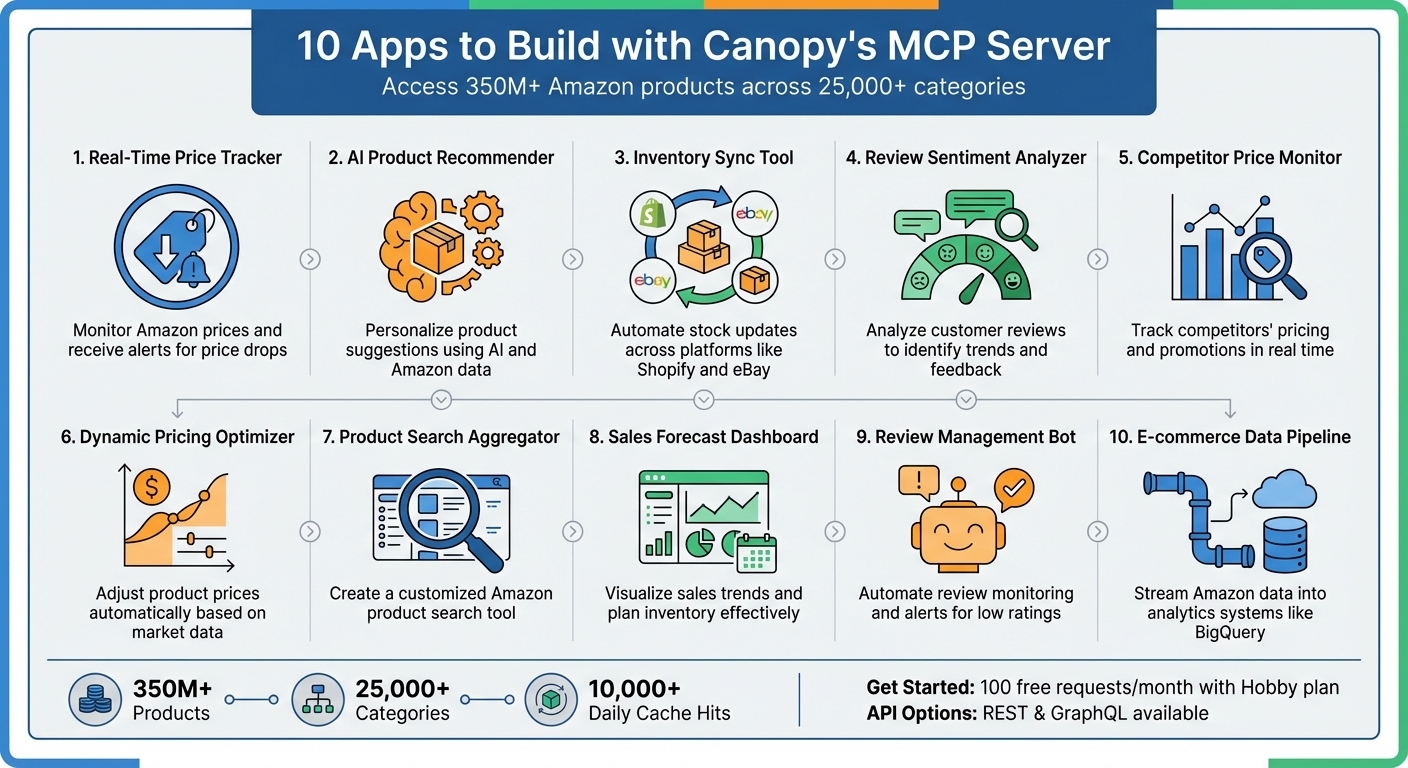
- Real-Time Price Tracker: Monitor Amazon prices and receive alerts for price drops.
- AI Product Recommender: Personalize product suggestions using AI and Amazon data.
- Inventory Sync Tool: Automate stock updates across platforms like Shopify and eBay.
- Review Sentiment Analyzer: Analyze customer reviews to identify trends and feedback.
- Competitor Price Monitor: Track competitors’ pricing and promotions in real time.
- Dynamic Pricing Optimizer: Adjust product prices automatically based on market data.
- Product Search Aggregator: Create a customized Amazon product search tool.
- Sales Forecast Dashboard: Visualize sales trends and plan inventory effectively.
- Review Management Bot: Automate review monitoring and alerts for low ratings.
- E-commerce Data Pipeline: Stream Amazon data into analytics systems like BigQuery.
Canopy's free Hobby plan offers 100 monthly requests to get started, with paid options for scaling. Use REST for simplicity or GraphQL for precise queries. Build smarter, faster, and more efficient tools without relying on alternatives to Amazon's official APIs and unstable scrapers.
10 Apps You Can Build with Canopy's MCP Server for E-commerce
1. Real-Time Price Tracker
A price tracking app keeps an eye on Amazon product prices, sending alerts when prices drop below a set threshold. You can build this functionality using the product's Amazon ASIN (Amazon Standard Identification Number) and domain parameter to query Canopy's API at regular intervals. For flash sales, polling every 15 minutes works well, while hourly checks are ideal for standard promotions. For long-term price trends, daily updates should suffice.
To get started, use Canopy's REST endpoint at https://rest.canopyapi.co/api/amazon/product with your API key in the header. Alternatively, you can use their GraphQL endpoint at https://graphql.canopyapi.co/ to request only specific fields like displayPrice, listPrice, and savings. This focused approach minimizes the payload size and speeds up response times. Store the results in a time-series database such as MongoDB or Google BigQuery to track price history and uncover trends.
For e-commerce businesses, this tool offers a powerful way to monitor competitors' prices and stock levels across countless products. Sellers can even set up automated repricing to maintain profit margins and stay competitive in a dynamic market. For consumers, the tracker simplifies the process of finding discounts and price drops, eliminating the need to manually check products multiple times a day.
To integrate this tracker effectively, automate data collection using node-cron, and set a 10-second timeout to handle network latency. Always include your API key in the headers for secure requests, and implement rate limiting to avoid exceeding your monthly API plan limits.
One major advantage of this approach is its reliability. Unlike web scrapers that often break when Amazon updates its website structure, Canopy's API ensures consistent, stable data delivery. This reliability not only makes the tracker dependable but also opens the door to other creative uses and applications.
sbb-itb-d082ab0
2. AI Product Recommender
Imagine building an AI-powered recommender system that processes Amazon product data to deliver personalized item suggestions. By integrating Canopy's MCP Server with a large language model like ChatGPT, you can create a tool that conducts product research and matches items to user preferences seamlessly. The MCP Server acts as a bridge, connecting your AI to Amazon's massive product ecosystem, which allows the AI to tap into a wealth of data for smarter, more contextual recommendations.
To get started, configure the MCP Server with a TOML policy file specifying allowed_calls = ["amazon.*"] for Amazon API access. Then, migrate this configuration to ~/.canopy/mcp_config.json using the gofastmcp format. Once that's ready, run the server with the following command:
python -m canopy_mcp <path_to_policy_file>
Next, update your language model's client configuration to point to this local server. This setup ensures smooth data integration, enabling real-time, personalized recommendations.
Why stop at star ratings? Enhance your product ranking by performing sentiment analysis on customer reviews. Instead of focusing solely on numerical ratings, analyze the text of reviews to uncover specific product strengths and weaknesses. For example, for electronics, you might highlight "battery life", while for shoes, you could emphasize "comfort." Use the same API endpoints detailed in Section 1, requesting fields like title, brand, reviews, rating, and salesRank to gather the necessary data.
Once the data is collected, feed it into your AI model to identify user preferences and generate tailored suggestions. For instance, if someone searches for "running shoes for flat feet", the system can analyze reviews mentioning arch support and cushioning to rank products that best meet those needs. The MCP policy enforcer ensures that all workflows remain secure, preventing unauthorized access to sensitive data.
The system is designed to handle over 10,000 cache hits daily, ensuring fast responses even when processing numerous recommendation requests. This level of reliability allows you to scale your recommendation engine without worrying about performance or data access bottlenecks.
3. Inventory Sync Tool
Expanding on tools like real-time price tracking, an inventory sync tool takes Canopy's capabilities even further by automating stock updates across multiple platforms. This means you can effortlessly synchronize inventory between Amazon and platforms like Shopify, eBay, or your warehouse management system. With access to over 350 million Amazon products spread across more than 25,000 categories, you can keep an eye on both your own listings and your competitors' stock levels.
You can start by using either the REST endpoint (https://rest.canopyapi.co/api/amazon/product) or the GraphQL endpoint (https://graphql.canopyapi.co/). GraphQL is particularly useful since it lets you request only the data you need - like availability.quantity or availability.status - which helps reduce bandwidth usage and speeds up the sync process. By querying with an ASIN and domain (e.g., "US"), you can pinpoint the exact product variant you want to monitor. This automation not only saves valuable time but also ensures your inventory across sales channels stays accurate and up to date.
For automated checks, you can use tools like node-cron to set polling schedules. For instance, you might check high-demand items every 15 minutes, while slower-moving products could be checked hourly. The API provides stock indicators like "Only 3 left in stock" or "Currently unavailable", which you can parse to trigger updates on other platforms. If Amazon shows low stock on an item, your sync tool can automatically adjust the inventory on your Shopify store to prevent overselling.
To authenticate, include your API key as a Bearer token in the HTTP header, and store it securely in environment variables. The Hobby plan gives you 100 requests per month for free, with additional requests costing $0.01 each.
"Time is a precious resource, do not spend it maintaining your Amazon scraper, build your product!" - Canopy API Documentation
This tool doesn’t stop at basic stock counts. You can also retrieve stock estimations to predict competitor behavior. For example, if a competitor runs out of stock, your sync tool can automatically adjust your pricing or increase ad spend to help you capture more sales. By automating these processes, inventory management becomes less of a manual burden and more of a competitive edge.
4. Review Sentiment Analyzer
User reviews are a goldmine for understanding customer satisfaction trends. This automated tool takes real-time tracking a step further, offering deeper insights by categorizing reviews as positive, negative, or neutral. These insights can guide actionable decisions.
To get started, you can fetch review data using Canopy's Amazon Search API via REST or GraphQL endpoints. By providing the product's ASIN and marketplace domain, you’ll receive structured data, including review titles, descriptions, star ratings, and reactions. This data can feed directly into sentiment analysis or language models to generate quick insights.
A real-world example highlights this tool's capabilities: a vector database was used to analyze 50,000 Amazon Shopping Reviews. The system populated the database in just 13 minutes, revealing mixed opinions on app updates. From this analysis, three targeted improvement projects were suggested - UI/UX Optimization, Performance Enhancement, and Feature Expansion - complete with specific tasks and timelines of less than 12 weeks.
"By tokenizing and storing reviews in a vector database, we can leverage retrieval-augmented generation (RAG) to pinpoint relevant reviews." - Ryan Gooch, phData
To streamline sentiment analysis, you can integrate Canopy's MCP Server with your AI client. This connection enables seamless, real-time analysis without the need for manual data scraping. Additionally, you can filter reviews by metadata such as thumbsUpCount, year, or month. This feature is particularly useful for tracking sentiment changes over time, like shifts in customer perception after a product update or price adjustment. For testing, the Hobby plan offers 100 free requests per month, with additional requests priced at $0.01 each.
5. Competitor Price Monitor
Tracking competitor prices manually is time-consuming and often unreliable. Instead, you can create a Competitor Price Monitor to automate real-time data collection and avoid the pitfalls of outdated or inconsistent scrapers.
Start by identifying your main competitors. Use the Amazon Search API with targeted keywords to pinpoint competitors and discover trending products. This method helps you gather ASINs (Amazon Standard Identification Numbers), which serve as unique identifiers for products. Once you have these ASINs, you can pull detailed pricing, inventory, and sales data using Canopy's REST or GraphQL endpoints. For instance, a REST call to https://rest.canopyapi.co/api/amazon/product with the right ASIN and domain parameters (like 'US') provides up-to-date information on prices, stock availability, and sales estimates.
To take it a step further, integrate the Amazon Deals API. This tool lets you track competitor discounts and promotional timing, giving you an edge in spotting trends. Monitoring inventory alongside pricing can also reveal sudden stock shortages, often a sign of fast-selling items. These insights allow you to adjust your pricing strategy in real time.
For even greater efficiency, connect Canopy's MCP Server with a large language model, such as ChatGPT. This setup enables AI-driven workflows that can send alerts whenever competitors change their prices or inventory levels. This smart automation leverages Canopy's reliable infrastructure to keep you ahead of the competition.
If you're just getting started, Canopy's Hobby plan offers 100 free requests each month. Need more? The Pay As You Go plan provides additional requests for just $0.01 each, making it a scalable option for growing businesses.
6. Dynamic Pricing Optimizer
Dynamic pricing is a game-changer for managing margins, as it adjusts product prices automatically based on factors like demand, competitor activity, and inventory levels. Here's how you can get started with implementing it effectively.
First, launch the server with the following command:
python -m canopy_mcp <path_to_policy_file>
To ensure security, configure your pricing policies in a TOML file. For instance, by setting allowed_calls = ["amazon.price.*"], you can restrict actions to price-related changes only. This setup prevents unauthorized modifications and guards against prompt injection attacks. You can also create multiple named flows - some tailored for aggressive repricing in competitive markets, while others take a more cautious approach for niche products.
For retrieving key Amazon sales data, use a REST API call like this: https://rest.canopyapi.co/api/amazon/product. By providing the ASIN and domain parameters, you can access details such as displayPrice, listPrice, and salesRank. These insights can then drive automated price adjustments based on real-time market conditions.
To take it a step further, connect the MCP Server to an AI model like ChatGPT. This integration allows you to analyze trends across Canopy's extensive database of over 350 million Amazon products. The result? Real-time price updates that keep your pricing competitive and aligned with market dynamics.
If you're testing your pricing strategies, the Hobby plan is a great place to start, offering 100 free requests per month. As your needs grow, the Pay As You Go plan charges just $0.01 per additional request, making it scalable and cost-effective. This dynamic pricing approach fits seamlessly into Canopy's suite of tools, empowering you to stay ahead in the market.
7. Product Search Aggregator
A product search aggregator allows users to explore Amazon products by entering keywords and applying filters, all through a single, user-friendly interface. With access to over 350 million products across 25,000+ categories, this tool provides highly targeted search results, giving users precise control over their browsing experience.
To get started, you can choose between Canopy's REST or GraphQL endpoints. For simple product lookups, use the REST API at https://rest.canopyapi.co/api/amazon/product with a GET request. If you need more flexibility, such as retrieving specific fields like titles, prices, or images, the GraphQL endpoint at https://graphql.canopyapi.co/ is the better option. This method reduces bandwidth usage and speeds up response times by fetching only the data you need.
The API provides essential fields such as displayPrice, listPrice, rating, availability, and salesRank. By parsing the JSON response, you can filter results based on criteria like price range, customer ratings, or stock availability. Want to highlight popular products? Sort by salesRank.overall. Looking for the best deals? Use the savings filter to showcase discounted items.
Security is a key consideration when managing search operations. Canopy's MCP Server helps enforce tool policies. For example, you can set allowed_calls = ["canopy.search.*"] in your TOML configuration file to limit interactions to search-specific actions. This safeguards against unauthorized operations and protects workflows from prompt injection attacks.
Canopy's pricing makes it easy to get started. The Hobby plan includes 100 free requests per month, while the Pay As You Go option charges just $0.01 per additional request. To ensure smooth performance, store API keys securely in environment variables and implement rate limiting to stay within your plan's limits while delivering a seamless user experience.
8. Sales Forecast Dashboard
A sales forecast dashboard transforms Amazon data into clear, actionable insights, helping you plan inventory and refine product strategies. By leveraging this tool, you can systematically collect data and create visualizations that offer real value.
Canopy's API is a key resource, delivering real-time data on sales estimates, stock levels, and pricing trends for over 350 million Amazon products. You can access this data via two endpoints: the REST endpoint at https://rest.canopyapi.co/api/amazon/product using GET requests, or the GraphQL endpoint at https://graphql.canopyapi.co/ for more specific queries.
To get started, use Canopy's API to pull historical data by querying with product ASINs and specifying the marketplace (e.g., 'US'). Store the JSON responses - containing details like displayPrice, salesRank, and sales estimates - in a time-series database. By combining sales estimates with stock data, you can identify whether sales changes are due to demand drops or inventory stockouts, providing a deeper understanding of performance.
For visualization, tools like Looker Studio or Chart.js can be used to highlight historical data and trends. If you want to take it a step further, you can integrate ChatGPT through MCP Server (using FastMCP or the MCP SDK) to automatically flag anomalies or uncover growth opportunities.
As for pricing, Canopy offers flexible options. The Hobby plan includes 100 free requests per month. For more extensive use, the Pay As You Go plan charges $0.01 per request, while the Premium plan offers 100,000 requests for $400 per month, with additional requests at $0.004 each.
9. Review Management Bot
A review management bot keeps an eye on Amazon reviews and sends out timely alerts when necessary. By linking Canopy's MCP Server with AI tools like ChatGPT or Claude, you can create a system that analyzes reviews in real time and flags issues that need attention.
This bot builds on earlier API configurations and uses live review data to stay ahead of potential problems. Start by setting up your MCP Server with your API key to access Amazon's review data. Use your preferred Canopy API endpoint to retrieve the information. By optimizing your GraphQL queries, you can request only the fields you need - such as ratings, review text, and dates - ensuring your queries remain quick and efficient.
Set up polling intervals to feed new reviews into your AI for sentiment analysis. Create triggers to flag reviews with ratings under three stars or those mentioning terms like "damaged" or "defective." With Canopy's Zapier MCP integration, you can automate alerts, log reviews, or even draft email responses. These triggers can also be connected to your notification tools or dashboard, making review management smoother and more efficient.
Canopy offers access to review data from over 350 million Amazon products across more than 25,000 categories. This means your bot can handle a wide range of inventories. You can start small using the free Hobby plan, then scale up as needed. For secure authentication, include your API key in the API-KEY header or use an Authorization: Bearer token. If your review volume increases, the Premium plan provides 100,000 requests for $400 per month, with additional requests costing just $0.004 each.
10. E-commerce Data Pipeline
An e-commerce data pipeline helps you extract, transform, and load Amazon product data into your analytics systems. By linking Canopy's MCP Server to data warehouses like Google BigQuery, Amazon Redshift, or Snowflake, you can set up a steady stream of real-time product data to fuel your business intelligence tools.
Start by extracting data with Canopy's GraphQL endpoint (https://graphql.canopyapi.co/). GraphQL lets you request only the fields you need - like displayPrice, availability, or Best Sellers Rank - which saves bandwidth and speeds up processing. Use your API key for authentication, securely stored in environment variables to protect it.
For the transformation step, parse the JSON responses to calculate key metrics. For example, compare displayPrice to listPrice to compute discount percentages, and flag products with significant discounts when savings exceed 40%. Schedule regular data pulls to keep up with price and inventory changes.
Once transformed, load the data into your warehouse using streamlined Node.js or Python scripts. Set up alerts to notify you of low stock levels or sudden discount spikes. The Premium plan starts at $400/month and includes 100,000 requests, with additional requests costing just $0.004 each - an affordable option for handling large volumes of data. Afterward, direct your processed data into visualization tools to turn raw numbers into actionable insights.
For visualization, connect your pipeline data directly to tools like Tableau or Power BI. These platforms let you build dashboards that display pricing trends, inventory updates, and overall product performance, giving you a clear view of your catalog's health and opportunities.
Conclusion
Canopy's MCP Server gives developers the tools they need to create scalable and efficient e-commerce and data-driven applications. Whether you're building real-time price trackers, AI-powered product recommenders, or advanced data pipelines, this platform provides the infrastructure to handle complex e-commerce challenges. With access to data from over 350 million Amazon products across 25,000+ categories and the ability to process more than 10,000 cache hits daily, reliability is at the core of its design. Every solution - be it a price tracker, recommender system, or data pipeline - benefits from Canopy's dependable data ecosystem.
The platform offers flexibility to suit different development styles. Use GraphQL (https://graphql.canopyapi.co/) for precise and efficient data queries, or opt for REST (https://rest.canopyapi.co/) for simpler integrations. Getting started is straightforward - just include your API key in the request headers, and you're good to go.
"Time is a precious resource, do not spend it maintaining your Amazon scraper, build your product!"
– Canopy API
Kick things off with the Hobby plan, which includes 100 free requests, and scale up to the Premium plan as your needs expand. For a hands-on experience, you can explore the API using the Swagger UI at http://localhost:8000/docs.
FAQs
How can Canopy's MCP Server help grow my e-commerce business?
Canopy’s MCP Server delivers real-time access to Amazon product data, allowing you to turn raw marketplace insights into actionable strategies. With live updates on pricing, inventory levels, sales trends, and review sentiment, you can automate key tasks like dynamic repricing, inventory alerts, and product comparisons - helping your business stay ahead in a competitive market.
The MCP Server also integrates seamlessly with AI tools or no-code platforms, enabling you to build smart apps that respond instantly to market shifts. For instance, you can set up notifications for price drops by competitors or improvements in a product’s search ranking, giving you the chance to act quickly and seize new opportunities. These tools not only save time and enhance efficiency but also help improve profit margins as your catalog expands.
Built with flexibility in mind, Canopy’s MCP Server makes it easy to embed live Amazon data into your storefront, inventory systems, or marketing tools. This ensures that your e-commerce brand can use the most up-to-date insights to gain an edge in the marketplace.
What are the benefits of using GraphQL with Canopy's MCP Server?
Using GraphQL with Canopy's MCP Server provides developers with a versatile, single endpoint to fetch exactly the data they need - nothing more, nothing less. This approach eliminates the problem of over-fetching, cuts down on bandwidth usage, and streamlines development by allowing you to retrieve product details like titles, images, prices, and reviews in one efficient query.
With GraphQL’s declarative queries, you can fine-tune search parameters and merge multiple data points - like price, ratings, and stock levels - without juggling numerous REST calls. This not only boosts performance but also simplifies error management and scales effortlessly as your demands grow. It's a smart choice for building e-commerce platforms, inventory systems, or analytics apps with Canopy's MCP Server.
How does Canopy's pricing support growing API usage?
Canopy offers pricing that grows with your needs. For newcomers, there's a free tier providing 100 requests at no charge - perfect for experimenting and building prototypes without committing any funds. Once you surpass the free limit, Canopy uses a pay-as-you-go model, where costs drop as usage increases. At higher volumes, requests can cost as little as $0.0002 each.
This usage-based approach means you can effortlessly scale from just a handful of requests daily to handling thousands per second, all without revisiting contracts. Pricing is listed in U.S. dollars and billed monthly, making it straightforward for U.S.-based teams to manage their expenses. Whether you're just starting or supporting large-scale applications, Canopy keeps your API needs affordable and scalable.