Real-time Amazon Data for Claude with Canopy MCP
Connect Claude to live Amazon product, price, stock, reviews, and Best Sellers via Canopy MCP for real-time research.

Claude can pull live Amazon data through Canopy MCP. That means I can use Claude to check products, prices, stock, reviews, Best Sellers, and sales estimates in one chat instead of jumping between Amazon pages and spreadsheets.
Here’s the short version:
- 17 read-only tools connect Claude to live Amazon catalog data
- I can look up data by ASIN, URL, or GTIN
- The setup uses OAuth 2.1, so I usually don’t need an API key
- Connection happens through Claude’s Connectors/MCP settings
- Claude can return Buy Box pricing, seller offers, stock estimates, reviews, and category best sellers
- The MCP endpoint is
https://mcp.canopyapi.co/mcp
This setup is built for three main use cases:
- Sellers: price checks, stock checks, competitor benchmarking
- Developers: live Amazon lookups inside Claude without local setup
- Analysts: review summaries, catalog checks, and sales estimate pulls
What stands out is the workflow. Instead of asking Claude to guess from old training data, I can have it call Canopy’s tools and pull current Amazon info at the moment I ask. That changes the job from general chat into live product research.
A few facts worth noting:
- Canopy exposes 17 Amazon research tools
- Permissions listed in the article are
openid,email, andoffline_access - Tool calls map to direct tasks like product lookup, offers, stock, sales, reviews, and Best Sellers
- All access is read-only, so Claude can inspect data but not edit listings or account settings
If I only need the takeaway, it’s this: Canopy MCP turns Claude into a live Amazon research interface. I connect the server, confirm the tools appear, and then ask plain-English questions for current marketplace data.
That’s the core idea the rest of the article walks through.
How to Connect Claude to Canopy MCP
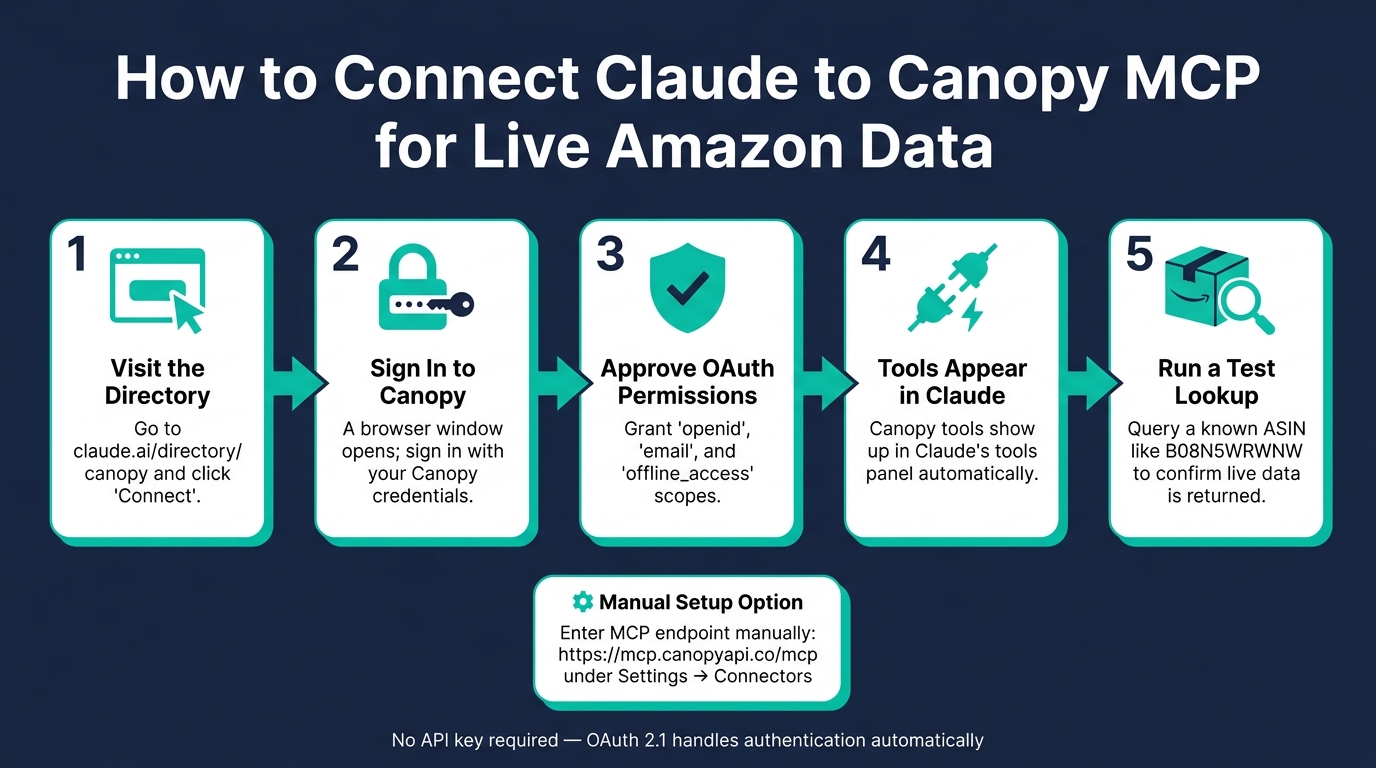
Once your Amazon data setup is ready, connecting Claude to Canopy MCP is pretty simple.
Canopy MCP runs as a hosted MCP server, which means Claude can connect to live Amazon data without any local installation [1].
What You Need Before You Start
You’ll need:
- a Claude account with access to the Connectors or MCP features under Settings → Connectors
- a Canopy account
If you don’t have a Canopy account yet, you can sign up at canopyapi.co.
The connection uses OAuth 2.1, so you don’t need to set up an API key. If your client doesn’t support OAuth, you can use a Canopy API key from your dashboard instead [1].
Step-by-Step: Connecting Canopy in Claude
- Go to https://claude.ai/directory/canopy and click Connect.
- A browser window will open. Sign in with your Canopy credentials.
- Approve the requested OAuth permissions:
openid,email, andoffline_access[1]. - Go back to Claude. The Canopy tools should now show up in the tools panel.
If you want to set it up by hand in Settings → Connectors, enter:
https://mcp.canopyapi.co/mcp [1]
How to Confirm the Connection Is Working
Run a live lookup with a known ASIN, like B08N5WRWNW. (You can use an Amazon ASIN Validator to check other IDs). Then check whether Claude shows the Amazon tools it can use. If the connection is working, Claude should return the Canopy tools for Amazon data retrieval [1].
If Claude gives you a generic reply instead of live data, tell it to use the Canopy tools. If the tools still don’t appear, open Settings → Connectors and make sure the connection is active and authenticated [1].
Once the connection is live, Claude can pull Amazon product, price, availability, review, and Best Sellers data on demand.
What You Can Do with Claude and Canopy MCP
Once the connection is live, Claude can use the right Canopy tool to pull live Amazon data whenever you need it. That makes it useful for catalog checks, competitor tracking, and faster product calls. A good place to start is a product lookup. From there, you can move into offers, stock, search, reviews, or best sellers.
Look Up an ASIN, Listing, or Product URL
get_amazon_product looks up a product by ASIN, Amazon URL, or GTIN such as a UPC, EAN, or ISBN. It returns the title, brand, price, images, rating, review count, and availability.
For example, a prompt like "Summarize the key features and specifications for ASIN B08N5WRWNW" prompts Claude to pull the listing and turn the bullet points into a short summary.
Use this lookup as your starting point for price, stock, and review checks.
Compare Live Prices, Offers, and Availability
get_amazon_product_offers gives Claude access to Buy Box data and the full list of seller offers for any product. If you ask Claude to "Compare the current Buy Box price and number of offers for B08N5WRWNW and B09B8YWXDF", it will run both lookups and show the results side by side.
get_amazon_product_stock returns real-time stock estimates. You can pair it with get_amazon_product_variants to see every size, color, or configuration available. For ASIN B01HY0JA3G, Claude can pull offers, variants, and estimated monthly sales in one query.
If you're doing category research, it makes sense to move from single-product tools to search and best-seller tools.
Search Results, Reviews, and Best Sellers
search_amazon_products supports keyword searches with filters for price range and condition: New, Used, or Renewed. You can use get_amazon_autocomplete to surface shopper search terms, then pass those into search_amazon_products.
get_amazon_bestsellers pulls the best sellers in a specific category. Pair it with get_amazon_bestseller_categories to find the right category ID first. That gives you more granular results than using a top-level browse. Ask Claude to list the top 10 best sellers in Wireless Earbuds.
For review analysis, get_amazon_product_top_reviews returns review text, star ratings, and helpful vote counts. You can ask Claude to summarize recurring complaints in recent reviews.
Developer View: What Canopy MCP Connects to Behind the Scenes
Behind the prompts, Claude calls Canopy tools directly. The path is pretty simple: Claude sends tool calls to https://mcp.canopyapi.co/mcp, that endpoint routes the request to live Amazon data, and then returns structured results that Claude turns into a readable answer [1][2].
Here’s the flow in plain English. You ask Claude a question. Claude chooses the right tool from the 17 read-only tools, sends a JSON-RPC request to the MCP server, the server queries Amazon, and Claude gets structured JSON in return. The results reflect live Amazon data at the moment of the request [1][2].
The table below shows how common tasks line up with specific tools and the data they return:
| Task | MCP Tool | Data Returned |
|---|---|---|
| Product lookup | get_amazon_product | Title, brand, price, images, ratings, specs |
| Offer comparison | get_amazon_product_offers | Seller offers, Buy Box info, shipping |
| Inventory check | get_amazon_product_stock | Stock estimates |
| Sales data | get_amazon_product_sales | Weekly and monthly sales estimates |
| Identifier mapping | get_amazon_asin_from_gtin / get_amazon_gtin_from_asin | ASIN to/from UPC, EAN, or ISBN |
| Market trends | get_amazon_bestsellers / get_amazon_deals | Top sellers by category, current discounts |
| Review analysis | get_amazon_product_top_reviews | Review text, star ratings, helpful votes |
Each tool call counts toward your Canopy usage the same way a direct API request would [1].
Claude with MCP vs. direct API use
For most Claude workflows, the MCP route is the simplest choice. Claude with MCP is a good fit for conversational Amazon research, while direct API access makes more sense for apps and automation workflows.
So in practice, Claude works as a simple front end for live Amazon research.
Conclusion: What Canopy MCP Adds to Claude for Amazon Research
Canopy MCP gives Claude live access to Amazon product, pricing, availability, review, and Best Sellers data on demand. Once it's connected, Amazon research turns into one chat instead of a tab-juggling mess.
That means faster research. You don't have to bounce between browser tabs, copy ASINs into spreadsheets, or compare listings by hand. You ask Claude a question, and it pulls the data for you. That works whether you're checking a product's Buy Box status, pulling top reviews for sentiment analysis, or scanning Best Sellers in a category. Put simply, Claude becomes a faster front end for live Amazon research.
Key Takeaways for Developers, Sellers, and Analysts
Developers, sellers, and analysts can use Claude to look up products, compare prices, check stock, and summarize reviews without leaving the chat.
- Developers get a maintenance-free way to access Amazon data for product lookup, search, offers, reviews, sales estimates, and category analysis.
- Sellers can watch competitor stock levels, track price changes, and check sales estimates with plain-English prompts instead of custom tools.
- Analysts can move from raw data to structured summaries in one Claude conversation, including GTIN-to-ASIN mapping and weekly sales estimates.
All tools are read-only, so Claude can research Amazon data without changing listings or account data.
FAQs
Do I need a Canopy account to connect Claude?
Yes. You need a Canopy account to connect Claude to the Canopy MCP server.
Create a free account to get your API key. That key is required for every MCP server request and must be added to your Claude Desktop configuration file to verify access to real-time Amazon data.
What kinds of Amazon data can Claude pull in real time?
With Canopy MCP, Claude can pull live Amazon data across a wide range of use cases.
That includes product details by ASIN, URL, or GTIN, plus variants, stock and availability estimates, live pricing, top customer reviews, sales estimates, deals, and seller information.
It also gives access to Amazon search and catalog data, including autocomplete, categories, and Best Sellers, using tools like get_amazon_product, search_amazon_products, get_amazon_deals, and related category and seller tools.
How do I know Claude is using live Canopy tools?
Check the tools panel in Claude Desktop. After you add the server setup to claude_desktop_config.json and restart the app, Canopy tools like get_amazon_product and search_amazon_products should show up there.
Then, when you ask Claude something in plain language, it can automatically use those tools to pull live Amazon data instead of static or cached information.